

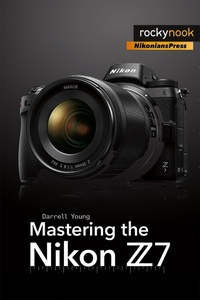
Mastering the Nikon Z7
Beschreibung

¿¿¿¿¿ "A mandatory manual for any Nikon camera."
Mastering the Nikon Z7 is the ultimate guide to understanding your new mirrorless full-frame Z7 camera.
Now updated with downloadable resources for the new firmware C2.00 Eye detection (Eye-AF) feature, Mastering the Nikon Z7 by Darrell Young provides a wealth of experience-based information and insights for owners of Nikon''s new mirrorless camera. Darrell is determined to help the user navigate past the confusion that often comes with complex and powerful professional camera equipment.
This book explores the features and capabilities of the camera in a way that far surpasses the user''s manual. It guides readers through the camera features with step-by-step setting adjustments; color illustrations; and detailed how, when, and why explanations for each option. Every button, dial, switch, and menu configuration setting is explored in a user-friendly manner, with suggestions for setup according to various shooting styles.
Darrell''s friendly and informative writing style allows readers to easily follow directions, while feeling as if a friend dropped in to share his knowledge. The information in this book goes beyond the camera itself and also covers basic photography technique.
What other Nikon Z7 users are saying about this book: ¿¿¿¿¿ This series has always been a vast improvement over the manuals. ¿¿¿¿¿ A must-have book if you have a Z6 or Z7
Weitere Details
Weitere Ausgaben
Andere Ausgaben
Inhalt
- Cover
- Table of Contents
- Foreword
- Camera Body Reference
- CHAPTER 1 Introduction and Initial Camera Setup
- Use This Book with Camera in Hand
- What Is the Purpose of This Book?
- Things to Know When Reading This Book
- Accessing the Camera Menus
- Touch-Sensitive Monitor
- Five Steps for First-Time Camera Configuration
- Using the Camera's Help System
- Camera Functions for Initial Configuration
- Camera Settings Recommendations
- Downloadable Resources Website
- Author's Conclusion
- CHAPTER 2 Camera Control Screens
- Mirrorless Is Different, Yet the Same
- Technical TFT-LCD Monitor Information
- Technical EVF Information
- The i Menu: A Shortcut to Critical Camera Functions
- Two i Menu Modes
- Using the i Menu
- Playback Quick Menus
- Flash Control Screen and Menu
- Photo Mode
- Movie Mode
- Control Panel
- Touch Screen
- Author's Conclusion
- CHAPTER 3 Metering, Exposure Modes, and Histogram
- Section 1: Metering
- Section 2: Exposure Modes
- Section 3: Histogram
- Author's Conclusion
- CHAPTER 4 Focus, AF-Area, and Release Modes
- Autofocus Types
- Custom Settings for Autofocus
- Three Important Mode Groups
- Accessing the Individual Mode Groups
- Focus Modes
- AF-Area Modes
- Release Modes
- Touch Shutter Release and Autofocus (Tap Shooting)
- Author's Conclusion
- CHAPTER 5 White Balance
- How Does White Balance Work?
- Color Temperature
- When Does White Balance Matter?
- Methods for Adjusting White Balance
- White Balance on the i Menu
- WB on the Photo and Movie Shooting Menus
- Using an Assigned Camera Button for White Balance
- Auto White Balance Considerations
- Author's Conclusion
- CHAPTER 6 Playback Menu
- Delete
- Playback Folder
- Playback Display Options
- Image Review
- After Delete
- After Burst, Show
- Rotate Tall
- Slide Show
- Rating
- Author's Conclusion
- CHAPTER 7 Photo Shooting Menu
- Configuring the Photo Shooting Menu
- User Settings U1, U2, and U3
- Reset Photo Shooting Menu
- Storage Folder
- File Naming
- Choose Image Area
- Image Quality
- Image Size
- NEF (RAW) Recording
- ISO Sensitivity Settings
- White Balance
- Set Picture Control
- Manage Picture Control
- Color Space
- Active D-Lighting
- Long Exposure NR
- High ISO NR
- Vignette Control
- Diffraction Compensation
- Auto Distortion Control
- Flicker Reduction Shooting
- Metering
- Flash Control
- Flash Mode
- Flash Compensation
- Focus Mode
- AF-Area Mode
- Vibration Reduction
- Auto Bracketing
- Multiple Exposure
- HDR (High Dynamic Range)
- Interval Timer Shooting
- Time-Lapse Movie
- Focus Shift Shooting
- Silent Photography
- Author's Conclusion
- CHAPTER 8 Movie Shooting Menu
- Reset Movie Shooting Menu
- File Naming
- Choose Image Area
- Frame Size/Frame Rate
- Movie Quality
- Movie File Type
- ISO Sensitivity Settings
- White Balance
- Set Picture Control
- Manage Picture Control
- Active D-Lighting
- High ISO NR
- Vignette Control
- Diffraction Compensation
- Auto Distortion Control
- Flicker Reduction
- Metering
- Focus Mode
- AF-Area Mode
- Vibration Reduction
- Electronic VR
- Microphone Sensitivity
- Attenuator
- Frequency Response
- Wind Noise Reduction
- Headphone Volume
- Timecode
- Author's Conclusion
- CHAPTER 9 Custom Setting Menu
- Reset Custom Settings
- SECTION ONE: a Autofocus
- SECTION TWO: b Metering/Exposure
- SECTION THREE: c Timers/AE Lock
- SECTION FOUR: d Shooting/Display
- SECTION FIVE: e Bracketing/Flash
- SECTION SIX: f Controls
- SECTION SEVEN: g Movie
- Author's Conclusion
- CHAPTER 10 Setup Menu
- Format Memory Card
- Save User Settings
- Reset User Settings
- Language
- Time Zone and Date
- Monitor Brightness
- Monitor Color Balance
- Viewfinder Brightness
- Viewfinder Color Balance
- Control Panel Brightness
- Limit Monitor Mode Selection
- Information Display
- AF Fine-Tune
- Non-CPU Lens Data
- Clean Image Sensor
- Image Dust Off Ref Photo
- Image Comment
- Copyright Information
- Beep Options
- Touch Controls
- HDMI
- Location Data
- Wireless Remote (WR) Options
- Assign Remote (WR) Fn Button
- Airplane Mode
- Connect to Smart Device
- Connect to PC
- Wireless Transmitter (WT-7)
- Conformity Marking
- Battery Info
- Slot Empty Release Lock
- Save/Load Settings
- Reset All Settings
- Firmware Version
- Author's Conclusion
- CHAPTER 11 Retouch Menu
- Retouched Image File Numbering
- Accessing the Retouch Functions-Two Methods
- Limitations on Previously Retouched Images
- NEF (RAW) Processing
- Trim
- Resize
- D-Lighting
- Red-Eye Correction
- Straighten
- Distortion Control
- Perspective Control
- Image Overlay
- Trim Movie
- Side-by-Side Comparison
- Author's Conclusion
- CHAPTER 12 My Menu and Recent Settings
- My Menu
- Afterword
- Credits
- Index
- A
- B
- C
- D
- E
- F
- G
- H
- I
- J
- K
- L
- M
- N
- O
- P
- Q
- R
- S
- T
- U
- V
- W
- X
- Y
- Z
