

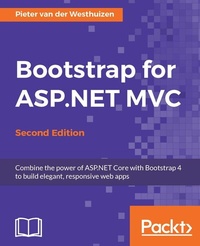
Bootstrap for ASP.NET MVC
Combine the power of ASP.NET Core with Bootstrap 4 to build elegant, responsive web apps
2. Auflage
Erschienen am 8. Juli 2025
186 Seiten
978-1-78588-523-5 (ISBN)
Beschreibung

Combine the power of ASP.NET Core with Bootstrap 4 to build elegant, responsive web apps
Key Features
[*] Updated for Bootstrap 4 and ASP.Net MVC 6, this book shows how to take advantage of the latest new features introduced in both of these industry-leading frameworks
[*] Build responsive, mobile-ready apps by combining the power of ASP.NET MVC with Bootstrap
[*] Grasp the intricacies of Bootstrap and how to use it with ASP.NET MVC
[*] Build your own tools and helpers to assist you in creating ASP.NET MVC Bootstrap sites easily and quickly
[*] Master the use of Bootstrap components and plugins with ASP.NET MVC
Book DescriptionOne of the leading open source frontend frameworks, Bootstrap has undergone a significant change and introduced several features that make designing compelling, next-generation UIs much simpler. Integrating Bootstrap with ASP.NET's powerful components can further enhance its capabilities. This book guides you through the process of creating an ASP.NET MVC website from scratch using Bootstrap. After a primer on the fundamentals of Bootstrap, you will learn your way around and create a new ASP.NET MVC project in Visual Studio. You will move on to learn about the various Bootstrap components as well as techniques to include them in your own projects. The book includes practical examples to show you how to use open-source plugins with Bootstrap and ASP.NET MVC and guides you through building an ASP.NET MVC website using Bootstrap, utilizing layout and user-interface components. At the end of this book, you will find some valuable tips and tricks to help you get the most out of your Bootstrap-integrated and ASP.NET MVC-integrated website. What you will learn
Create a new ASP.NET MVC project that uses Bootstrap for its styling and learn how to include external libraries using the new package managers
Learn to use the various Bootstrap CSS and HTML elements, and how to use the new Bootstrap 4 grid layout system
Explore the different input groups and implement alerts, progress bars, and badges
Explore JavaScript components by illustrating and walking through the process of using JavaScript/jQuery to add interactivity to Twitter Bootstrap components
Build your own ASP.NET MVC helpers and tag helpers to reduce the amount of HTML needed to generate Bootstrap elements
Convert a Bootstrap HTML template into a usable ASP.NET MVC project
Use the jQuery DataTables plugin with Bootstrap and ASP.NET MVC
Who this book is forIf you are an ASP.NET MVC developer and would like to know how to incorporate Bootstrap into your projects, then this book is invaluable to you. Developers with entry-level experience of ASP.NET MVC development and limited experience with Bootstrap will also benefit from this book.
Key Features
[*] Updated for Bootstrap 4 and ASP.Net MVC 6, this book shows how to take advantage of the latest new features introduced in both of these industry-leading frameworks
[*] Build responsive, mobile-ready apps by combining the power of ASP.NET MVC with Bootstrap
[*] Grasp the intricacies of Bootstrap and how to use it with ASP.NET MVC
[*] Build your own tools and helpers to assist you in creating ASP.NET MVC Bootstrap sites easily and quickly
[*] Master the use of Bootstrap components and plugins with ASP.NET MVC
Book DescriptionOne of the leading open source frontend frameworks, Bootstrap has undergone a significant change and introduced several features that make designing compelling, next-generation UIs much simpler. Integrating Bootstrap with ASP.NET's powerful components can further enhance its capabilities. This book guides you through the process of creating an ASP.NET MVC website from scratch using Bootstrap. After a primer on the fundamentals of Bootstrap, you will learn your way around and create a new ASP.NET MVC project in Visual Studio. You will move on to learn about the various Bootstrap components as well as techniques to include them in your own projects. The book includes practical examples to show you how to use open-source plugins with Bootstrap and ASP.NET MVC and guides you through building an ASP.NET MVC website using Bootstrap, utilizing layout and user-interface components. At the end of this book, you will find some valuable tips and tricks to help you get the most out of your Bootstrap-integrated and ASP.NET MVC-integrated website. What you will learn
Create a new ASP.NET MVC project that uses Bootstrap for its styling and learn how to include external libraries using the new package managers
Learn to use the various Bootstrap CSS and HTML elements, and how to use the new Bootstrap 4 grid layout system
Explore the different input groups and implement alerts, progress bars, and badges
Explore JavaScript components by illustrating and walking through the process of using JavaScript/jQuery to add interactivity to Twitter Bootstrap components
Build your own ASP.NET MVC helpers and tag helpers to reduce the amount of HTML needed to generate Bootstrap elements
Convert a Bootstrap HTML template into a usable ASP.NET MVC project
Use the jQuery DataTables plugin with Bootstrap and ASP.NET MVC
Who this book is forIf you are an ASP.NET MVC developer and would like to know how to incorporate Bootstrap into your projects, then this book is invaluable to you. Developers with entry-level experience of ASP.NET MVC development and limited experience with Bootstrap will also benefit from this book.
Alle Preise
Weitere Details
Auflage
2nd Revised edition
Sprache
Englisch
Verlagsort
Birmingham
Großbritannien
Zielgruppe
Für Beruf und Forschung
US School Grade: College Graduate Student
Editions-Typ
Überarbeitete Ausgabe
Dateigröße
6,58 MB
ISBN-13
978-1-78588-523-5 (9781785885235)
Copyright in bibliographic data and cover images is held by Nielsen Book Services Limited or by the publishers or by their respective licensors: all rights reserved.
Schweitzer Klassifikation
Weitere Ausgaben
Andere Ausgaben
Pieter Van Der Westhuizen
Bootstrap for ASP.NET MVC, Second Edition
Buch
09/2016
Packt Publishing
50,20 €
Versand in 3-4 Wochen
Person
van der Westhuizen Pieter :
Pieter van der Westhuizen is a freelance software and web developer specializing in ASP.NET MVC, web technologies, and MS Office development. He started his career in web development using classic ASP, Visual InterDev, HoTMetaL, and FrontPage. Pieter has over 16 years of experience in the IT industry and is also one of the people fortunate enough to have his hobby become his full-time profession. He is also a technology evangelist for Add-in Express (www.add-in-express.com), which focuses on tools for Microsoft Office integration. This is Pieter's second book and he has been blogging since 2007 on his personal blog at www.mythicalmanmoth.com and on the Add-in Express blog since 2010. He lives with his wife and two dogs in Pretoria, South Africa.
Pieter van der Westhuizen is a freelance software and web developer specializing in ASP.NET MVC, web technologies, and MS Office development. He started his career in web development using classic ASP, Visual InterDev, HoTMetaL, and FrontPage. Pieter has over 16 years of experience in the IT industry and is also one of the people fortunate enough to have his hobby become his full-time profession. He is also a technology evangelist for Add-in Express (www.add-in-express.com), which focuses on tools for Microsoft Office integration. This is Pieter's second book and he has been blogging since 2007 on his personal blog at www.mythicalmanmoth.com and on the Add-in Express blog since 2010. He lives with his wife and two dogs in Pretoria, South Africa.
Inhalt
Table of Contents
Getting Started with ASP.NET Core and Bootstrap 4
Using the Bootstrap CSS & HTML elements
Using Bootstrap Components
Using Bootstrap JavaScript components
Creating MVC Bootstrap Helper and Tag Helpers
Converting a Bootstrap HTML template into a usable ASP.Net MVC project
Using the jQuery DataTables Plugin with Bootstrap 4
Creating Bootstrap 4 ASP.Net MVC sites using Visual Studio Code
Appendix: Bootstrap Resources
Getting Started with ASP.NET Core and Bootstrap 4
Using the Bootstrap CSS & HTML elements
Using Bootstrap Components
Using Bootstrap JavaScript components
Creating MVC Bootstrap Helper and Tag Helpers
Converting a Bootstrap HTML template into a usable ASP.Net MVC project
Using the jQuery DataTables Plugin with Bootstrap 4
Creating Bootstrap 4 ASP.Net MVC sites using Visual Studio Code
Appendix: Bootstrap Resources

