

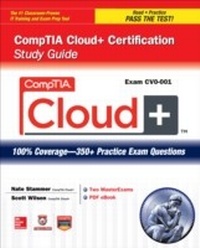
CompTIA Cloud+ Certification Study Guide (Exam CV0-001)
1. Auflage
Erschienen am 30. September 2013
474 Seiten
978-0-07-182884-0 (ISBN)
Als Download verfügbar
Beschreibung

An all-new, exam-focused study guide for the new CompTIA Cloud+ certification examCompTIA Cloud+ Certification Study Guide (Exam CV0-001) offers a proven study system for the CompTIA Cloud+ certification exam, the professional-level exam that aims to validate the skills and knowledge required of IT practitioners working in cloud computing environments. You'll gain the knowledge and skills required to understand cloud computing terminology, to implement, maintain, and deliver cloud technologies and infrastructures, and to understand aspects of IT security and use of industry best practices related to cloud implementations and the application of virtualization.To prepare you for this challenging, technically focused exam, CompTIA Cloud+ Certification Study Guide (Exam CV0-001) offers 100% complete coverage of the exam objectives woven into an integrated self-study system. The book teaches and reinforces practical skills through special Exam Watch, Inside the Exam, and On-the-Job elements. Also included are end-of-chapter self-test questions with in-depth answer explanations. Electronic content includes two practice exams that mirror the actual exam in content, format, style, tone, and difficulty.CAPP Authorized and CompTIA reviewed and approved: CAQC (CompTIA Approved Quality Content)Electronic content features two simulated practice exams in the LearnKey MasterExam test engine software and an eBook version of the Study Guide
Weitere Details
Weitere Ausgaben
Andere Ausgaben
Nate Stammer | Scott Wilson
CompTIA Cloud+ Certification Study Guide (Exam CV0-001)
Buch
12/2013
McGraw-Hill Professional
41,98 €
Artikel ist vergriffen; siehe andere Ausgabe
Inhalt
- Cover
- Title Page
- Copyright Page
- About the Authors
- Contents at a Glance
- Contents
- Acknowledgments
- Preface
- Introduction
- 1. Cloud Computing Concepts, Models, and Terminology
- Cloud Service Models
- Infrastructure as a Service (IaaS)
- Platform as a Service (PaaS)
- Software as a Service (SaaS)
- Database as a Service (DBaaS)
- Communications as a Service (CaaS)
- Business Process as a Service (BPaaS)
- Anything as a Service (XaaS)
- Accountability and Responsibility by Service Model
- Cloud Delivery Models and Services
- Private Cloud
- Public Cloud
- Hybrid Cloud
- Community Cloud
- On-Premise Versus Off-Premise Hosting
- Orchestration Platforms
- Cloud Characteristics and Terms
- Elasticity
- Demand-Driven Service
- Pay-as-You-Grow
- Chargeback
- Ubiquitous Access
- Metering
- Multitenancy
- Cloud Bursting
- Object Storage Concepts
- Object ID
- Metadata
- Data BLOB
- Policies
- Replicas
- Two-Minute Drill
- Q&A Self Test
- Self Test Answers
- 2. Disk Storage Systems
- Disk Types and Configurations
- Rotational Media
- Solid State Drive (SSD)
- USB Drive
- Tape
- Tiering
- Performance Levels of Each Tier
- Policies
- Redundant Array of Independent Disks (RAID)
- RAID 1
- RAID 0
- RAID 1+0
- RAID 0+1
- RAID 5
- RAID 6
- File System Types
- Unix File System
- Extended File System
- File Allocation Table
- New Technology File System
- Virtual Machine File System
- Z File System
- Two-Minute Drill
- Q&A Self Test
- Self Test Answers
- 3. Storage Networking
- Storage Technologies
- Direct Attached Storage (DAS)
- Storage Area Network (SAN)
- Network Attached Storage (NAS)
- Access Protocols and Applications
- Fibre Channel (FC)
- Fibre Channel Protocol
- Fibre Channel over Ethernet (FCoE)
- Ethernet
- Internet Protocol (IP)
- Internet Small Computer System Interface (iSCSI)
- Storage Provisioning
- Logical Unit Numbers (LUNs)
- Network Shares
- Zoning and LUN Masking
- Multipathing
- Two-Minute Drill
- Q&A Self Test
- Self Test Answers
- 4. Network Infrastructure
- Network Types
- Intranet
- Internet
- Extranet
- Network Optimization
- Network Topologies
- Bandwidth and Latency
- Load Balancing
- Routing and Switching
- Network Address Translation (NAT)
- Port Address Translation (PAT)
- Subnetting and Supernetting
- Virtual Local Area Network (VLAN)
- Routing Tables
- Network Ports and Protocols
- Hypertext Transfer Protocol (HTTP) and Hypertext Transfer Protocol Secure (HTTPS)
- File Transfer Protocol (FTP) and File Transfer Protocol Secure (FTPS)
- Secure File Transfer Protocol (SFTP)/Secure Shell File Transfer Protocol (SSH)
- Domain Name System (DNS) and Dynamic Host Configuration Protocol (DHCP)
- Simple Mail Transfer Protocol (SMTP)
- Well-Known Ports
- Two-Minute Drill
- Q&A Self Test
- Self Test Answers
- 5. Virtualization Components
- Hypervisor
- Type 1
- Type 2
- Proprietary
- Open Source
- Consumer versus Enterprise
- Virtualization Host
- Hardware-Assisted Virtualization
- Basic Input/Output System (BIOS)
- Firmware Configurations
- Central Processing Unit (CPU) and Cores
- Memory Capacity and Configurations
- Network Interface Cards (NICs)
- Virtual Machine
- Virtual Disks
- Virtual NICs
- Virtual Switches
- Memory
- Storage Virtualization
- Guest Tools
- Two-Minute Drill
- Q&A Self Test
- Self Test Answers
- 6. Virtualization and the Cloud
- Benefits of Virtualization in a Cloud Environment
- Shared Resources
- Elasticity
- Network and Application Isolation
- Infrastructure Consolidation
- Virtual Data Center Creation
- Virtual Resource Migrations
- Virtual Machine Templates
- Physical to Virtual (P2V)
- Virtual to Virtual (V2V)
- Virtual to Physical (V2P)
- Virtual Machine Cloning
- Storage Migration
- Migration Considerations
- Requirements Gathering
- Maintenance Scheduling
- Upgrading
- Testing
- Two-Minute Drill
- Q&A Self Test
- Self Test Answers
- 7. Network Management
- Resource Monitoring Techniques
- Protocols and Methods
- Baselines and Thresholds
- Automated Event Responses
- Remote-Access Tools
- Remote Hypervisor Access
- Remote Desktop Protocol (RDP)
- Console Port
- Secure Shell (SSH)
- HTTP
- Two-Minute Drill
- Q&A Self Test
- Self Test Answers
- 8. Performance Tuning
- Host Resource Allocation
- Compute Resources
- Quotas and Limits
- Licensing
- Reservations
- Resource Pools
- Virtual Machine Resource Allocation
- Compute Resources
- Quotas and Limits
- Licensing
- Physical Resource Redirection
- Resource Pools
- Dynamic Resource Allocation
- Optimizing Performance
- Configuration Best Practices
- Common Issues
- Performance Concepts
- Two-Minute Drill
- Q&A Self Test
- Self Test Answers
- 9. Systems Management
- Policies and Procedures
- Change Management
- Configuration Management
- Capacity Management
- Life Cycle Management
- Systems Management Best Practices
- Documentation
- Standardization
- Planning
- Two-Minute Drill
- Q&A Self Test
- Self Test Answers
- 10. Testing and Troubleshooting
- Testing Techniques
- Configuration Testing
- Security Testing
- Roles and Responsibilities
- Troubleshooting and Tools
- Tools
- Documentation
- System Logs
- Two-Minute Drill
- Q&A Self Test
- Self Test Answers
- 11. Security in the Cloud
- Network Security: Best Practices
- Assess and Audit the Network
- Leverage Established Industry Frameworks
- Utilize Layered Security
- Utilize a Third Party to Audit the Network
- "Harden" Host and Guest Computers
- Employ Penetration Testing
- Perform Vulnerability Assessments
- Secure Storage Resources
- Keep Employees and Tools Up to Date
- Data Security
- Public Key Infrastructure
- Ciphers
- Encryption Protocols
- Access Control Methods
- Role-Based Access Controls
- Mandatory Access Controls
- Discretionary Access Controls
- Multifactor Authentication
- Single Sign-On
- Federation
- Two-Minute Drill
- Self Test
- Self Test Answers
- 12. Business Continuity and Disaster Recovery
- Disaster Recovery Methods
- Multisite Configuration
- Backups and Recovery
- Snapshots
- High Availability
- Fault Tolerance
- Multipathing
- Load Balancing
- Two-Minute Drill
- Q&A Self Test
- Self Test Answers
- A: About the Download
- System Requirements
- Downloadable MasterExam
- MasterExam
- Help
- Removing Installation
- Technical Support
- LearnKey Technical Support
- McGraw-Hill Education Technical Support and Customer Service
- B: Practice Exam
- Questions
- Answers
- Glossary
- Index

