

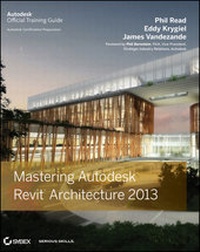
Mastering Autodesk Revit Architecture 2013
Erschienen am 3. Juli 2012
1120 Seiten
978-1-118-22700-8 (ISBN)
Beschreibung
Learn BIM the Revit Way
Revit is Autodesk's industry-leading Building Information Modeling (BIM) software, and this Autodesk Official Training Guide thoroughly covers core Revit topics such as modeling, massing, sustainability, and more. It also brings you up to speed on advanced techniques such as using Revit in the cloud and how to go direct to fabrication.
Organized by real-world workflows, this book covers the interface, templates, worksharing, modeling and massing, visualization techniques for different industries, sustainability, roofs and floors, stairs and railings, documentation, and much more.
* This Autodesk Official Training Guide teaches you how to use the leading BIM software and also serves as a study aid for Autodesk's Certified Associate and Certified Professional exams
* Organized according to actual workflows, the book begins with an explanation of key BIM concepts, familiarizes you with the interface, and then moves into actual application
* Covers modeling and massing, the Family Editor, visualization techniques for various industries, documentation, annotation and detailing, and how to work with complex walls, roofs, floors, stairs, and railings
* Companion website features before-and-after tutorial files, so readers can jump in at any point
Mastering Autodesk Revit Architecture helps you learn Revit in a context that makes real-world sense.
Revit is Autodesk's industry-leading Building Information Modeling (BIM) software, and this Autodesk Official Training Guide thoroughly covers core Revit topics such as modeling, massing, sustainability, and more. It also brings you up to speed on advanced techniques such as using Revit in the cloud and how to go direct to fabrication.
Organized by real-world workflows, this book covers the interface, templates, worksharing, modeling and massing, visualization techniques for different industries, sustainability, roofs and floors, stairs and railings, documentation, and much more.
* This Autodesk Official Training Guide teaches you how to use the leading BIM software and also serves as a study aid for Autodesk's Certified Associate and Certified Professional exams
* Organized according to actual workflows, the book begins with an explanation of key BIM concepts, familiarizes you with the interface, and then moves into actual application
* Covers modeling and massing, the Family Editor, visualization techniques for various industries, documentation, annotation and detailing, and how to work with complex walls, roofs, floors, stairs, and railings
* Companion website features before-and-after tutorial files, so readers can jump in at any point
Mastering Autodesk Revit Architecture helps you learn Revit in a context that makes real-world sense.
Alle Preise
Weitere Details
Weitere Ausgaben
Personen
Phil Read is the Founder of Arch Tech, as well as one of thedriving forces behind the original Revit software. He's an avidblogger and a popular speaker at Autodesk University, and iscurrently working at an AEC-related technology startup. EddyKrygiel is an Autodesk Authorized Author and registered architectat HNTB Architects, where he implements BIM and has used Revit tocomplete projects of all sizes. James Vandezande is a registeredarchitect and Senior Associate at HOK, where he is one of thecompany's BIM leaders. James is also President of the New York CityRevit Users Group and teaches Revit as an adjunct lecturingprofessor at NYU. Connect with the authors at their "MasteringRevit" page on Facebook.
Inhalt
Foreword xxvii
Introduction xxix
Part 1 * Fundamentals 1
Chapter 1 * Introduction: The Basics of BIM 3
Chapter 2 * Principles: UI and Project Organization 15
Chapter 3 * The Basics of the Toolbox 61
Part 2 * Understanding the Workflow 101
Chapter 4 * Confi guring Templates and Standards 103
Chapter 5 * Managing a Project 147
Chapter 6 * Understanding Worksharing 173
Chapter 7 * Working with Consultants 203
Chapter 8 * Interoperability: Working Multiplatform237
Part 3 * Modeling and Massing for Design 271
Chapter 9 * Advanced Modeling and Massing 273
Chapter 10 * Conceptual Design and Sustainability 353
Chapter 11 * Working with Phasing, Groups, and DesignOptions 399
Chapter 12 * Visualization 455
Part 4 * Extended Modeling Techniques 511
Chapter 13 * Walls and Curtain Walls 513
Chapter 14 * Floors, Ceilings, and Roofs 577
Chapter 15 * Family Editor 607
Chapter 16 * Stairs and Railings 659
Part 5 * Documentation 713
Chapter 17 * Detailing Your Design 715
Chapter 18 * Documenting Your Design 749
Chapter 19 * Annotating Your Design 785
Chapter 20 * Presenting Your Design827
Part 6 * Construction and Beyond 843
Chapter 21 * The Construction Phase 845
Chapter 22 * Using Laser Scans in Revit 867
Chapter 23 * Revit in the Classroom 881
Chapter 24 * Essential Hardware 901
Chapter 25 * Getting Acquainted with the API 911
Chapter 26 * Revit for Film and Stage 947
Chapter 27 * BIM in the Cloud 989
Appendices 999
Appendix A * The Bottom Line 1001
Appendix B * Tips, Tricks, and Troubleshooting 1027
Appendix C * Autodesk Revit Architecture 2013Certification 1041
Index 1049
Introduction xxix
Part 1 * Fundamentals 1
Chapter 1 * Introduction: The Basics of BIM 3
Chapter 2 * Principles: UI and Project Organization 15
Chapter 3 * The Basics of the Toolbox 61
Part 2 * Understanding the Workflow 101
Chapter 4 * Confi guring Templates and Standards 103
Chapter 5 * Managing a Project 147
Chapter 6 * Understanding Worksharing 173
Chapter 7 * Working with Consultants 203
Chapter 8 * Interoperability: Working Multiplatform237
Part 3 * Modeling and Massing for Design 271
Chapter 9 * Advanced Modeling and Massing 273
Chapter 10 * Conceptual Design and Sustainability 353
Chapter 11 * Working with Phasing, Groups, and DesignOptions 399
Chapter 12 * Visualization 455
Part 4 * Extended Modeling Techniques 511
Chapter 13 * Walls and Curtain Walls 513
Chapter 14 * Floors, Ceilings, and Roofs 577
Chapter 15 * Family Editor 607
Chapter 16 * Stairs and Railings 659
Part 5 * Documentation 713
Chapter 17 * Detailing Your Design 715
Chapter 18 * Documenting Your Design 749
Chapter 19 * Annotating Your Design 785
Chapter 20 * Presenting Your Design827
Part 6 * Construction and Beyond 843
Chapter 21 * The Construction Phase 845
Chapter 22 * Using Laser Scans in Revit 867
Chapter 23 * Revit in the Classroom 881
Chapter 24 * Essential Hardware 901
Chapter 25 * Getting Acquainted with the API 911
Chapter 26 * Revit for Film and Stage 947
Chapter 27 * BIM in the Cloud 989
Appendices 999
Appendix A * The Bottom Line 1001
Appendix B * Tips, Tricks, and Troubleshooting 1027
Appendix C * Autodesk Revit Architecture 2013Certification 1041
Index 1049
