

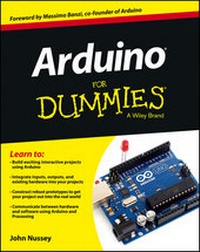
Arduino For Dummies
Erschienen am 29. April 2013
456 Seiten
978-1-118-44642-3 (ISBN)
Beschreibung

The quick, easy way to leap into the fascinating world ofphysical computing
This is no ordinary circuit board. Arduino allows anyone,whether you're an artist, designer, programmer or hobbyist, tolearn about and play with electronics. Through this book you learnhow to build a variety of circuits that can sense or control thingsin the real world. Maybe you'll prototype your own product orcreate a piece of interactive artwork? This book equips you witheverything you'll need to build your own Arduino project, but whatyou make is up to you! If you're ready to bring your ideas into thereal world or are curious about the possibilities, this book is foryou.
? Learn by doing ? start building circuits and programmingyour Arduino with a few easy to follow examples - rightaway!
? Easy does it ? work through Arduino sketches line by linein plain English, to learn of how a they work and how to write yourown
? Solder on! ? Only ever used a breadboard in the kitchen?Don't know your soldering iron from a curling iron? No problem,you'll be prototyping in no time
? Kitted out ? discover new and interesting hardware to makeyour Arduino into anything from a mobile phone to a geigercounter!
? Become an Arduino savant ? learn all about functions,arrays, libraries, shields and other tools of the trade to takeyour Arduino project to the next level.
? Get social ? teach your Arduino to communicate withsoftware running on a computer to link the physical world with thevirtual world
It's hardware, it's software, it's fun! Start building the nextcool gizmo with Arduino and Arduino For Dummies.
This is no ordinary circuit board. Arduino allows anyone,whether you're an artist, designer, programmer or hobbyist, tolearn about and play with electronics. Through this book you learnhow to build a variety of circuits that can sense or control thingsin the real world. Maybe you'll prototype your own product orcreate a piece of interactive artwork? This book equips you witheverything you'll need to build your own Arduino project, but whatyou make is up to you! If you're ready to bring your ideas into thereal world or are curious about the possibilities, this book is foryou.
? Learn by doing ? start building circuits and programmingyour Arduino with a few easy to follow examples - rightaway!
? Easy does it ? work through Arduino sketches line by linein plain English, to learn of how a they work and how to write yourown
? Solder on! ? Only ever used a breadboard in the kitchen?Don't know your soldering iron from a curling iron? No problem,you'll be prototyping in no time
? Kitted out ? discover new and interesting hardware to makeyour Arduino into anything from a mobile phone to a geigercounter!
? Become an Arduino savant ? learn all about functions,arrays, libraries, shields and other tools of the trade to takeyour Arduino project to the next level.
? Get social ? teach your Arduino to communicate withsoftware running on a computer to link the physical world with thevirtual world
It's hardware, it's software, it's fun! Start building the nextcool gizmo with Arduino and Arduino For Dummies.
Weitere Details
Weitere Ausgaben
Nachauflagen
Andere Ausgaben
Person
John Nussey is a specialist in physical computing who has worked for many years creating interactive art installations and prototyping products using Arduino. He is a proud advocate of Arduino and teaches the craft of interaction design, hacking, and prototyping to people of all ages, competencies, and abilities.
Inhalt
Foreword xvii
Introduction 1
Part I: Getting to Know Arduino 5
Chapter 1: What Is Arduino and Where Did It Come From? 7
Chapter 2: Finding Your Board and Your Way Around It 17
Chapter 3: Downloading and Installing Arduino 33
Chapter 4: Blinking an LED 41
Part II: Getting Physical with Arduino 61
Chapter 5: Tools of the Trade 63
Chapter 6: A Primer on Electricity and Circuitry 75
Chapter 7: Basic Sketches: Inputs, Outputs, and Communication91
Chapter 8: More Basic Sketches: Motion and Sound 123
Part III: Building on the Basics 161
Chapter 9: Learning by Example 163
Chapter 10: Soldering On 179
Chapter 11: Getting Clever with Code 209
Chapter 12: Common Sense with Common Sensors 241
Part IV: Unlocking Your Arduino's Potential 287
Chapter 13: Becoming a Specialist with Shields and Libraries289
Chapter 14: Sensing More Inputs and Controlling More Outputs315
Chapter 15: Multiplying Your Outputs with I2C 339
Part V: Sussing Out Software 357
Chapter 16: Getting to Know Processing 359
Chapter 17: Processing the Physical World 359
Part VI: The Part of Tens 407
Chapter 18: Ten Places to Learn More about Arduino 409
Chapter 19: Ten Great Shops to Know 413
Chapter 20: Ten Places to Find Parts and Components 417
Index 421
Bonus Chapter: Hacking Other Hardware On the Companion Websiteat wwwdummiescom/go/arduinofd
Introduction 1
Part I: Getting to Know Arduino 5
Chapter 1: What Is Arduino and Where Did It Come From? 7
Chapter 2: Finding Your Board and Your Way Around It 17
Chapter 3: Downloading and Installing Arduino 33
Chapter 4: Blinking an LED 41
Part II: Getting Physical with Arduino 61
Chapter 5: Tools of the Trade 63
Chapter 6: A Primer on Electricity and Circuitry 75
Chapter 7: Basic Sketches: Inputs, Outputs, and Communication91
Chapter 8: More Basic Sketches: Motion and Sound 123
Part III: Building on the Basics 161
Chapter 9: Learning by Example 163
Chapter 10: Soldering On 179
Chapter 11: Getting Clever with Code 209
Chapter 12: Common Sense with Common Sensors 241
Part IV: Unlocking Your Arduino's Potential 287
Chapter 13: Becoming a Specialist with Shields and Libraries289
Chapter 14: Sensing More Inputs and Controlling More Outputs315
Chapter 15: Multiplying Your Outputs with I2C 339
Part V: Sussing Out Software 357
Chapter 16: Getting to Know Processing 359
Chapter 17: Processing the Physical World 359
Part VI: The Part of Tens 407
Chapter 18: Ten Places to Learn More about Arduino 409
Chapter 19: Ten Great Shops to Know 413
Chapter 20: Ten Places to Find Parts and Components 417
Index 421
Bonus Chapter: Hacking Other Hardware On the Companion Websiteat wwwdummiescom/go/arduinofd
