

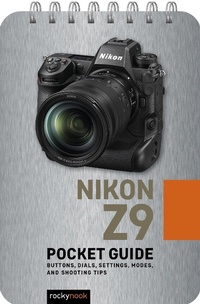
Nikon Z9: Pocket Guide
Buttons, Dials, Settings, Modes, and Shooting Tips
Erschienen am 13. September 2023
44 Seiten
979-8-88814-129-8 (ISBN)
Beschreibung

Designed for photographers who haven't memorized every button, dial, setting, and feature on their Nikon Z9, Rocky Nook's handy and ultra-portable quick reference Pocket Guide you get the shot when you're out and about.
- Confirm that your camera is set up properly with the pre-shoot checklist
- Identify every button and dial on your camera
- Learn the essential modes and settings you need to know
- Dive deeper with additional features of your camera
- Execute step-by-step instructions for shooting multiple exposures, in-camera HDR, time-lapse movies, and more
- Follow tips and techniques for getting great shots in typical scenarios (portrait, landscape, freezing action, low light, etc.)
Weitere Details
Weitere Ausgaben
Andere Ausgaben
Buch
01/2024
Rocky Nook
16,50 €
Versand in 10-20 Tagen
E-Book
09/2023
Rocky Nook
13,49 €
Als Download verfügbar
Inhalt
- Cover
- Title Page
- Table of Contents
- 01. Pre-Shoot Checklist
- 02. Buttons, Dials, and Screens
- Camera Body Top
- Camera Body Back
- Camera Body Front
- Viewfinder Display (Photo)
- Viewfinder Display (Movie)
- Monitor Display (Photo)
- Monitor Display (Movie)
- Control Panel
- 03. Essential Modes and Settings
- Shooting Modes
- Metering Modes
- Exposure Compensation
- Focus Modes
- AF-Area Modes (Focus Area)
- Release Modes
- White Balance
- File Format / Image Quality
- 04. Other Helpful Settings
- Picture Controls
- Flash Modes
- Color Space
- Highlight Warning (Blinkies)
- Noise Reduction
- Auto ISO
- Disp Button
- Active D-Lighting
- Auto Bracketing
- Wireless Connection (Snapbridge)
- 05. Step-By-Step Shooting Instructions
- Multiple Exposures
- HDR
- Time-Lapse Movies
- Interval Timer Photography
- 06. Typical Shooting Scenarios
- Portrait
- Group Portrait
- Landscape
- Freeze Action
- Showing Motion-Panning
- Low-Light Action
- Long Exposure
