

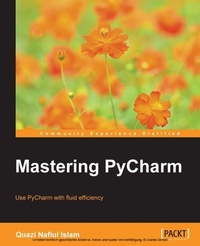
Mastering PyCharm
Use PyCharm with fluid efficiency to write idiomatic python code
1. Auflage
Erschienen am 7. Oktober 2025
232 Seiten
978-1-78355-132-3 (ISBN)
Beschreibung

Use PyCharm with fluid efficiency to write idiomatic python code.Key FeaturesBook DescriptionPyCharm is addictive, with powerful and configurable code completion, superb editing tools, top-notch support, diverse plugins, and a vibrant ecosystem to boot. Learning how PyCharm works and maximising the synergy of its powerful tools will help you to rapidly develop applications. From leveraging the power of the editor to understanding PyCharm's internals, this book will give you a comprehensive view of PyCharm and allow you to make your own choices about which workflow and tools are best for you. You will start by getting comfortable with PyCharm and making it look exactly like you want. You can customize the tools and taskbars to suit individual developers' coding styles. You also learn how to assign keyboard shortcuts. You will master debugging by inserting breakpoints, collecting runtime data, and debugging from the console. You will understand how PyCharm works underneath and how plugins such as Codemap, Vim, Bitbucket, Assets compressor, markdown, bash file, shortcut translator, and.gitignore leverage the power of the IntelliJ platform. You will become comfortable using the VCS interface in PyCharm and see the benefits of using it for some simple tasks as well as some more complex tasks such as partial commits using changelists. You will take an in-depth look at the various tools in PyCharm, improving your workflow drastically. Finally, you will deploy powerful PyCharm tools for Django, Flask, GAE, and Pyramid Development, becoming well acquainted with PyCharm's toolset for web development with popular platforms. Packed with insider tricks, this book will help you boost productivity with PyCharm.What you will learn - Understand the internal workings of the IntelliJ Platform
- Leverage PyCharm's powerful search tools, and learn which ones are the best for you and your workflow
- Customize PyCharm's enhanced Python interpreter and its inbuilt terminal
- Develop web applications quickly and easily with different frameworks such as Flask and Django
- Understand how code completion works in PyCharm for Python and JavaScript
Who this book is for
- Leverage PyCharm's powerful search tools, and learn which ones are the best for you and your workflow
- Customize PyCharm's enhanced Python interpreter and its inbuilt terminal
- Develop web applications quickly and easily with different frameworks such as Flask and Django
- Understand how code completion works in PyCharm for Python and JavaScript
Who this book is for
Weitere Details
Weitere Ausgaben
Andere Ausgaben
Person
Islam Nafiul :
Quazi Nafiul Islam is a consultant and an occasional speaker, and has worked professionally with Python for 3 years while completing his bachelor's degree in computer science. He blogs regularly on his website, nafiulis.me. He struggled to find the right tools that could aid his workflow when working on large Python projects until he was introduced to PyCharm. He loved it so much that he wrote a book on it, his very first one.
Quazi Nafiul Islam is a consultant and an occasional speaker, and has worked professionally with Python for 3 years while completing his bachelor's degree in computer science. He blogs regularly on his website, nafiulis.me. He struggled to find the right tools that could aid his workflow when working on large Python projects until he was introduced to PyCharm. He loved it so much that he wrote a book on it, his very first one.
Inhalt
- Cover
- Copyright
- Credits
- About the Author
- About the Reviewers
- www.PacktPub.com
- Table of Contents
- Preface
- Chapter 1: Getting the Right Look
- A short note on keyboard shortcuts
- The basics
- The first change - fonts
- The layout
- The minimalist
- Beautiful code
- Editor
- Getting the right colors
- Style hierarchies
- Styling on steroids
- Imports and exports
- TextMate bundles
- Summary
- Chapter 2: Understanding the Keymap
- Different keymaps
- Finding shortcuts
- Setting shortcuts
- Troubleshooting on Mac
- Summary
- Chapter 3: Getting Places
- Omni
- Back and Forward
- Macro
- Go to definition or navigate to declaration
- Search Everywhere
- The Switcher tool
- The Project panel
- Micro
- The Structure panel
- Ace Jump
- Summary
- Chapter 4: Editing
- Improving code completion
- Understanding what intentions can do for you
- Collecting runtime types
- Adding docstrings and type information
- The skeletons in PyCharm's closet
- Setting up IPython Notebook
- Editor plugins
- Writing code
- Refactoring
- Multiple cursors
- doc_mode
- Reading code
- The lens mode
- Diagrams
- Method hierarchies
- Summary
- Chapter 5: Interpreters and Consoles
- All about interpreters
- Adding interpreters
- Creating virtualenvs
- Through the terminal
- Installing packages
- Setting paths
- Remote interpreters
- Using Vagrant in PyCharm
- The PyCharm console
- Console configuration
- Summary
- Chapter 6: Debugging
- Running, debugging, and setting breakpoints
- Debugging workflow
- Dealing with threads and processes
- Processes
- Debugging from the console
- Attach to Process.
- Profiling
- Summary
- Chapter 7: The PyCharm Ecosystem
- The IntelliJ ecosystem
- Support for PyCharm
- YouTrack.JetBrains
- What makes a good plugin?
- Summary
- Chapter 8: File Templates and Snippets
- File templates
- Understanding variables
- Making new templates
- Snippets (live templates)
- Surround templates
- Summary
- Chapter 9: Version Control Integration
- Initializing version control
- Ignoring files
- Remotes
- The VCS menu
- The Changes panel
- Changing Diff colors
- Change lists
- Summary
- Chapter 10: HTML and JavaScript Tools
- JavaScript support
- Getting the most out of JavaScript code completion
- Using JSDoc
- Using libraries
- Transpiled to JavaScript languages
- Support for libraries and frameworks
- Client-side frameworks
- Server-side frameworks and NodeJS
- JavaScript Code Quality Tools
- HTML and CSS
- Emmet
- Live debugging
- Installing the plugin
- Debugging the file
- File watchers
- Summary
- Chapter 11: Web Development with PyCharm
- Database tools
- Adding a data source
- Connecting to a database
- Adding files
- Using the SQL console
- Parameterized statements
- Console history
- Database diagrams
- Exporting data
- Copying DDLs
- Exporting the table contents
- Web frameworks
- Common features
- Support for templating engines
- Customized project creation
- Debugging in templates
- Django
- Setting up Django
- Model dependency diagrams
- Manage.py tasks
- Django Console
- Summary
- Index
