

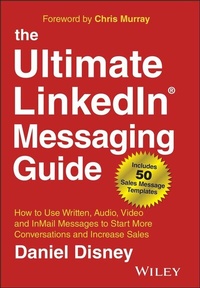
The Ultimate LinkedIn Messaging Guide
Beschreibung

The Ultimate LinkedIn Messaging Guide is for salespeople, businesses, recruiters, and LinkedIn users who struggle to get replies and results on the essential business platform. In this book, author Daniel Disney shows you just how powerful LinkedIn can be when you figure out how to do it right. You'll discover how to use LinkedIn messages to get noticed by employers, get attention to your business, and close deals. When you master LinkedIn messaging with the proven tips inside this book, you'll be able to start more conversations, create more opportunities and drive more sales and revenue.
What you're looking for is out there - if you know how to reach the people who can help. But in this age of information overload, no one will respond to a spammy message, call, or e-mail. You need to stand out and prove that you're legitimate. In this book, you'll find real examples of successful messages, as well as over 50 message templates and scripts for written, audio, video and InMail messages. There are also QR codes throughout the book that take you to recorded examples of video and audio messages so you can see and hear them in action.
* Learn how to send personalised connection requests and LinkedIn messages that prompt people to talk to you
* Discover tips for building your network and reaching the decision makers at any company
* Leverage the power of audio and video messages to connect more effectively on LinkedIn
* Follow up and convert replies into sales, job offers, and high-value relationships
If you've struggled to get noticed, meet the right people, and close deals, The Ultimate LinkedIn Messaging Guide is the tool you need to turn it around.
Weitere Details
Weitere Ausgaben
Andere Ausgaben
Person
www.thedailysales.net
Inhalt
About the Author
Introduction
Part 1: Prospecting With Messages
Chapter 1 - Motivation To Message
Chapter 2 - The Prospecting Maze
Chapter 3 - Outbound Social Selling
Part 2: Research & Personalisation
Chapter 4 - Why Aren't People Replying?
Chapter 5 - Research & Personalisation
Chapter 6 - The One Thing To Avoid
Chapter 7 - No One Likes Spam Messages
Part 3: LinkedIn Messaging Thoughts
Chapter 8 - InMail VS Message
Chapter 9 - When To Send Messages
Chapter 10 - One Size Doesn't Fit All
Part 4: Written LinkedIn Messages
Chapter 11 - The Seven-Figure LinkedIn Message
Chapter 12 - 25 Written Sales Message Templates
Chapter 13 - Top Tips
Part 5: Audio LinkedIn Messages
Chapter 14 - Audio Voice Notes On LinkedIn
Chapter 15 - How & When To Send Audio Messages
Chapter 16 - The Two Most Important Components
Chapter 17 - Ten Audio Sales Message Scripts
Part 6: Video LinkedIn Messages
Chapter 18 - Video Messages On LinkedIn
Chapter 19 - From Video To Sale In 24 Hours
Chapter 20 - Ten Video Sales Message Scripts
Part 7: InMail Messages On Sales Navigator
Chapter 21 - InMail Messages On LinkedIn
Chapter 22 - InMail Subject Lines
Chapter 23 - Ten InMail Sales Templates
Part 8: Follow Up, Replies & Converting To Sales
Chapter 24 - What If They Don't Reply?
Chapter 25 - Pick Up The Phone
Chapter 26 - Conversation To Opportunity
Part 9: Bonus Chapters
Chapter 27 - Pipeline Will Always Be King
Chapter 28 - Ten Big LinkedIn & Sales Navigator Tips
Chapter 29 - Social Selling Top Tips
Chapter 30 - Building A Strong LinkedIn Profile
Chapter 31 - Cold Calling Is Like Blockbuster
Chapter 32 - Social Selling In 15 Minutes
Chapter 33 - The ABC's Of Social Selling
Working with Daniel Disney
Acknowledgements
Index
CHAPTER 11
THE SEVEN-FIGURE LINKEDIN MESSAGE
Here is the whole story of how a single individual LinkedIn message opened the door to one of the biggest sales in my career.
I will go into as much detail as I can as the processes completed before and after the message are equally as important as the message itself.
Setting the scene
Whilst working for a large IT company in the UK, my team mainly sold IT training packages to SMEs (small to medium-sized employers). When selling to SMEs, it's often very easy to reach decision-makers via cold calling-well, it certainly used to be back then-as there aren't as many people or layers in the business.
We would go in and present a variety of training packages valued between £3,000 and £18,000. The sales process often took around 1-2 months from prospecting through to closing.
Most of the time, we would first cold-call to find the decision-maker and aim to either email information over or book a meeting straight off the call.
During the meeting, we would then run through needs, listen and learn about the prospect. After that, we would go back, put together a proposal and call or meet them again to run through it.
It was a highly competitive market; we had a lot of competitors, some bigger and some cheaper than us. A lot of our success came down to either being the first to contact the prospect or our ability to build stronger relationships.
Following some really rapid growth, and as the top-performing person in sales, I was tasked with bringing new, large corporate clients to our portfolio. I very quickly found that cold calling was not as effective as it was with smaller companies!
Complex organisational structures and good gatekeepers made it difficult to get in front of the decision-maker. I learned how to do it effectively, but some companies were extremely challenging.
I was working on a few companies-global companies with multi-billion pound turnover. After, once again, getting stuck at the gatekeeper on a cold call, I decided to look for other ways in. One thing popped into my head: I wonder if the decision-maker is on LinkedIn?
I didn't have the name of the decision-maker, only a few job titles that I was currently working with. I was looking for HR Managers, L&D Managers and IT Managers (and above).
After a quick search, there they were! I popped onto their profile, had a read and soon qualified that this was the person I needed and wanted to speak to.
Let me just pause this story for a minute whilst I talk you through this stage:
The first step is to connect with your prospect.
LinkedIn InMails are okay, but they're no different (in some ways worse) than a cold call. When you connect with someone, you are able to send them a LinkedIn message directly, which is far more effective compared to an InMail, which is sent to someone you aren't connected with.
Similar to most of the messages I get, most InMails are even MORE sales-y.
To be able to send a direct message, you need to connect with them first.
When you go on their profile, if they're a 2nd-degree connection, you'll see the option to "Connect." It's a nice blue button just under their LinkedIn banner.
NOTE: If they're a 3rd-degree connection, you won't see the "Connect" button but instead will see a "Message" button with a little lock image next to it. This means you can only message them via InMails if you have LinkedIn Premium or LinkedIn Sales Navigator. In the past, there was no way that you could send this person a connection request; however, LinkedIn has changed that now.
If you click the "More." button next to the "Message" button, it will open a section with four options: Share Profile, Save to PDF, Connect and Report/Block.
If you click the "Connect" option, it will be the same as clicking the connect button with a 2nd-degree connection.
When you click on the "Connect" button, it will prompt a little pop-up that will say:
"You can customise this invitation.
LinkedIn members are more likely to accept invitations that include a personal note.
Add note - Send now"
Would you like to customise this request? YES! It can be very helpful, depending on the prospect, to personalise your connection request.
However, personalising can work against you! Not only are there a huge number of people out there that will be more than happy to connect to you without a personalised request, but sometimes personalising it can discourage people from connecting.
I get tonnes of requests daily, and a large percentage of the personalised ones are personalised with a sales pitch! This does not help increase your chances of getting accepted.
From my own experience connecting and messaging hundreds of decision-makers, the higher up or more senior the prospect, the more beneficial personalising will be. The key is NOT to personalise it with a sales message. There are several templates you can use for this. Most of the time, I go with something simple like:
"Hi Sally,
I'd love to connect,
Kind Regards,
Dan"
Simple, personal and in no way presents me as someone who is going to try and sell to them. This isn't a sure-fire, guaranteed way to get them to accept; some people need more than this.
Some will need you to engage with their content a bit first. I judge it by how active THEY are on LinkedIn. If they are quite active and have a large network (over 1,000), that tells me they are going to be quite likely to accept my request.
If they're not very active and have a smaller network, it's more likely that I'll need to build some rapport first.
Back to the story.
In this case, the prospect is active, so I went with the small, simple personalisation. Within 30 minutes, they accepted my request-a great start to the process!
Sometimes, it can be smarter after connecting to engage with their content a bit first or share your own content for them to see. You can do this over a few days or 1-2 weeks+ to build some foundations before you go in to start a conversation. Again, make a judgement on the prospect and also the proposition you are offering.
In this case, I was very confident that this company would need and want the product I was selling (from qualifications I had already gained). The prospect was active on LinkedIn, which showed me that sending a message straight away might work well.
What I have found from experience is that the higher up the chain you're pitching, the more direct you should be. If you're selling to Directors or C-Level positions, it can often work better to just go straight in with a message.
BUT!
Obviously, it needs to be a well-crafted message.
And this is where the £1,000,000 LinkedIn message was born.
Remember, this is NOT a sales pitch.
This is not about you listing loads of features and benefits or telling them how amazing your product and company are.
It's not about you trying to jump into bed with them straight away.
It is NOT some spammy message.
It is NOT a copy-and-paste job.
It is a simple message with one simple goal.
To start a conversation with a potential customer.
Here it is.
"Hi Sally,
Thank you for connecting! I work for a company called X, who is one of the UK's leading providers of IT Training. I would love to learn a bit more about what you're currently using for that?
Kind Regards,
Dan"
It was that simple.
Before you start to feel underwhelmed by this message, this is the message that opened the door to a sale valued at over £1,000,000. It was this single simple message that did it. Not a cold call, not an email, not a letter, not a text, not a video, not the type of LinkedIn messages I get in my inbox, but this simple message.
In sales, we know simple works best. It's when we overcomplicate things that they often go wrong.
This was a small conversational prospecting message that thanked them for connecting, explained who we are and what we do, and asked them a question about what they may already have in place for that product or service.
As a decision-maker reading this, I'm not overwhelmed by some sort of huge message or something that comes across in an aggressive way.
It makes me think of that particular product or service and whether or not I'm happy with what I've currently got, whether I need it or whether I may want to change it.
Of course, this doesn't work for everyone.
As I mentioned earlier, this isn't something you can just copy and paste a thousand times. However, with the right prospects, this can and does work. For me, on this occasion and for this particular prospect, I received a reply within an hour.
I can actually remember the exact moment; I was having lunch with a colleague (fish and chips with a cold can of lemonade) and decided to check my phone. Logging into LinkedIn, I saw the little notification on the messages, opened it up and was met with...
