

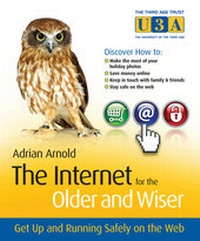
The Internet for the Older and Wiser
Get Up and Running Safely on the Web
Erschienen am 11. Oktober 2010
326 Seiten
978-0-470-68271-5 (ISBN)
Beschreibung

The Internet is not just for the youthful-it's for everyone!
With plenty of leisure time and disposable income, the over 50sare the fastest growing segment of Internet users. Frombooking holidays to shopping, joining clubs and researchingfamily history, the Internet is where the people over 50 canindulge in their favorite pastimes and stay in touch with friendsand family.
The Internet for the Older and Wiser is the idealsolution to get you up and running safely on the World Wide Web.This full-colour guide walks you step by step through the basics,while giving you the best advice on how to make the most of whatthe Internet has to offer.
* Shows you how to safely search and shop online; research yourfamily tree; stay in touch with family; join social networks; andmanage your finances
* Written in full colour with explanatory screenshots and aneasy-to-read font
* Includes brain-teaser sections, a glossary for easy reference,and a useful website directory.
* Uses the latest release of Windows Vista Home Premium, WindowsXP, and Internet Explorer 8-updates, including Windows 7, andtraining tutorials can be found online at pcwisdom.co.uk
If you want to get started online but don't know how, you won'tfind a better guide than The Internet for the Older andWiser.
With plenty of leisure time and disposable income, the over 50sare the fastest growing segment of Internet users. Frombooking holidays to shopping, joining clubs and researchingfamily history, the Internet is where the people over 50 canindulge in their favorite pastimes and stay in touch with friendsand family.
The Internet for the Older and Wiser is the idealsolution to get you up and running safely on the World Wide Web.This full-colour guide walks you step by step through the basics,while giving you the best advice on how to make the most of whatthe Internet has to offer.
* Shows you how to safely search and shop online; research yourfamily tree; stay in touch with family; join social networks; andmanage your finances
* Written in full colour with explanatory screenshots and aneasy-to-read font
* Includes brain-teaser sections, a glossary for easy reference,and a useful website directory.
* Uses the latest release of Windows Vista Home Premium, WindowsXP, and Internet Explorer 8-updates, including Windows 7, andtraining tutorials can be found online at pcwisdom.co.uk
If you want to get started online but don't know how, you won'tfind a better guide than The Internet for the Older andWiser.
Weitere Details
Weitere Ausgaben
Andere Ausgaben
Buch
10/2009
Wiley
18,90 €
Artikel ist vergriffen; siehe andere Ausgabe
Person
Adrian Arnold qualified as a veterinary surgeon from CambridgeUniversity in 1964. Having served as an assistant in generalpractices in Dunstable and Woking he set up his own veterinarypractice in Crawley in 1968. Having created a four-man, two-centrepractice the family decided to move to Colchester in Essex where heset up another new practice in 1987. Throughout this time he becamea freelance journalist writing for both the local and veterinarypress. In 1989 he became one of the first vets in the country tocomputerise his veterinary records and computing has remained ahobby ever since.
His other hobbies included light aircraft flying,digitalphotography, reading and travelling to meet friends and relativesin Europe, America, Africa and Asia.
Adrian and his wife, Jen, who still sits as a magistrate, havethree children and four grandchildren while they enjoy hisretirement in a small village in the Stour valley.
His other hobbies included light aircraft flying,digitalphotography, reading and travelling to meet friends and relativesin Europe, America, Africa and Asia.
Adrian and his wife, Jen, who still sits as a magistrate, havethree children and four grandchildren while they enjoy hisretirement in a small village in the Stour valley.
Inhalt
Acknowledgement.
About the Author.
Publisher's Acknowledgement.
Icons used in the book.
Chapter 1 - Introduction.
PART I - Using your Internet tools.
Chapter 2 - Getting started.
Chapter 3 - Browsing the Internet.
Chapter 4 - Searching the Internet.
Chapter 5 - Staying safe online.
Chapter 6 - Getting help.
Chapter 7 - Email.
Chapter 8 - Entertainment on the Web.
PART II - Shopping.
Chapter 9 - Shopping.
Chapter 10 - Travel on the Internet.
Chapter 11 - Save money and get a bargain.
PART III - Projects.
Chapter 12 - Digital photography online.
Chapter 13 - Learning a new skill.
Chapter 14 - Managing your finances.
Chapter 15 - Staying in touch.
Chapter 16 - Social networking.
Chapter 17 - Publishing online.
Chapter 18 - Research your family tree.
PART IV - Appendices.
Appendix A - Internet links.
Appendix B - Glossary.
Index.
About the Author.
Publisher's Acknowledgement.
Icons used in the book.
Chapter 1 - Introduction.
PART I - Using your Internet tools.
Chapter 2 - Getting started.
Chapter 3 - Browsing the Internet.
Chapter 4 - Searching the Internet.
Chapter 5 - Staying safe online.
Chapter 6 - Getting help.
Chapter 7 - Email.
Chapter 8 - Entertainment on the Web.
PART II - Shopping.
Chapter 9 - Shopping.
Chapter 10 - Travel on the Internet.
Chapter 11 - Save money and get a bargain.
PART III - Projects.
Chapter 12 - Digital photography online.
Chapter 13 - Learning a new skill.
Chapter 14 - Managing your finances.
Chapter 15 - Staying in touch.
Chapter 16 - Social networking.
Chapter 17 - Publishing online.
Chapter 18 - Research your family tree.
PART IV - Appendices.
Appendix A - Internet links.
Appendix B - Glossary.
Index.
