

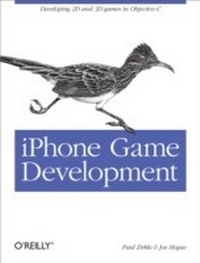
iPhone Game Development
Developing 2D & 3D games in Objective-C
1st Edition
Published on 28. October 2009
260 pages
978-1-4493-8300-8 (ISBN)
Description

What do you need to know to create a game for the iPhone? Even if you've already built some iPhone applications, developing games using iPhone's gestural interface and limited screen layout requires new skills. With iPhone Game Development, you get everything from game development basics and iPhone programming fundamentals to guidelines for dealing with special graphics and audio needs, creating in-game physics, and much more.Loaded with descriptive examples and clear explanations, this book helps you learn the technical design issues particular to the iPhone and iPod Touch, and suggests ways to maximize performance in different types of games. You also get plug-in classes to compensate for the areas where the iPhone's game programming support is weak.Learn how to develop iPhone games that provide engaging user experiencesBecome familiar with Objective-C and the Xcode suite of toolsLearn what it takes to adapt the iPhone interface to gamesCreate a robust, scalable framework for a game appUnderstand the requirements for implementing 2D and 3D graphicsLearn how to add music and audio effects, as well as menus and controlsGet instructions for publishing your game to the App Store
More details
Other editions
Additional editions
Book
12/2009
1st Edition
O'Reilly
€33.00
Shipment within 10-20 days
Content
- Intro
- Table of Contents
- Preface
- The Authors
- Our Goal
- Prerequisites
- Audience
- Organization of This Book
- Conventions Used in This Book
- Using Code Examples
- We'd Like to Hear from You
- Safari® Books Online
- Acknowledgments
- Chapter 1. Introduction to the iPhone
- Apple Developer Account and Downloading the SDK
- Application Bundles
- Xcode and Interface Builder
- Views and Controllers
- Adding a new View and View Controller to an existing window
- Adding a new View to an existing View Controller
- Proxy objects
- Loading Devices
- Certificates and Profiles
- App ID
- UDID
- WWDR certificate
- Installing the profile
- Xcode Configuration
- Objective-C Primer
- Classes
- Instantiation
- Messaging
- Member Variables
- Memory Management
- Constructors and Destructors
- Interface Builder Integration
- Mixed C++ and Objective-C
- Conclusion
- Chapter 2. Game Engine Anatomy
- Application Framework
- Main Loop
- Game State Manager
- State Machine
- Graphics Engine
- Texturing
- Pixels, textures, and images
- Transparency
- Texture blending
- Rotation
- Clipping
- Animation
- Two-dimensional animation: Sprites
- Three-dimensional animation: Models
- Animation controllers
- Particle systems
- Culling
- Texture sorting
- Texture files
- Resource management
- Level of detail
- Physics Engine
- Collision detection versus collision resolution
- Two-dimensional collision detection
- Three-dimensional collision detection
- Collision resolution
- Audio Engine
- Sound samples
- Playing sound
- Multichannel sound
- Music versus SFX
- Output devices and interruptions
- Player Input
- Touch events
- Resolving into high-level events
- Game Logic
- High-level events
- Artificial intelligence
- Transparent suspend and resume
- Frame-based versus time-based logic
- Game logic organization
- Conclusion
- Chapter 3. The Framework
- Game State Management
- Implementation
- Removing the Status Bar
- The App Delegate
- Frames per Second
- Event Handling
- The Resource Manager
- Texture Format
- Sound Format
- Deploying Resources
- Management
- The Render Engine
- GLESGameState
- Textures
- Font Textures
- Example State
- The Sound Engine
- Example State
- The Data Store
- Storing Simple Data
- Storing Complex Data
- Example State
- The Skeleton Application
- Conclusion
- Chapter 4. 2D Game Engine
- Game Design
- Feature List
- User Input Scheme
- Learning Curve
- Level 1
- Level 2
- Level 3
- Level 4
- Tile Engine
- Unique Tiles
- Drawing Tiles
- TileWorld Class
- Loading
- Rendering
- Camera
- Physics
- Animation
- Animation and Sprite Classes
- Property list
- Animation class
- Sprite class
- Physics
- Entities
- Entity-to-World
- Special Tiles
- Entity-to-Entity
- Level 1 Implementation
- gsEmuLevel
- TileWorld
- Main Character
- Entity
- gsEmuLevel
- User input
- Emu Chicks
- Entity
- gsEmuLevel
- Emu Mother
- Game Logic
- Sound
- Level 2 Implementation
- gsLionLevel
- TileWorld
- McGuffin
- Main Character
- Lion Entities
- Entity
- gsLionLevel
- Game Logic
- Sound
- Level 3 Implementation
- gsMazeLevel
- TileWorld
- Buttons
- Doors
- Cat and Mouse
- User Input
- Game Logic
- Initialization
- Context action
- Update
- Sounds
- Level 4 Implementation
- gsRiverLevel
- TileWorld
- Crocodiles
- Logs
- Tom
- User Input
- Game Logic
- Initialization
- Update
- Sounds
- Game State Serialization
- Initialize Storage
- End Game
- Modify UI
- Conclusion
- Chapter 5. 3D Games
- GLESGameState3D Class
- POWERVR
- Vectors and matrixes
- Model format
- 3ds Max plug-in
- Texture format
- Sprite3D
- Accelerometer
- 3D Game Design
- Graphics
- Ship
- Hoops
- Skybox
- Particle system
- 2D elements
- Input
- Accelerometer
- Thruster
- Camera
- Logic
- Implementation
- Camera
- Skybox
- Input
- Calibration
- Thrusters
- Rings
- Layout
- Implementation
- Particle System
- Logic
- Best Times
- End Game
- Conclusion
- Chapter 6. Considerations for Game Design
- Resource Management
- User Input Design
- Networking
- Third-Party Code
- Libraries
- Middleware
- Open Source Games
- App Store
- Conclusion
- Appendix. References
- Code Reference
- Physics Libraries
- Middleware
- Open Source Games
- Index
