

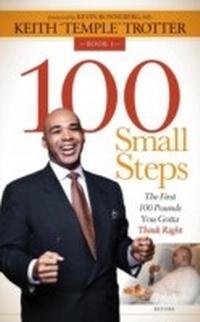
100 Small Steps
The First 100 Pounds You Gotta Think Right
1st Edition
Published on 10. September 2019
146 pages
978-1-63047-181-1 (ISBN)
Description

A successful consultant shares his incredible weight loss journey-and the practical steps that changed his life-in this inspiring memoir.
Through trial and error, tears and triumph, Keith "Temple" Trotter has lost more than 150 pounds and-kept it off for years. He achieved his goal by applying the same principles he brings to his clients as a successful consultant: research, testing, and results documentation. In 100 Small Steps, Keith shares his personal journey, using his own private journal notes to capture the mindset he was in day-to-day as well as his process of discovery.
In this inspiring and honest memoir, Temple openly shares his pain and triumph. His amazing story has been featured on CNN.com, the Huffington Post, Dish Network, and elsewhere. His 100 Small Steps blog continues to inspire people around the world.
Through trial and error, tears and triumph, Keith "Temple" Trotter has lost more than 150 pounds and-kept it off for years. He achieved his goal by applying the same principles he brings to his clients as a successful consultant: research, testing, and results documentation. In 100 Small Steps, Keith shares his personal journey, using his own private journal notes to capture the mindset he was in day-to-day as well as his process of discovery.
In this inspiring and honest memoir, Temple openly shares his pain and triumph. His amazing story has been featured on CNN.com, the Huffington Post, Dish Network, and elsewhere. His 100 Small Steps blog continues to inspire people around the world.
All prices
More details
Other editions
Additional editions
Book
01/2015
Morgan James Publishing llc
€13.40
Shipment within 3-4 weeks
Book
01/2015
Morgan James Publishing llc
€33.00
Article not available at the moment
Person
Keith "Temple" Trotter is founder of Temple Consulting, and author of the blog and upcoming book 100 Small Steps: The First 100 Pounds You Gotta Think Right.Applying the principles he brings to his clients (research, testing, and results documentation) to create millions of dollars in cost savings to their organizations, he's lost over 150 pounds and has kept the weight off for three years. His weight loss story has been featured in the Hudson Star Observer, CNN.com, URAWarrior.com, Bershan.com, Haneef Jordan's "Talking With Truth" In LA and will be featured on the Oprah Winfrey Network's Crazy, Sexy Life which will air in March of 2014.
Content
- Intro
- Title Page
- Copyright Page
- Dedication
- Contents
- Foreword
- Acknowledgments
- Introduction
- Book 1 You Gotta Think Right!
- Step 1 Know Why You Are Doing It!
- Step 1 Question
- Step 2 Remove the Words "Diet," "Low fat," and "Low Calorie" from Your Kitchen and Vocabulary
- Step 2 Question
- Step 3 Be Present in Every Choice
- Step 3 Questions
- Step 4 Be Brutally Honest with Yourself about Yourself
- Step 4 Questions
- Step 5 Focus on the Whole Life
- Step 6 Be Ye Not Afraid to Fail!
- Step 6 Questions
- Step 7 See a Licensed Counselor
- Step 7 Questions
- Step 8 Understand Feast vs. Famine in the Brain
- Step 8 Question
- Step 9 Know that "Willpower" Is Finite!
- Step 9 Questions
- Step 10 Minimize Stress
- Step 10 Questions
- Step 11 Learn How to Meditate
- Step 12 Know Your Numbers
- Step 12 Questions
- Step 13 Food and Emotions Don't Mix
- Step 13 Question
- Step 14 Surround Yourself with the Positive
- Step 14 Questions
- Step 15 Celebrate Small Victories
- Step 16 Be Held Accountable
- Step 16 Questions
- Step 17 Visualize the End Result
- Step 17 Questions
- Step 18 Take Your Credit Card Out of Your Wallet
- Step 19 Keep It Simple
- Step 19 Questions
- Step 20 It's Gonna Hurt-Get Over It!
- Step 21 Have a Cheat Day Every Week
- Step 21 Questions
- Step 22 Television Is Not Your Weight-Loss Friend
- Step 23 Dress Well All the Time
- Step 24 Make Routines, Like Brushing Your Teeth after Meals
- Step 25 Never, Ever Go Grocery Shopping Hungry
- Step 26 Learn to Love Yourself
- Step 26 Questions
- Step 27 Don't Watch the Food
- Step 28 Network With and Befriend Fit People
- Step 28 Question
- Step 29 Get Active Socially
- Step 29 Questions
- Step 30 Read Into It!
- Step 31 Keep a Journal
- Step 31 Question
- Step 32 Book That Vacation
- Step 33 Be a Catalyst
- Excerpt from Book 2
- You Gotta Eat Right
- Notes
- Glossary

