

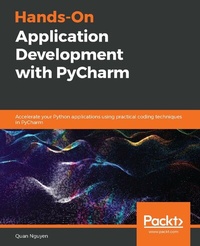
Hands-On Application Development with PyCharm
Accelerate your Python applications using practical coding techniques in PyCharm
1st Edition
Published on 3. June 2024
494 pages
978-1-78934-286-4 (ISBN)
Description

A definitive guide to PyCharm to help you build business-oriented Python applications ranging from modern web development to data scienceKey Features - Learn basic to advanced PyCharm concepts to improve efficiency of your Python projects
- Work through practical examples that focus on efficient application development with PyCharm
- Explore advanced features in PyCharm such as code automation, version control, and GUI debugging
Book DescriptionJetBrain's PyCharm is the most popular Integrated Development Environment (IDE) used by the Python community thanks to its numerous features that facilitate faster, more accurate, and more productive programming practices. However, the abundance of options and customizations can make PyCharm seem quite intimidating. Hands-on Application Development with PyCharm starts with PyCharm's installation and configuration process, and systematically takes you through a number of its powerful features that can greatly improve your productivity. You'll explore code automation, version control, graphical debugging/testing, management of virtual environments, and much more. Finally, you'll delve into specific PyCharm features that support web development and data science, two of the fastest growing applications in Python programming. These include the integration of the Django framework as well as the extensive support for IPython and Jupyter Notebook. By the end of this PyCharm book, you will have gained extensive knowledge of the tool and be able to implement its features and make the most of its support for your projects.What you will learn - Explore PyCharm functionalities and what makes it stand out from other Python IDEs
- Set up, configure, and customize your Python projects in PyCharm
- Understand how PyCharm integrates with Django for web development
- Discover PyCharm s capabilities in database management and data visualization
- Perform code automation, GUI testing, and version control in PyCharm
- Integrate interactive Python tools such as Jupyter Notebooks for building virtual environments
Who this book is forIf you're a beginner or an expert Python user looking to improve your productivity using one of the best Python IDEs, this book is for you. Basic knowledge of Python programming language is expected.
- Work through practical examples that focus on efficient application development with PyCharm
- Explore advanced features in PyCharm such as code automation, version control, and GUI debugging
Book DescriptionJetBrain's PyCharm is the most popular Integrated Development Environment (IDE) used by the Python community thanks to its numerous features that facilitate faster, more accurate, and more productive programming practices. However, the abundance of options and customizations can make PyCharm seem quite intimidating. Hands-on Application Development with PyCharm starts with PyCharm's installation and configuration process, and systematically takes you through a number of its powerful features that can greatly improve your productivity. You'll explore code automation, version control, graphical debugging/testing, management of virtual environments, and much more. Finally, you'll delve into specific PyCharm features that support web development and data science, two of the fastest growing applications in Python programming. These include the integration of the Django framework as well as the extensive support for IPython and Jupyter Notebook. By the end of this PyCharm book, you will have gained extensive knowledge of the tool and be able to implement its features and make the most of its support for your projects.What you will learn - Explore PyCharm functionalities and what makes it stand out from other Python IDEs
- Set up, configure, and customize your Python projects in PyCharm
- Understand how PyCharm integrates with Django for web development
- Discover PyCharm s capabilities in database management and data visualization
- Perform code automation, GUI testing, and version control in PyCharm
- Integrate interactive Python tools such as Jupyter Notebooks for building virtual environments
Who this book is forIf you're a beginner or an expert Python user looking to improve your productivity using one of the best Python IDEs, this book is for you. Basic knowledge of Python programming language is expected.
All prices
More details
Other editions
New editions
Bruce M. Van Horn II | Quan Nguyen Nguyen
Hands-On Application Development with PyCharm
Build applications like a pro with the ultimate python development tool
E-Book
10/2023
2nd Edition
Packt Publishing Limited
from
€29.99
Available for download
Additional editions
Quan Nguyen
Hands-On Application Development with PyCharm
Accelerate your Python applications using practical coding techniques in PyCharm
Book
09/2019
Packt Publishing
€52.70
Shipment within 3-4 weeks
Person
Nguyen Quan :
Quan Nguyen, the author of the first edition of this book, is a Python programmer with a strong passion for machine learning. He holds a dual degree in mathematics and computer science, with a minor in philosophy, earned from DePauw University. Quan is deeply involved in the Python community and has authored multiple Python books, contributing to the Python Software Foundation and regularly sharing insights on DataScience portal. He is currently pursuing a Ph.D. in computer science at Washington University in St. Louis.
Quan Nguyen, the author of the first edition of this book, is a Python programmer with a strong passion for machine learning. He holds a dual degree in mathematics and computer science, with a minor in philosophy, earned from DePauw University. Quan is deeply involved in the Python community and has authored multiple Python books, contributing to the Python Software Foundation and regularly sharing insights on DataScience portal. He is currently pursuing a Ph.D. in computer science at Washington University in St. Louis.
Content
Table of Contents - Introduction to PyCharm - The Most Popular IDE for Python
- Installing and Configuring PyCharm
- Customizing Interpreters and Virtual Environments
- Editing and Formatting with Ease
- Version Control with Git in PyCharm
- Seamless Testing, Debugging, and Profiling
- Web Development with JavaScript, HTML, and CSS
- Integrating Django in PyCharm
- Understanding Database Management with PyCharm
- Building a Web Application in PyCharm
- Turning On Scientific Mode
- Dynamic Data Viewing with SciView and Jupyter
- Building a Data Pipeline in PyCharm
- More Possibilities with PyCharm Plugins
- Future Developments
- Installing and Configuring PyCharm
- Customizing Interpreters and Virtual Environments
- Editing and Formatting with Ease
- Version Control with Git in PyCharm
- Seamless Testing, Debugging, and Profiling
- Web Development with JavaScript, HTML, and CSS
- Integrating Django in PyCharm
- Understanding Database Management with PyCharm
- Building a Web Application in PyCharm
- Turning On Scientific Mode
- Dynamic Data Viewing with SciView and Jupyter
- Building a Data Pipeline in PyCharm
- More Possibilities with PyCharm Plugins
- Future Developments
