

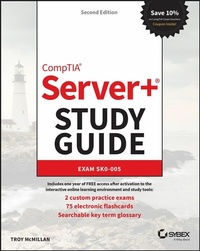
CompTIA Server+ Study Guide
Exam SK0-005
2nd Edition
Published on 2. September 2022
608 pages
978-1-119-89145-1 (ISBN)
Description

Prepare for the Server+ exam--and an exciting new career in tech--with this hands-on guide
In the newly updated Second Edition of the CompTIA Server+ Study Guide: Exam SK0-005, veteran technology educator Troy McMillan delivers a comprehensive, hands-on blueprint for success on the Server+ SK0-005 exam. Learn about essential hardware and software technologies used in on-premise and hybrid server environments and prepare yourself for the exam and real-world, on-the-job challenges.
This Study Guide provides you with a solid understanding of how network and cloud storage systems work by helping you learn how to store, protect, and access the data that's ever more crucial to modern businesses. Find coverage of every objective tested by the exam, including server hardware installation and management, server administration, security and disaster recovery, and troubleshooting. You also learn:
* Expert guidance on acing a certification exam is increasing demand amongst high-paying employers
* Critical performance tips for professionals who want to hit the ground running on their first day on the job
* Complimentary access to the Sybex interactive online learning environment and test bank, complete with hundreds of practice questions and answers, bonus exams, electronic flashcards, and a searchable glossary of key terms
A can't-miss resource for anyone preparing for a new role as a server administrator, data storage specialist, or related IT specialty, the CompTIA Server+ Study Guide: Exam SK0-005, Second Edition, will earn a place in the libraries of anyone looking for an efficient and effective way to prep for this challenging and rewarding technical certification.
In the newly updated Second Edition of the CompTIA Server+ Study Guide: Exam SK0-005, veteran technology educator Troy McMillan delivers a comprehensive, hands-on blueprint for success on the Server+ SK0-005 exam. Learn about essential hardware and software technologies used in on-premise and hybrid server environments and prepare yourself for the exam and real-world, on-the-job challenges.
This Study Guide provides you with a solid understanding of how network and cloud storage systems work by helping you learn how to store, protect, and access the data that's ever more crucial to modern businesses. Find coverage of every objective tested by the exam, including server hardware installation and management, server administration, security and disaster recovery, and troubleshooting. You also learn:
* Expert guidance on acing a certification exam is increasing demand amongst high-paying employers
* Critical performance tips for professionals who want to hit the ground running on their first day on the job
* Complimentary access to the Sybex interactive online learning environment and test bank, complete with hundreds of practice questions and answers, bonus exams, electronic flashcards, and a searchable glossary of key terms
A can't-miss resource for anyone preparing for a new role as a server administrator, data storage specialist, or related IT specialty, the CompTIA Server+ Study Guide: Exam SK0-005, Second Edition, will earn a place in the libraries of anyone looking for an efficient and effective way to prep for this challenging and rewarding technical certification.
More details
Other editions
Additional editions
Book
11/2022
Sybex Inc.,U.S.
€59.00
Shipment within 15-20 days
Previous edition
E-Book
06/2016
Sybex
€38.99
Available for download
Person
ABOUT THE AUTHOR
TROY MCMILLAN has earned over 30 IT certifications, including Server+, A+, and Network+. He is a Product Developer and Technical Editor for CyberVista and helps individuals and organizations train on technology and prepare for certification exams. He specializes in teaching CompTIA, Cisco, Microsoft, and Wireless certifications.
TROY MCMILLAN has earned over 30 IT certifications, including Server+, A+, and Network+. He is a Product Developer and Technical Editor for CyberVista and helps individuals and organizations train on technology and prepare for certification exams. He specializes in teaching CompTIA, Cisco, Microsoft, and Wireless certifications.
Content
- Cover
- Title Page
- Copyright Page
- Contents at a Glance
- Contents
- Table of Exercises
- Introduction
- What Is Server+ Certification?
- Who Should Buy This Book?
- What Does This Book Cover?
- What's Included in the Book
- Interactive Online Learning Environment and Test Bank
- How to Use This Book
- Tips for Taking the Server+ Exam
- The CompTIA Server+ Exam Objectives
- CompTIA SK0-005 Exam
- 1.1 Given a scenario, install physical hardware.
- 1.2 Given a scenario, deploy and manage storage.
- 1.3 Given a scenario, perform server hardware maintenance.
- 2.1 Given a scenario, install server operating systems.
- 2.2 Given a scenario, configure servers to use network infrastructure services.
- 2.3 Given a scenario, configure and maintain server functions and features
- 2.4 Explain the key concepts of high availability for servers.
- 2.5 Summarize the purpose and operation of virtualization.
- 2.6 Summarize scripting basics for server administration.
- 2.7 Explain the importance of asset management and documentation.
- 2.8 Explain licensing concepts.
- 3.1 Summarize data security concepts.
- 3.2 Summarize physical security concepts.
- 3.3 Explain important concepts pertaining to identity and access management for server administration.
- 3.4 Explain data security risks and mitigation strategies.
- 3.5 Given a scenario, apply server hardening methods.
- 3.6 Summarize proper server decommissioning concepts.
- 3.7 Explain the importance of backups and restores.
- 3.8 Explain the importance of disaster recovery.
- 4.1 Explain the troubleshooting theory and methodology.
- 4.2 Given a scenario, troubleshoot common hardware failures.
- 4.3 Given a scenario, troubleshoot storage problems.
- 4.4 Given a scenario, troubleshoot common OS and software problems.
- 4.5 Given a scenario, troubleshoot network connectivity issues.
- 4.6 Given a scenario, troubleshoot security problems.
- Objective Map
- SK0-004 Exam Objectives
- How to Contact the Publisher
- Assessment Test
- Answers to Assessment Test
- Chapter 1 Server Hardware
- Racking
- Enclosure Sizes
- Unit Sizes
- Rack Layout
- Power Cabling
- Voltage
- Redundant Power
- Power Connector Types
- Cable Management
- Network Cabling
- Redundant Networking
- Twisted Pair
- Fiber
- Gigabit
- 10 GigE
- Small Form-Factor Pluggable (SFP)
- SFP+
- Quad Small Form-Factor Pluggable (QSFP)
- Cable Management
- Server Chassis Types
- Server Components
- NICs
- Summary
- Exam Essentials
- Review Questions
- Chapter 2 Installing and Configuring Servers
- Installing Server Operating Systems
- Minimum Operating System (OS) Requirements
- Hardware Compatibility List (HCL)
- Installations
- Partition and Volume Types
- File System Types
- Configuring and Maintaining Server Functions and Features
- Server Roles Requirements
- Data Migration and Transfer
- Administrative Interfaces
- The Purpose and Operation of Virtualization
- Host vs. Guest
- Virtual Networking
- Resource Allocation and Provisioning
- Management Interfaces for Virtual Machines
- Cloud Models
- Summary
- Exam Essentials
- Review Questions
- Chapter 3 Server Maintenance
- Given a Scenario, Perform Server Hardware Maintenance
- Out-of-Band Management
- Local Hardware Administration
- Components
- Drives
- Hot-Swappable Hardware
- Basic Input/Output System (BIOS)/Unified Extensible Firmware Interface (UEFI)
- Explain Licensing Concepts
- Models
- Open Source
- Subscription
- License vs. Maintenance and Support
- Volume Licensing
- License Count Validation
- Version Compatibility
- Summary
- Exam Essentials
- Review Questions
- Chapter 4 Storage Technologies and Asset Management
- Given a Scenario, Deploy and Manage Storage
- RAID Levels and Types
- Capacity Planning
- Hard Drive Media Types
- Interface Types
- Shared Storage
- Explain the Importance of Asset Management and Documentation
- Asset Management
- Documentation Management
- Document Availability
- Secure Storage of Sensitive Documentation
- Summary
- Exam Essentials
- Review Questions
- Chapter 5 Identifying Fault Tolerance Requirements
- Clustering
- Active-Active
- Active-Passive
- Failover/Failback
- Proper Patching Procedures
- Heartbeat
- Fault Tolerance
- Server-Level Redundancy vs. Component Redundancy
- Redundant Server Network Infrastructure
- Load Balancing
- Network Interface Card (NIC) Teaming and Redundancy
- Summary
- Exam Essentials
- Review Questions
- Chapter 6 Securing the Server
- Summarize Physical Security Concepts
- Physical Access Controls
- Environmental Controls
- Explain Data Security Risks and Mitigation Strategies
- Security Risks
- Mitigation Strategies
- Given a Scenario, Apply Server Hardening Methods
- OS Hardening
- Application Hardening
- Host Security
- Hardware Hardening
- Summary
- Exam Essentials
- Review Questions
- Chapter 7 Securing Server Data and Network Access
- Summarize Data Security Concepts
- Encryption Paradigms
- VPN
- IPsec
- Retention Policies
- Data Storage
- UEFI/BIOS Passwords
- Bootloader Passwords
- Business Impact
- Explain Important Concepts Pertaining to Identity and Access Management for Server Administration
- User Accounts
- Permissions and Access Controls
- Auditing
- Multifactor Authentication (MFA)
- Single Sign-on (SSO)
- Summarize Proper Server Decommissioning Concepts
- Proper Removal Procedures
- Media Destruction
- Media Retention Requirements
- Cable Remediation
- Electronics Recycling
- Summary
- Exam Essentials
- Review Questions
- Chapter 8 Networking and Scripting
- Given a Scenario, Configure Servers to Use Network Infrastructure Services
- IP Configuration
- Virtual Local Area Network (VLAN)
- Default Gateways
- Name Resolution
- Addressing Protocols
- Firewall
- Static vs. Dynamic
- MAC Addresses
- Summarize Scripting Basics for Server Administration
- Script Types
- Environment Variables
- Comment Syntax
- Basic Script Constructs
- Basic Data Types
- Common Server Administration Scripting Tasks
- Summary
- Exam Essentials
- Review Questions
- Chapter 9 Disaster Recovery
- Explain the Importance of Backups and Restores
- Backup Methods
- Backup Frequency
- Media Rotation
- Backup Media Types
- File-Level vs. System-State Backup
- Restore Methods
- Backup Validation
- Media Inventory Before Restoration
- Explain the Importance of Disaster Recovery
- Site Types
- Replication
- Testing
- Summary
- Exam Essentials
- Review Questions
- Chapter 10 Troubleshooting Hardware and Software Issues
- Explain the Troubleshooting Theory and Methodology
- Identify the Problem and Determine the Scope
- Establish a Theory of Probable Cause (Question the Obvious)
- Test the Theory to Determine the Cause
- Establish a Plan of Action to Resolve the Problem
- Implement the Solution or Escalate
- Verify Full System Functionality and, if Applicable, Implement Preventive Measures
- Perform a Root Cause Analysis
- Document Findings, Actions, and Outcomes Throughout the Process
- Given a Scenario, Troubleshoot Common Hardware Failures
- Common Problems
- Causes of Common Problems
- Tools and Techniques
- Given a Scenario, Troubleshoot Common OS and Software Problems
- Common Problems
- Causes of Common Problems
- OS and Software Tools and Techniques
- Summary
- Exam Essentials
- Review Questions
- Chapter 11 Troubleshooting Network Connectivity and Security Issues
- Given a Scenario, Troubleshoot Network Connectivity Issues
- Common Problems
- Causes of Common Problems
- Tools and Techniques
- Given a Scenario, Troubleshoot Security Problems
- Common Problems
- Causes of Common Problems
- Security Tools
- Summary
- Exam Essentials
- Review Questions
- Chapter 12 Troubleshooting Storage Issues
- Given a Scenario, Troubleshoot Storage Problems
- Common Problems
- Causes of Common Problems
- Tools and Techniques
- Summary
- Exam Essentials
- Review Questions
- Appendix: Answers to Review Questions
- Chapter 1: Server Hardware
- Chapter 2: Installing and Configuring Servers
- Chapter 3: Server Maintenance
- Chapter 4: Storage Technologies and Asset Management
- Chapter 5: Identifying Fault Tolerance Requirements
- Chapter 6: Securing the Server
- Chapter 7: Securing Server Data and Network Access
- Chapter 8: Networking and Scripting
- Chapter 9: Disaster Recovery
- Chapter 10: Troubleshooting Hardware and Software Issues
- Chapter 11: Troubleshooting Network Connectivity and Security Issues
- Chapter 12: Troubleshooting Storage Issues
- Index
- EULA
