

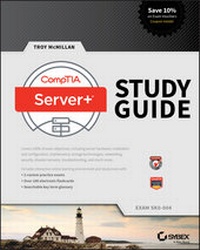
CompTIA Server+ Study Guide
Exam SK0-004
Published on 1. June 2016
552 pages
978-1-119-13784-9 (ISBN)
Description

NOTE: The correct URL to access the Sybex interactive online test bank and study tools is www.wiley.com/go/sybextestprep. The book's back cover, Introduction, and last page in the book provided the wrong URL. We apologize for any confusion and inconvenience this may have caused you.
Comprehensive interactive exam preparation plus expert insight from the field
CompTIA Server+ Study Guide Exam SK0-004 is your ideal study companion for the SK0-004 exam. With 100% coverage of all exam objectives, this guide walks you through system hardware, software, storage, best practices, disaster recovery, and troubleshooting, with additional coverage of relevant topics including virtualization, big data, cloud storage, security, and scalability. Get an 'in the trenches' view of how server and data storage administration works in a real-world IT environment. From the basics through advanced topics, you'll learn how to deliver world-class solutions in today's evolving organizations by getting under the hood of technologies that enable performance, resiliency, availability, recoverability, and simplicity. Gain access to the Sybex interactive online learning environment, which features electronic flashcards, a searchable glossary, test bank, and bonus practice exams to reinforce what you have learned.
Using and understanding in-house storage devices and the cloud has become an urgent skill for any IT professional. This is your comprehensive, expert driven study guide for taking the CompTIA Server+ exam SK0-004
* Study 100% of exam objectives and more
* Understand storage design, implementation, and administration
* Utilize bonus practice exams and study tools
* Gain a real-world perspective of data storage technology
CompTIA Server+ Study Guide Exam SK0-004 is your ticket to exam day confidence.
More details
Other editions
New editions
E-Book
09/2022
2nd Edition
Wiley-Scrivener
€38.99
Available for download
Additional editions
Book
07/2016
Sybex Inc.,U.S.
€65.90
Shipment within 15-20 days
Person
Troy MCMillan writes practice tests, study guides, and online course materials for Kaplan IT Cert Prep. He holds more than 30 industry certifications, delivers certification training classes, appears in training videos, and runs his own consulting and training business.
Content
1 - Cover [Seite 1]
2 - Title Page [Seite 5]
3 - Copyright [Seite 6]
4 - Acknowledgments [Seite 9]
5 - About the Author [Seite 10]
6 - Contents at a Glance [Seite 11]
7 - Contents [Seite 13]
8 - Table of Exercises [Seite 21]
9 - CompTIA [Seite 22]
10 - Introduction [Seite 23]
11 - Assessment Test [Seite 53]
12 - Answers to Assessment Test [Seite 60]
13 - Chapter 1 Server Hardware [Seite 63]
13.1 - Server Form Factors [Seite 65]
13.1.1 - Rack Mount [Seite 65]
13.1.2 - Tower [Seite 68]
13.1.3 - Blade Technology [Seite 69]
13.2 - Installing and Configuring Server Components [Seite 73]
13.2.1 - CPU [Seite 73]
13.2.2 - RAM [Seite 78]
13.2.3 - Bus Types, Bus Channels, and Expansion Slots [Seite 81]
13.2.4 - NICs [Seite 83]
13.2.5 - Hard Drives [Seite 84]
13.2.6 - Riser Cards [Seite 87]
13.2.7 - RAID Controllers [Seite 88]
13.2.8 - BIOS/UEFI [Seite 88]
13.2.9 - Firmware [Seite 90]
13.2.10 - USB Interface/Ports [Seite 90]
13.2.11 - Hot-Swappable Component [Seite 91]
13.3 - Maintaining Power and Cooling Requirements [Seite 91]
13.3.1 - Power [Seite 91]
13.3.2 - Cooling [Seite 96]
13.4 - Summary [Seite 99]
13.5 - Exam Essentials [Seite 99]
13.6 - Review Questions [Seite 101]
14 - Chapter 2 Installing and Configuring Servers [Seite 105]
14.1 - Installing and Configuring Server Operating Systems [Seite 107]
14.1.1 - Determining the Server Role/Purpose [Seite 107]
14.1.2 - Updating Firmware [Seite 108]
14.1.3 - BIOS/UEFI Configuration [Seite 108]
14.1.4 - Disk Preparation [Seite 111]
14.1.5 - Configuring Hostnames [Seite 116]
14.1.6 - Local Account Setup [Seite 117]
14.1.7 - Connecting to the Network [Seite 118]
14.1.8 - Joining a Domain/Directory [Seite 118]
14.1.9 - Addressing Security Concerns [Seite 119]
14.1.10 - Enabling Services [Seite 120]
14.1.11 - Installing Features, Roles, Applications, and Drivers [Seite 122]
14.1.12 - Performance Baseline [Seite 122]
14.1.13 - Unattended/Remote Installations [Seite 125]
14.2 - Using Access and Control Methods to Administer a Server [Seite 128]
14.2.1 - Local Hardware Administration [Seite 128]
14.2.2 - Network-Based Hardware Administration [Seite 131]
14.2.3 - Network-Based Operating System Administration [Seite 133]
14.3 - Purpose and Operation of Virtualization Components [Seite 135]
14.3.1 - Hosts and Guests [Seite 135]
14.3.2 - Management Interface for Virtual Machines [Seite 136]
14.3.3 - Hypervisor [Seite 136]
14.3.4 - Hardware Compatibility List [Seite 139]
14.3.5 - Resource Allocation Between Guest and Host [Seite 140]
14.4 - Summary [Seite 147]
14.5 - Exam Essentials [Seite 147]
14.6 - Review Questions [Seite 149]
15 - Chapter 3 Server Maintenance [Seite 153]
15.1 - Server Roles and Requirements [Seite 155]
15.1.1 - Web Server [Seite 155]
15.1.2 - Application Server [Seite 156]
15.1.3 - Directory Services Server [Seite 157]
15.1.4 - Database Server [Seite 158]
15.1.5 - File Servers [Seite 158]
15.1.6 - Print Server [Seite 159]
15.1.7 - Messaging Server [Seite 160]
15.1.8 - Mail Server [Seite 160]
15.1.9 - Routing and Remote Access Service (RRAS) Server [Seite 160]
15.1.10 - Network Services Server [Seite 161]
15.2 - Proper Server Maintenance Techniques [Seite 162]
15.2.1 - Change Management [Seite 163]
15.2.2 - Patch Management [Seite 163]
15.2.3 - Outages and Service-Level Agreements [Seite 166]
15.2.4 - Performance Monitoring [Seite 167]
15.2.5 - Hardware Maintenance [Seite 170]
15.2.6 - Fault Tolerance and High Availability Techniques [Seite 182]
15.3 - Asset Management and Documentation [Seite 185]
15.3.1 - Asset Management [Seite 185]
15.3.2 - Documentation [Seite 187]
15.3.3 - Secure Storage of Sensitive Documentation [Seite 191]
15.4 - Summary [Seite 192]
15.5 - Exam Essentials [Seite 192]
15.6 - Review Questions [Seite 193]
16 - Chapter 4 Storage Technologies [Seite 197]
16.1 - Hardware and Features of Various Storage Technologies [Seite 198]
16.1.1 - Direct Attached Storage (DAS) [Seite 198]
16.1.2 - Network-Attached Storage (NAS) [Seite 198]
16.1.3 - Storage Area Networks (SANs) [Seite 199]
16.1.4 - Using iSCSI and FCoE [Seite 202]
16.1.5 - JBOD [Seite 204]
16.1.6 - Tape [Seite 204]
16.1.7 - Optical Drive [Seite 206]
16.1.8 - Flash, Compact Flash, and USB Drive [Seite 206]
16.2 - Installing and Deploying Primary Storage Devices [Seite 206]
16.2.1 - Disk Specifications [Seite 206]
16.2.2 - Interfaces [Seite 208]
16.2.3 - Hard Drive vs. SSD [Seite 212]
16.3 - Summary [Seite 214]
16.4 - Exam Essentials [Seite 214]
16.5 - Review Questions [Seite 215]
17 - Chapter 5 Identifying Capacity and Fault Tolerance Requirements [Seite 219]
17.1 - Calculating Appropriate Storage Capacity and Planning for Future Growth [Seite 220]
17.1.1 - Base 10 vs. Base 2 Disk Size Calculation [Seite 220]
17.1.2 - Disk Quotas [Seite 221]
17.1.3 - Compression [Seite 222]
17.1.4 - Capacity Planning Considerations [Seite 222]
17.2 - Configuring RAID [Seite 226]
17.2.1 - RAID Levels and Performance Considerations [Seite 227]
17.2.2 - Software vs. Hardware RAID [Seite 229]
17.2.3 - Configuration Specifications [Seite 231]
17.2.4 - Hot-Swap Support and Ramifications [Seite 233]
17.2.5 - Hot Spare vs. Cold Spare [Seite 233]
17.2.6 - Array Controller [Seite 233]
17.3 - Summary [Seite 235]
17.4 - Exam Essentials [Seite 235]
17.5 - Review Questions [Seite 236]
18 - Chapter 6 Securing the Server [Seite 241]
18.1 - Physical Security Methods and Concepts [Seite 242]
18.1.1 - Multifactor Authentication [Seite 242]
18.1.2 - Security Concepts [Seite 243]
18.2 - Server Hardening Techniques [Seite 249]
18.2.1 - OS Hardening [Seite 249]
18.2.2 - Endpoint Security [Seite 251]
18.2.3 - Remediating Security Issues Based on a Vulnerability Scan [Seite 252]
18.2.4 - Hardware Hardening [Seite 254]
18.3 - Proper Environmental Controls and Techniques [Seite 258]
18.3.1 - Power Concepts and Best Practices [Seite 259]
18.3.2 - Safety [Seite 268]
18.4 - Summary [Seite 277]
18.5 - Exam Essentials [Seite 277]
18.6 - Review Questions [Seite 278]
19 - Chapter 7 Securing Server Data and Network Access [Seite 283]
19.1 - Basic Network Security Systems and Protocols [Seite 284]
19.1.1 - Firewall [Seite 284]
19.1.2 - Network Access Control [Seite 288]
19.1.3 - Router Access List [Seite 290]
19.1.4 - NIDS [Seite 291]
19.1.5 - Authentication Protocols [Seite 291]
19.1.6 - PKI [Seite 292]
19.1.7 - VPN [Seite 294]
19.1.8 - IPsec [Seite 294]
19.1.9 - VLAN [Seite 295]
19.1.10 - Security Zones [Seite 296]
19.2 - Logical Access Control Methods [Seite 297]
19.2.1 - Access Control Lists [Seite 297]
19.2.2 - Permissions [Seite 302]
19.3 - Data Security Methods and Secure Storage Disposal Techniques [Seite 305]
19.3.1 - Storage Encryption [Seite 305]
19.3.2 - Storage Media [Seite 307]
19.4 - Summary [Seite 309]
19.5 - Exam Essentials [Seite 309]
19.6 - Review Questions [Seite 310]
20 - Chapter 8 Networking [Seite 315]
20.1 - Configuring Servers to Use IP Addressing and Network Infrastructure Services [Seite 317]
20.1.1 - IPv4 vs. IPv6 [Seite 317]
20.1.2 - Default Gateway [Seite 318]
20.1.3 - CIDR Notation and Subnetting [Seite 318]
20.1.4 - Public and Private IP Addressing [Seite 319]
20.1.5 - Static IP Assignment vs. DHCP [Seite 320]
20.1.6 - DNS [Seite 321]
20.1.7 - NetBIOS [Seite 327]
20.1.8 - WINS [Seite 327]
20.1.9 - NAT/PAT [Seite 329]
20.1.10 - MAC Addresses [Seite 329]
20.1.11 - Network Interface Card Configuration [Seite 331]
20.2 - Ports and Protocols [Seite 337]
20.2.1 - TCP vs. UDP [Seite 337]
20.2.2 - SNMP 161 [Seite 338]
20.2.3 - SMTP 25 [Seite 338]
20.2.4 - FTP 20/21 [Seite 338]
20.2.5 - SFTP 22 [Seite 338]
20.2.6 - SSH 22 [Seite 338]
20.2.7 - SCP 22 [Seite 338]
20.2.8 - NTP 123 [Seite 339]
20.2.9 - HTTP 80 [Seite 339]
20.2.10 - HTTPS 443 [Seite 339]
20.2.11 - Telnet 23 [Seite 339]
20.2.12 - IMAP 143 [Seite 339]
20.2.13 - POP3 110 [Seite 339]
20.2.14 - RDP 3389 [Seite 339]
20.2.15 - FTPS 989/990 [Seite 340]
20.2.16 - LDAP 389/3268 [Seite 340]
20.2.17 - DNS 53 [Seite 340]
20.2.18 - DHCP 68 [Seite 340]
20.3 - Cable Management Procedures [Seite 340]
20.3.1 - Copper [Seite 340]
20.3.2 - Fiber [Seite 343]
20.3.3 - Connectors [Seite 344]
20.3.4 - Cable Placement and Routing [Seite 347]
20.4 - Summary [Seite 350]
20.5 - Exam Essentials [Seite 351]
20.6 - Review Questions [Seite 352]
21 - Chapter 9 Disaster Recovery [Seite 355]
21.1 - Disaster Recovery Principles [Seite 356]
21.1.1 - Site Types [Seite 356]
21.1.2 - Replication Methods [Seite 357]
21.1.3 - Continuity of Operations [Seite 359]
21.2 - Backup [Seite 360]
21.2.1 - Methodology [Seite 361]
21.2.2 - Backup Media [Seite 366]
21.2.3 - Media and Restore Best Practices [Seite 367]
21.2.4 - Media Storage Location [Seite 369]
21.3 - Summary [Seite 371]
21.4 - Exam Essentials [Seite 371]
21.5 - Review Questions [Seite 372]
22 - Chapter 10 Troubleshooting Hardware and Software Issues [Seite 377]
22.1 - Troubleshooting Theory and Methodologies [Seite 379]
22.1.1 - Identifying the Problem and Determining the Scope [Seite 379]
22.1.2 - Establish a Theory of Probable Cause (Question the Obvious) [Seite 381]
22.1.3 - Test the Theory to Determine Cause [Seite 382]
22.1.4 - Establish a Plan of Action to Resolve the Problem and Notify Impacted Users [Seite 382]
22.1.5 - Implement the Solution or Escalate as Appropriate [Seite 382]
22.1.6 - Verify Full System Functionality and If Applicable Implement Preventative Measures [Seite 383]
22.1.7 - Perform a Root Cause Analysis [Seite 383]
22.1.8 - Document Findings, Actions and Outcomes Throughout the Process [Seite 383]
22.2 - Troubleshooting Hardware Problems [Seite 384]
22.2.1 - Common Problems [Seite 384]
22.2.2 - Causes of Common Problems [Seite 390]
22.2.3 - Environmental Issues [Seite 393]
22.2.4 - Hardware Tools [Seite 395]
22.3 - Troubleshooting Software Problems [Seite 396]
22.3.1 - Common Problems [Seite 396]
22.3.2 - Cause of Common Problems [Seite 405]
22.3.3 - Software Tools [Seite 410]
22.4 - Summary [Seite 422]
22.5 - Exam Essentials [Seite 422]
22.6 - Review Questions [Seite 423]
23 - Chapter 11 Troubleshooting Connectivity Issues [Seite 427]
23.1 - Diagnosing Network Problems [Seite 428]
23.1.1 - Common Problems [Seite 428]
23.1.2 - Causes of Common Problems [Seite 440]
23.1.3 - Networking Tools [Seite 446]
23.2 - Diagnosing Security Issues [Seite 453]
23.2.1 - Common Problems [Seite 453]
23.2.2 - Causes of Common Problems [Seite 455]
23.2.3 - Security Tools [Seite 461]
23.3 - Summary [Seite 466]
23.4 - Exam Essentials [Seite 467]
23.5 - Review Questions [Seite 468]
24 - Chapter 12 Troubleshooting Storage Issues [Seite 473]
24.1 - Troubleshooting Storage Problems [Seite 474]
24.1.1 - Common Problems [Seite 474]
24.1.2 - Causes of Common Problems [Seite 480]
24.1.3 - Storage Tools [Seite 488]
24.2 - Summary [Seite 500]
24.3 - Exam Essentials [Seite 501]
24.4 - Review Questions [Seite 502]
25 - Appendix Answers to Review Questions [Seite 505]
25.1 - Chapter 1: Server Hardware [Seite 506]
25.2 - Chapter 2: Installing and Configuring Servers [Seite 507]
25.3 - Chapter 3: Server Maintenance [Seite 509]
25.4 - Chapter 4: Storage Technologies [Seite 510]
25.5 - Chapter 5: Identifying Capacity and Fault Tolerance Requirements [Seite 512]
25.6 - Chapter 6: Securing the Server [Seite 513]
25.7 - Chapter 7: Securing Server Data and Network Access [Seite 515]
25.8 - Chapter 8: Networking [Seite 517]
25.9 - Chapter 9: Disaster Recovery [Seite 518]
25.10 - Chapter 10: Troubleshooting Hardware and Software Issues [Seite 520]
25.11 - Chapter 11: Troubleshooting Connectivity Issues [Seite 522]
25.12 - Chapter 12: Troubleshooting Storage Issues [Seite 523]
26 - Index [Seite 525]
27 - Advert [Seite 545]
28 - EULA [Seite 546]
2 - Title Page [Seite 5]
3 - Copyright [Seite 6]
4 - Acknowledgments [Seite 9]
5 - About the Author [Seite 10]
6 - Contents at a Glance [Seite 11]
7 - Contents [Seite 13]
8 - Table of Exercises [Seite 21]
9 - CompTIA [Seite 22]
10 - Introduction [Seite 23]
11 - Assessment Test [Seite 53]
12 - Answers to Assessment Test [Seite 60]
13 - Chapter 1 Server Hardware [Seite 63]
13.1 - Server Form Factors [Seite 65]
13.1.1 - Rack Mount [Seite 65]
13.1.2 - Tower [Seite 68]
13.1.3 - Blade Technology [Seite 69]
13.2 - Installing and Configuring Server Components [Seite 73]
13.2.1 - CPU [Seite 73]
13.2.2 - RAM [Seite 78]
13.2.3 - Bus Types, Bus Channels, and Expansion Slots [Seite 81]
13.2.4 - NICs [Seite 83]
13.2.5 - Hard Drives [Seite 84]
13.2.6 - Riser Cards [Seite 87]
13.2.7 - RAID Controllers [Seite 88]
13.2.8 - BIOS/UEFI [Seite 88]
13.2.9 - Firmware [Seite 90]
13.2.10 - USB Interface/Ports [Seite 90]
13.2.11 - Hot-Swappable Component [Seite 91]
13.3 - Maintaining Power and Cooling Requirements [Seite 91]
13.3.1 - Power [Seite 91]
13.3.2 - Cooling [Seite 96]
13.4 - Summary [Seite 99]
13.5 - Exam Essentials [Seite 99]
13.6 - Review Questions [Seite 101]
14 - Chapter 2 Installing and Configuring Servers [Seite 105]
14.1 - Installing and Configuring Server Operating Systems [Seite 107]
14.1.1 - Determining the Server Role/Purpose [Seite 107]
14.1.2 - Updating Firmware [Seite 108]
14.1.3 - BIOS/UEFI Configuration [Seite 108]
14.1.4 - Disk Preparation [Seite 111]
14.1.5 - Configuring Hostnames [Seite 116]
14.1.6 - Local Account Setup [Seite 117]
14.1.7 - Connecting to the Network [Seite 118]
14.1.8 - Joining a Domain/Directory [Seite 118]
14.1.9 - Addressing Security Concerns [Seite 119]
14.1.10 - Enabling Services [Seite 120]
14.1.11 - Installing Features, Roles, Applications, and Drivers [Seite 122]
14.1.12 - Performance Baseline [Seite 122]
14.1.13 - Unattended/Remote Installations [Seite 125]
14.2 - Using Access and Control Methods to Administer a Server [Seite 128]
14.2.1 - Local Hardware Administration [Seite 128]
14.2.2 - Network-Based Hardware Administration [Seite 131]
14.2.3 - Network-Based Operating System Administration [Seite 133]
14.3 - Purpose and Operation of Virtualization Components [Seite 135]
14.3.1 - Hosts and Guests [Seite 135]
14.3.2 - Management Interface for Virtual Machines [Seite 136]
14.3.3 - Hypervisor [Seite 136]
14.3.4 - Hardware Compatibility List [Seite 139]
14.3.5 - Resource Allocation Between Guest and Host [Seite 140]
14.4 - Summary [Seite 147]
14.5 - Exam Essentials [Seite 147]
14.6 - Review Questions [Seite 149]
15 - Chapter 3 Server Maintenance [Seite 153]
15.1 - Server Roles and Requirements [Seite 155]
15.1.1 - Web Server [Seite 155]
15.1.2 - Application Server [Seite 156]
15.1.3 - Directory Services Server [Seite 157]
15.1.4 - Database Server [Seite 158]
15.1.5 - File Servers [Seite 158]
15.1.6 - Print Server [Seite 159]
15.1.7 - Messaging Server [Seite 160]
15.1.8 - Mail Server [Seite 160]
15.1.9 - Routing and Remote Access Service (RRAS) Server [Seite 160]
15.1.10 - Network Services Server [Seite 161]
15.2 - Proper Server Maintenance Techniques [Seite 162]
15.2.1 - Change Management [Seite 163]
15.2.2 - Patch Management [Seite 163]
15.2.3 - Outages and Service-Level Agreements [Seite 166]
15.2.4 - Performance Monitoring [Seite 167]
15.2.5 - Hardware Maintenance [Seite 170]
15.2.6 - Fault Tolerance and High Availability Techniques [Seite 182]
15.3 - Asset Management and Documentation [Seite 185]
15.3.1 - Asset Management [Seite 185]
15.3.2 - Documentation [Seite 187]
15.3.3 - Secure Storage of Sensitive Documentation [Seite 191]
15.4 - Summary [Seite 192]
15.5 - Exam Essentials [Seite 192]
15.6 - Review Questions [Seite 193]
16 - Chapter 4 Storage Technologies [Seite 197]
16.1 - Hardware and Features of Various Storage Technologies [Seite 198]
16.1.1 - Direct Attached Storage (DAS) [Seite 198]
16.1.2 - Network-Attached Storage (NAS) [Seite 198]
16.1.3 - Storage Area Networks (SANs) [Seite 199]
16.1.4 - Using iSCSI and FCoE [Seite 202]
16.1.5 - JBOD [Seite 204]
16.1.6 - Tape [Seite 204]
16.1.7 - Optical Drive [Seite 206]
16.1.8 - Flash, Compact Flash, and USB Drive [Seite 206]
16.2 - Installing and Deploying Primary Storage Devices [Seite 206]
16.2.1 - Disk Specifications [Seite 206]
16.2.2 - Interfaces [Seite 208]
16.2.3 - Hard Drive vs. SSD [Seite 212]
16.3 - Summary [Seite 214]
16.4 - Exam Essentials [Seite 214]
16.5 - Review Questions [Seite 215]
17 - Chapter 5 Identifying Capacity and Fault Tolerance Requirements [Seite 219]
17.1 - Calculating Appropriate Storage Capacity and Planning for Future Growth [Seite 220]
17.1.1 - Base 10 vs. Base 2 Disk Size Calculation [Seite 220]
17.1.2 - Disk Quotas [Seite 221]
17.1.3 - Compression [Seite 222]
17.1.4 - Capacity Planning Considerations [Seite 222]
17.2 - Configuring RAID [Seite 226]
17.2.1 - RAID Levels and Performance Considerations [Seite 227]
17.2.2 - Software vs. Hardware RAID [Seite 229]
17.2.3 - Configuration Specifications [Seite 231]
17.2.4 - Hot-Swap Support and Ramifications [Seite 233]
17.2.5 - Hot Spare vs. Cold Spare [Seite 233]
17.2.6 - Array Controller [Seite 233]
17.3 - Summary [Seite 235]
17.4 - Exam Essentials [Seite 235]
17.5 - Review Questions [Seite 236]
18 - Chapter 6 Securing the Server [Seite 241]
18.1 - Physical Security Methods and Concepts [Seite 242]
18.1.1 - Multifactor Authentication [Seite 242]
18.1.2 - Security Concepts [Seite 243]
18.2 - Server Hardening Techniques [Seite 249]
18.2.1 - OS Hardening [Seite 249]
18.2.2 - Endpoint Security [Seite 251]
18.2.3 - Remediating Security Issues Based on a Vulnerability Scan [Seite 252]
18.2.4 - Hardware Hardening [Seite 254]
18.3 - Proper Environmental Controls and Techniques [Seite 258]
18.3.1 - Power Concepts and Best Practices [Seite 259]
18.3.2 - Safety [Seite 268]
18.4 - Summary [Seite 277]
18.5 - Exam Essentials [Seite 277]
18.6 - Review Questions [Seite 278]
19 - Chapter 7 Securing Server Data and Network Access [Seite 283]
19.1 - Basic Network Security Systems and Protocols [Seite 284]
19.1.1 - Firewall [Seite 284]
19.1.2 - Network Access Control [Seite 288]
19.1.3 - Router Access List [Seite 290]
19.1.4 - NIDS [Seite 291]
19.1.5 - Authentication Protocols [Seite 291]
19.1.6 - PKI [Seite 292]
19.1.7 - VPN [Seite 294]
19.1.8 - IPsec [Seite 294]
19.1.9 - VLAN [Seite 295]
19.1.10 - Security Zones [Seite 296]
19.2 - Logical Access Control Methods [Seite 297]
19.2.1 - Access Control Lists [Seite 297]
19.2.2 - Permissions [Seite 302]
19.3 - Data Security Methods and Secure Storage Disposal Techniques [Seite 305]
19.3.1 - Storage Encryption [Seite 305]
19.3.2 - Storage Media [Seite 307]
19.4 - Summary [Seite 309]
19.5 - Exam Essentials [Seite 309]
19.6 - Review Questions [Seite 310]
20 - Chapter 8 Networking [Seite 315]
20.1 - Configuring Servers to Use IP Addressing and Network Infrastructure Services [Seite 317]
20.1.1 - IPv4 vs. IPv6 [Seite 317]
20.1.2 - Default Gateway [Seite 318]
20.1.3 - CIDR Notation and Subnetting [Seite 318]
20.1.4 - Public and Private IP Addressing [Seite 319]
20.1.5 - Static IP Assignment vs. DHCP [Seite 320]
20.1.6 - DNS [Seite 321]
20.1.7 - NetBIOS [Seite 327]
20.1.8 - WINS [Seite 327]
20.1.9 - NAT/PAT [Seite 329]
20.1.10 - MAC Addresses [Seite 329]
20.1.11 - Network Interface Card Configuration [Seite 331]
20.2 - Ports and Protocols [Seite 337]
20.2.1 - TCP vs. UDP [Seite 337]
20.2.2 - SNMP 161 [Seite 338]
20.2.3 - SMTP 25 [Seite 338]
20.2.4 - FTP 20/21 [Seite 338]
20.2.5 - SFTP 22 [Seite 338]
20.2.6 - SSH 22 [Seite 338]
20.2.7 - SCP 22 [Seite 338]
20.2.8 - NTP 123 [Seite 339]
20.2.9 - HTTP 80 [Seite 339]
20.2.10 - HTTPS 443 [Seite 339]
20.2.11 - Telnet 23 [Seite 339]
20.2.12 - IMAP 143 [Seite 339]
20.2.13 - POP3 110 [Seite 339]
20.2.14 - RDP 3389 [Seite 339]
20.2.15 - FTPS 989/990 [Seite 340]
20.2.16 - LDAP 389/3268 [Seite 340]
20.2.17 - DNS 53 [Seite 340]
20.2.18 - DHCP 68 [Seite 340]
20.3 - Cable Management Procedures [Seite 340]
20.3.1 - Copper [Seite 340]
20.3.2 - Fiber [Seite 343]
20.3.3 - Connectors [Seite 344]
20.3.4 - Cable Placement and Routing [Seite 347]
20.4 - Summary [Seite 350]
20.5 - Exam Essentials [Seite 351]
20.6 - Review Questions [Seite 352]
21 - Chapter 9 Disaster Recovery [Seite 355]
21.1 - Disaster Recovery Principles [Seite 356]
21.1.1 - Site Types [Seite 356]
21.1.2 - Replication Methods [Seite 357]
21.1.3 - Continuity of Operations [Seite 359]
21.2 - Backup [Seite 360]
21.2.1 - Methodology [Seite 361]
21.2.2 - Backup Media [Seite 366]
21.2.3 - Media and Restore Best Practices [Seite 367]
21.2.4 - Media Storage Location [Seite 369]
21.3 - Summary [Seite 371]
21.4 - Exam Essentials [Seite 371]
21.5 - Review Questions [Seite 372]
22 - Chapter 10 Troubleshooting Hardware and Software Issues [Seite 377]
22.1 - Troubleshooting Theory and Methodologies [Seite 379]
22.1.1 - Identifying the Problem and Determining the Scope [Seite 379]
22.1.2 - Establish a Theory of Probable Cause (Question the Obvious) [Seite 381]
22.1.3 - Test the Theory to Determine Cause [Seite 382]
22.1.4 - Establish a Plan of Action to Resolve the Problem and Notify Impacted Users [Seite 382]
22.1.5 - Implement the Solution or Escalate as Appropriate [Seite 382]
22.1.6 - Verify Full System Functionality and If Applicable Implement Preventative Measures [Seite 383]
22.1.7 - Perform a Root Cause Analysis [Seite 383]
22.1.8 - Document Findings, Actions and Outcomes Throughout the Process [Seite 383]
22.2 - Troubleshooting Hardware Problems [Seite 384]
22.2.1 - Common Problems [Seite 384]
22.2.2 - Causes of Common Problems [Seite 390]
22.2.3 - Environmental Issues [Seite 393]
22.2.4 - Hardware Tools [Seite 395]
22.3 - Troubleshooting Software Problems [Seite 396]
22.3.1 - Common Problems [Seite 396]
22.3.2 - Cause of Common Problems [Seite 405]
22.3.3 - Software Tools [Seite 410]
22.4 - Summary [Seite 422]
22.5 - Exam Essentials [Seite 422]
22.6 - Review Questions [Seite 423]
23 - Chapter 11 Troubleshooting Connectivity Issues [Seite 427]
23.1 - Diagnosing Network Problems [Seite 428]
23.1.1 - Common Problems [Seite 428]
23.1.2 - Causes of Common Problems [Seite 440]
23.1.3 - Networking Tools [Seite 446]
23.2 - Diagnosing Security Issues [Seite 453]
23.2.1 - Common Problems [Seite 453]
23.2.2 - Causes of Common Problems [Seite 455]
23.2.3 - Security Tools [Seite 461]
23.3 - Summary [Seite 466]
23.4 - Exam Essentials [Seite 467]
23.5 - Review Questions [Seite 468]
24 - Chapter 12 Troubleshooting Storage Issues [Seite 473]
24.1 - Troubleshooting Storage Problems [Seite 474]
24.1.1 - Common Problems [Seite 474]
24.1.2 - Causes of Common Problems [Seite 480]
24.1.3 - Storage Tools [Seite 488]
24.2 - Summary [Seite 500]
24.3 - Exam Essentials [Seite 501]
24.4 - Review Questions [Seite 502]
25 - Appendix Answers to Review Questions [Seite 505]
25.1 - Chapter 1: Server Hardware [Seite 506]
25.2 - Chapter 2: Installing and Configuring Servers [Seite 507]
25.3 - Chapter 3: Server Maintenance [Seite 509]
25.4 - Chapter 4: Storage Technologies [Seite 510]
25.5 - Chapter 5: Identifying Capacity and Fault Tolerance Requirements [Seite 512]
25.6 - Chapter 6: Securing the Server [Seite 513]
25.7 - Chapter 7: Securing Server Data and Network Access [Seite 515]
25.8 - Chapter 8: Networking [Seite 517]
25.9 - Chapter 9: Disaster Recovery [Seite 518]
25.10 - Chapter 10: Troubleshooting Hardware and Software Issues [Seite 520]
25.11 - Chapter 11: Troubleshooting Connectivity Issues [Seite 522]
25.12 - Chapter 12: Troubleshooting Storage Issues [Seite 523]
26 - Index [Seite 525]
27 - Advert [Seite 545]
28 - EULA [Seite 546]
