

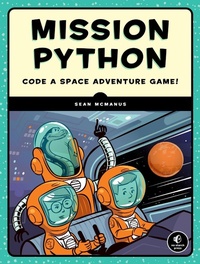
Mission Python
Code a Space Adventure Game!
Published on 16. October 2018
280 pages
978-1-59327-858-8 (ISBN)
Description

Program a graphical adventure game in this hands-on, beginner-friendly introduction to coding in the Python language.
Launch into coding with Mission Python, a space-themed guide to building a complete computer game in Python. You'll learn programming fundamentals like loops, strings, and lists as you build Escape!, an exciting game with a map to explore, items to collect, and tricky logic puzzles to solve. As you work through the book, you'll build exercises and mini-projects, like making a spacewalk simulator and creating an astronaut's safety checklist that will put your new Python skills to the test. You'll learn how to use Pygame Zero, a free resource that lets you add graphics and sound effects to your creations, and you'll get useful game-making tips, such as how to design fun puzzles and intriguing maps. Before you know it, you'll have a working, awesome game to stump your friends with (and some nifty coding skills, too!). You can follow this book using a Raspberry Pi or a Microsoft Windows PC, and the 3D graphics and sound effects you need are provided as a download.
Launch into coding with Mission Python, a space-themed guide to building a complete computer game in Python. You'll learn programming fundamentals like loops, strings, and lists as you build Escape!, an exciting game with a map to explore, items to collect, and tricky logic puzzles to solve. As you work through the book, you'll build exercises and mini-projects, like making a spacewalk simulator and creating an astronaut's safety checklist that will put your new Python skills to the test. You'll learn how to use Pygame Zero, a free resource that lets you add graphics and sound effects to your creations, and you'll get useful game-making tips, such as how to design fun puzzles and intriguing maps. Before you know it, you'll have a working, awesome game to stump your friends with (and some nifty coding skills, too!). You can follow this book using a Raspberry Pi or a Microsoft Windows PC, and the 3D graphics and sound effects you need are provided as a download.
More details
Other editions
Additional editions
Book
10/2018
No Starch Press
€36.50
Shipment within 3-4 weeks
Person
Sean McManus is an experienced computer book author, with extensive experience in writing coding books for children. His children's titles include Cool Scratch Projects in Easy Steps, Scratch Programming in Easy Steps, and Super Skills: How To Code in 10 Easy Lessons. He co-wrote Raspberry Pi For Dummies with Mike Cook. Sean has been a Code Club volunteer, helping junior school children to learn programming in weekly sessions.
Content
- Intro
- Title Page
- Copyright Page
- Dedication
- ABOUT THE AUTHOR
- ABOUT THE TECHNICAL REVIEWER
- BRIEF CONTENTS
- CONTENTS IN DETAIL
- ACKNOWLEDGMENTS
- INTRODUCTION
- How to Use This Book
- What's in This Book?
- Installing the Software
- Downloading the Game Files
- Running the Game
- Playing the Game
- 1 YOUR FIRST SPACEWALK
- Starting the Python Editor
- Introducing the Python Shell
- Introducing Script Mode
- Creating the Starfield
- Stopping Your Pygame Zero Program
- Adding the Planet and Spaceship
- Are You Fit to Fly?
- 2 LISTS CAN SAVE YOUR LIFE
- Making Your First List: The Take-Off Checklist
- Using Index Numbers
- Creating the Spacewalk Checklist
- A List of Lists: The Flight Manual
- Combining Lists
- Making Maps from Lists: The Emergency Room
- Are You Fit to Fly?
- 3 REPEAT AFTER ME
- Displaying Maps with Loops
- Loop the Loop
- Displaying a 3D Room Image
- Understanding How the Room Is Drawn
- Working Out Where to Draw Each Item
- Are You Fit to Fly?
- 4 CREATING THE SPACE STATION
- Automating the Map Making Process
- How the Automatic Map Maker Works
- Creating the Map Data
- Writing the GAME_MAP Code
- Testing and Debugging the Code
- Generating Rooms from the Data
- Exploring the Space Station in 3D
- Making Your Own Maps
- Are You Fit to Fly?
- 5 PREPARING THE SPACE STATION EQUIPMENT
- Creating a Simple Planets Dictionary
- Making the Space Station Objects Dictionary
- Are You Fit to Fly?
- 6 INSTALLING THE SPACE STATION EQUIPMENT
- Understanding the Dictionary for the Scenery Data
- Adding the Scenery Data
- Adding the Perimeter Fence for the Planet Surface
- Loading the Scenery into Each Room
- Updating the Explorer to Tour the Space Station
- Are You Fit to Fly?
- 7 MOVING INTO THE SPACE STATION
- Arriving on the Space Station
- Adding the Movement Code
- Understanding the Movement Code
- Moving Between Rooms
- Are You Fit to Fly?
- 8 REPAIRING THE SPACE STATION
- Sending Information to a Function
- Adding Variables for Shadows, Wall Transparency, and Colors
- Deleting the EXPLORER Section
- Adding the DISPLAY Section
- Positioning the Room on Your Screen
- Making the Front Wall Fade In and Out
- Displaying Hints, Tips, and Warnings
- Showing the Room Name When You Enter the Room
- Are You Fit to Fly?
- 9 UNPACKING YOUR PERSONAL ITEMS
- Adding the Props Information
- Adding Props to the Room Map
- Finding an Object Number from the Room Map
- Picking Up Objects
- Adding the Inventory Functionality
- Dropping Objects
- Examining Objects
- Are You Fit to Fly?
- 10 MAKE YOURSELF USEFUL
- Adding the Keyboard Control for Using Objects
- Adding Standard Messages for Using Objects
- Adding the Game Progress Variables
- Adding the Actions for Specific Objects
- Combining Objects
- Adding the Game Completion Sequence
- Exploring the Objects
- Are You Fit to Fly?
- 11 ACTIVATING SAFETY DOORS
- Planning Where to Put Safety Doors
- Positioning the Doors
- Adding Access Controls
- Making the Doors Open and Close
- Adding the Door Animation
- Shutting the Timed Door
- Adding a Teleporter
- Activating the Airlock Security Door
- Removing Exits for Your Own Game Designs
- Mission Accomplished?
- Are You Fit to Fly?
- 12 DANGER! DANGER! ADDING HAZARDS
- Adding the Air Countdown
- Adding the Moving Hazards
- Adding the Toxic Spills
- Making the Finishing Touches
- Your Next Mission: Customizing the Game
- Are You Fit to Fly?
- A ESCAPE: THE COMPLETE GAME LISTING
- B TABLE OF VARIABLES, LISTS, AND DICTIONARIES
- C DEBUGGING YOUR LISTINGS
- Indentation
- Case Sensitivity
- Parentheses and Brackets
- Colons
- Commas
- Images and Sounds
- Spelling
- INDEX
