

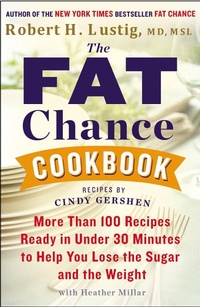
The Fat Chance Cookbook
More Than 100 Recipes Ready in Under 30 Minutes to Help You Lose the Sugar and the Weight
Published on 31. December 2013
352 pages
978-0-698-15363-9 (ISBN)
Description

The companion cookbook to the New York Times bestseller Fat Chance
Fat Chance became an instant New York Times bestseller. Robert Lustig's message that the increased sugar in our diets has led to the pandemic of chronic disease over the last thirty years captured our national attention.
Now, in The Fat Chance Cookbook, Lustig helps us put this information into action for ourselves. With more than 100 recipes as well as meal plans, nutritional analyses, shopping lists, and food swaps, he shows us easy ways to drastically reduce sugar and increase fiber to lose weight and regain health - both for ourselves and for our families. Lustig also shows us how to navigate the grocery store with handy lists for stocking the pantry as well as how to read a food label in order to find hidden sugars and evaluate fiber content.
Accessible, affordable, and geared toward lasting results, The Fat Chance Cookbook will be a fun and easy roadmap to better health for the whole family.
Fat Chance became an instant New York Times bestseller. Robert Lustig's message that the increased sugar in our diets has led to the pandemic of chronic disease over the last thirty years captured our national attention.
Now, in The Fat Chance Cookbook, Lustig helps us put this information into action for ourselves. With more than 100 recipes as well as meal plans, nutritional analyses, shopping lists, and food swaps, he shows us easy ways to drastically reduce sugar and increase fiber to lose weight and regain health - both for ourselves and for our families. Lustig also shows us how to navigate the grocery store with handy lists for stocking the pantry as well as how to read a food label in order to find hidden sugars and evaluate fiber content.
Accessible, affordable, and geared toward lasting results, The Fat Chance Cookbook will be a fun and easy roadmap to better health for the whole family.
More details
Other editions
Additional editions
Robert H. Lustig
The Fat Chance Cookbook
More Than 100 Recipes Ready in Under 30 Minutes to Help You Lose the Sugar and the Weight
Book
12/2014
Avery Publishing Group Inc.,U.S.
€19.00
Shipment within 15-20 days
Robert H. Lustig | Cindy Gershen | Heather Millar
The Fat Chance Cookbook
More Than 100 Recipes Ready in Under 30 Minutes to Help You Lose the Sugar and the Weight
Book
12/2013
Hudson Street Press
€44.80
Article exhausted; check different version
Person
Robert H. Lustig, M.D., M.S.L., is an internationally renowned pediatric endocrinologist. He lives in San Francisco.
