

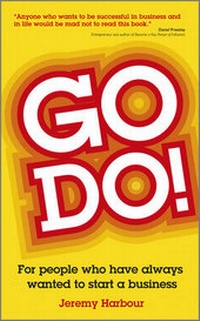
Go Do!
For People Who Have Always Wanted to Start a Business
Published on 22. March 2012
256 pages
978-0-85708-316-6 (ISBN)
Description

A refreshingly simple, easy-to-read guide to getting started inbusiness
If you've ever dreamed of starting your own business, this bookwill give you the information, inspiration, and reassurance youneed to get started. It encourages budding entrepreneurs to takethe leap into the dark, while shining a bright light on the firstsix months of a successful start-up. It breaks down what appears tobe an Everest-size challenge into a series of small hills for youto conquer. Written by successful entrepreneur Jeremy Harbour,Go Do! argues that the skills and tactics of successfulentrepreneurship can't be learnt except by doing. So this bookoffers the guidance and the confidence you need to just go doit.
If you've ever dreamed of starting your own business, this bookwill give you the information, inspiration, and reassurance youneed to get started. It encourages budding entrepreneurs to takethe leap into the dark, while shining a bright light on the firstsix months of a successful start-up. It breaks down what appears tobe an Everest-size challenge into a series of small hills for youto conquer. Written by successful entrepreneur Jeremy Harbour,Go Do! argues that the skills and tactics of successfulentrepreneurship can't be learnt except by doing. So this bookoffers the guidance and the confidence you need to just go doit.
More details
Other editions
Additional editions
Book
03/2012
Capstone Publishing Ltd
€16.90
Article exhausted; check different version
Person
Jeremy Harbour has spent 20 years starting-up, buying and selling SME companies in the UK. He was the runner up Coutts Entrepreneur of the Year 3 times, has written for Men's Health and appeared on the Money Channel. He has mentored for the Prince's Trust and been featured in the Telegraph, Sunday Times and Financial Times. He founded the Harbour Club in 2009 to provide training in acquiring and selling businesses.
Content
Acknowledgements vii
Introduction 1
1. Go Me! 9
2. Risk 29
3. Go You! 41
4. The Worst Five Excuses 57
5. The Invention Myth 83
6. Taking Responsibility 97
7. The Four Stages of Enterprise 107
8. Planning 119
9. Marketing 137
10. A Compelling Offer 157
11. Go Do! 171
About the Author 199
What People Have Been Saying About The Harbour Club Light 201
Index 203
Introduction 1
1. Go Me! 9
2. Risk 29
3. Go You! 41
4. The Worst Five Excuses 57
5. The Invention Myth 83
6. Taking Responsibility 97
7. The Four Stages of Enterprise 107
8. Planning 119
9. Marketing 137
10. A Compelling Offer 157
11. Go Do! 171
About the Author 199
What People Have Been Saying About The Harbour Club Light 201
Index 203
