

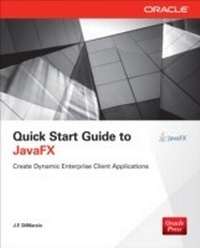
Quick Start Guide to JavaFX
1st Edition
Published on 11. March 2014
273 pages
978-0-07-180897-2 (ISBN)
Description

Get started with JavaFX Develop and deploy interactive client applications in no time with help from this practical tutorial from Oracle Press. With a focus on working in NetBeans IDE, Quick Start Guide to JavaFX explains how to use JavaFX layouts, draw shapes, use coloring and gradient tools, load images, apply effects and transformations, include animation, and embed media. You'll also get details on using JavaFX events, subclassing existing nodes, creating custom nodes, working with WebView, and styling your applications with CSS. Designed for easy learning, the book features: Key Skills & Concepts -- Chapter-opening lists of specific skills covered in the chapter Ask the Expert -- Q&A sections filled with bonus information and helpful tips Try This -- Hands-on exercises that show you how to apply your skills Notes -- Extra information related to the topic being covered Tips -- Helpful reminders or alternate ways of doing things Cautions -- Errors and pitfalls to avoid Annotated Syntax -- Example code with commentary that describes the programming techniques being illustrated Self-tests -- Chapter-ending quizzes to reinforce your skills
More details
Other editions
Additional editions
J.F. DiMarzio
Quick Start Guide to JavaFX
Book
04/2014
Osborne/McGraw-Hill
€41.50
Article not available at the moment
Content
- Cover
- About the Author
- About the Technical Editor
- Title Page
- Copyright Page
- Contents at a Glance
- Contents
- Introduction
- Why This Book?
- Chapter 1: Introduction to JavaFX
- What Is JavaFX?
- What Is Needed for JavaFX Development?
- Required Skills and Knowledge
- Required Software
- Required Hardware
- Downloading and Installing the Required Software
- NetBeans
- Try This: Configure Your NetBeans
- Chapter 1 Self Test
- Chapter 2: Setting the Scene
- Creating a New JavaFX Project
- The (Not-so) Empty JavaFX Project
- Examining the Project Files
- Exploring the Project in NetBeans
- Working with the JavaFXForBeginners.java File
- The Comments
- The package Statement
- Your First Stage
- The Application Entry Point
- The Sample.fxml File
- Compiling Your JavaFX Application
- Chapter 2 Self Test
- Chapter 3: Hello World
- What Is MVC?
- Using JavaFX Scene Builder
- Working with Containers
- Working with Controls
- Creating Your Own Hello World Application
- Using JavaFX Binding
- An Introduction to Methods and Properties
- Java Methods
- JavaFX Properties
- Building Your Property and Method(s)
- Binding to the helloMessage Property
- Chapter 3 Self Test
- Chapter 4: Using JavaFX Layouts
- The HBox
- The VBox
- Nested Layouts
- Try This: Using Other Layouts
- Chapter 4 Self Test
- Chapter 5: Creating Shapes
- JavaFX Scene Graph
- Drawing Shapes
- Before You Begin
- Lines
- Rectangles
- Polygons
- Arcs
- Circles and Ellipses
- Try This: Create Multiple Shapes
- Chapter 5 Self Test
- Chapter 6: Using Colors and Gradients
- Using Color
- Predefined Colors
- Mixing Colors
- Color.rgb
- Color.hsb
- Color.web
- The alpha Attribute
- Using Gradients
- LinearGradients
- RadialGradients
- Try This: Create a Custom Gradient
- Chapter 6 Self Test
- Chapter 7: Using Images
- The ImageView Node
- The Image Class
- Try This: Working with Different Image Types
- The Canvas
- Chapter 7 Self Test
- Chapter 8: Applying Effects and Transformations
- Effects
- Bloom
- ColorAdjust
- GaussianBlur
- Glow
- DropShadow
- Lighting
- Distant
- PointLight
- Spot
- SepiaTone
- Transformations
- XY Transformations
- Rotation
- PerspectiveTransform
- Try This: Combining Multiple Effects
- Chapter 8 Self Test
- Chapter 9: Basic Animation
- Timelines
- Animating Along a Path
- Try This: Create a Path Animation
- Chapter 9 Self Test
- Chapter 10: Using Events
- What Are Events?
- Mouse Events
- Key Events
- Chapter 10 Self Test
- Chapter 11: Custom Nodes and Subclassing
- Subclassing Node
- Creating a RoundButton
- Try This: Create Your Own Shapes
- Chapter 11 Self Test
- Chapter 12: Working with WebView
- Rendering HTML
- Communicating Between JavaScript and JavaFX
- Chapter 12 Self Test
- Chapter 13: Style Your JavaFX with CSS
- Adding a Style Sheet to Your Packages
- Creating a Style
- Using Your Styles
- Creating Independent Style Classes
- Try This: Experimenting with Styles
- Chapter 13 Self Test
- Chapter 14: Embedded Media
- Playing Video
- Creating a Play/Pause Button
- Creating a Progress Indicator
- Chapter 14 Self Test
- Appendix A: Packaging and Deploying JavaFX
- JavaFX Packager Tool
- Self-Contained Application Packages
- Web Start
- Appendix B: The Swing of Things
- JavaFX Swing Compatibility
- Putting JavaFX in Swing Apps
- Appendix C: Answers to Self Tests
- Chapter 1
- Chapter 2
- Chapter 3
- Chapter 4
- Chapter 5
- Chapter 6
- Chapter 7
- Chapter 8
- Chapter 9
- Chapter 10
- Chapter 11
- Chapter 12
- Chapter 13
- Chapter 14
- Index
