

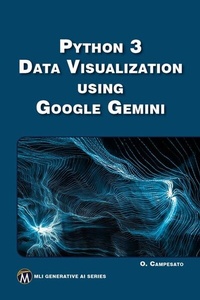
Python 3 Data Visualization Using Google Gemini
1st Edition
Published on 27. March 2024
184 pages
978-1-5015-1979-6 (ISBN)
Description

This book offers a comprehensive guide to leveraging Python-based data visualization techniques with the innovative capabilities of Google Gemini. Tailored for individuals proficient in Python seeking to enhancetheir visualization skills, it explores essential libraries like Pandas, Matplotlib, and Seaborn, along with insights into the innovative Gemini platform. With a focus on practicality and efficiency, it delivers a rapid yet thorough exploration of data visualization methodologies, supported by Gemini-generated code samples. Companion files with source code and figures are available for downloading.
FEATURES:
- Covers Python-based data visualization libraries and techniques
- Includes practical examples and Gemini-generated code samples for efficient learning
- Integrates Google Gemini for advanced data visualization capabilities
- Sets up a conducive development environment for a seamless coding experience
- Includes companion files for downloading with source code and figures
All prices
More details
Series
Language
English
Place of publication
New York
United States
Target group
Professional and scholarly
US School Grade: College Graduate Student
File size
11,31 MB
ISBN-13
978-1-5015-1979-6 (9781501519796)
Copyright in bibliographic data and cover images is held by Nielsen Book Services Limited or by the publishers or by their respective licensors: all rights reserved.
Schweitzer Classification
Other editions
Additional editions
Oswald Campesato
Python 3 Data Visualization Using Google Gemini
E-Book
04/2024
1st Edition
Mercury Learning and Information
from
€46.95
Available for download
Oswald Campesato
Python 3 Data Visualization Using Google Gemini
Book
04/2024
1st Edition
De Gruyter
€44.95
Article not available at the moment
Content
- Cover
- Title Page
- Copyright Page
- Dedication
- Contents
- Preface
- Chapter 1: Introduction to Python
- Tools for Python
- easy_install and pip
- virtualenv
- IPython
- Python Installation
- Setting the PATH Environment Variable (Windows Only)
- Launching Python on Your Machine
- The Python Interactive Interpreter
- Python Identifiers
- Lines, Indentation, and Multi-Line Comments
- Quotations and Comments in Python
- Saving Your Code in a Module
- Some Standard Modules in Python
- The help() and dir() Functions
- Compile Time and Runtime Code Checking
- Simple Data Types
- Working with Numbers
- Working with Other Bases
- The chr() Function
- The round() Function
- Formatting Numbers
- Working with Fractions
- Unicode and UTF-8
- Working with Unicode
- Working with Strings
- Comparing Strings
- Formatting Strings
- Slicing and Splicing Strings
- Testing for Digits and Alphabetic Characters
- Search and Replace a String in Other Strings
- Remove Leading and Trailing Characters
- Printing Text Without NewLine Characters
- Text Alignment
- Working with Dates
- Converting Strings to Dates
- Exception Handling in Python
- Handling User Input
- Command-Line Arguments
- Summary
- Chapter 2: Introduction to NumPy
- What is NumPy?
- Useful NumPy Features
- What are NumPy Arrays?
- Working with Loops
- Appending Elements to Arrays (1)
- Appending Elements to Arrays (2)
- Multiplying Lists and Arrays
- Doubling the Elements in a List
- Lists and Exponents
- Arrays and Exponents
- Math Operations and Arrays
- Working with "-1" Subranges with Vectors
- Working with "-1" Subranges with Arrays
- Other Useful NumPy Methods
- Arrays and Vector Operations
- NumPy and Dot Products (1)
- NumPy and Dot Products (2)
- NumPy and the Length of Vectors
- NumPy and Other Operations
- NumPy and the reshape() Method
- Calculating the Mean and Standard Deviation
- Code Sample with Mean and Standard Deviation
- Trimmed Mean and Weighted Mean
- Working with Lines in the Plane (Optional)
- Plotting Randomized Points with NumPy and Matplotlib
- Plotting a Quadratic with NumPy and Matplotlib
- What is Linear Regression?
- What is Multivariate Analysis?
- What about Non-Linear Datasets?
- The MSE (Mean Squared Error) Formula
- Other Error Types
- Non-Linear Least Squares
- Calculating the MSE Manually
- Find the Best-Fitting Line in NumPy
- Calculating the MSE by Successive Approximation (1)
- Calculating the MSE by Successive Approximation (2)
- Google Colaboratory
- Uploading CSV Files in Google Colaboratory
- Summary
- Chapter 3: Matplotlib and Visualization
- What is Data Visualization?
- Types of Data Visualization
- What is Matplotlib?
- Matplotlib Styles
- Display Attribute Values
- Color Values in Matplotlib
- Cubed Numbers in Matplotlib
- Horizontal Lines in Matplotlib
- Slanted Lines in Matplotlib
- Parallel Slanted Lines in Matplotlib
- A Grid of Points in Matplotlib
- A Dotted Grid in Matplotlib
- Two Lines and a Legend in Matplotlib
- Loading Images in Matplotlib
- A Checkerboard in Matplotlib
- Randomized Data Points in Matplotlib
- A Set of Line Segments in Matplotlib
- Plotting Multiple Lines in Matplotlib
- Trigonometric Functions in Matplotlib
- A Histogram in Matplotlib
- Histogram with Data from a sqlite3 Table
- Plot Bar Charts in Matplotlib
- Plot a Pie Chart in Matplotlib
- Heat Maps in Matplotlib
- Save Plot as a PNG File
- Working with SweetViz
- Working with Skimpy
- 3D Charts in Matplotlib
- Plotting Financial Data with Mplfinance
- Charts and Graphs with Data from Sqlite3
- Summary
- Chapter 4: Seaborn for Data Visualization
- Working With Seaborn
- Features of Seaborn
- Seaborn Dataset Names
- Seaborn Built-In Datasets
- The Iris Dataset in Seaborn
- The Titanic Dataset in Seaborn
- Extracting Data From Titanic Dataset in Seaborn (1)
- Extracting Data From Titanic Dataset in Seaborn (2)
- Visualizing a Pandas Dataset in Seaborn
- Seaborn Heat Maps
- Seaborn Pair Plots
- What Is Bokeh?
- Introduction to Scikit-Learn
- The Digits Dataset in Scikit-learn
- The Iris Dataset in Scikit-Learn
- Scikit-Learn, Pandas, and the Iris Dataset
- Advanced Topics in Seaborn
- Summary
- Chapter 5: Generative AI, Bard, and Gemini
- What is Generative AI?
- Key Features of Generative AI
- Popular Techniques in Generative AI
- What Makes Generative AI Unique
- Conversational AI Versus Generative AI
- Primary Objective
- Applications
- Technologies Used
- Training and Interaction
- Evaluation
- Data Requirements
- Is Gemini Part of Generative AI?
- DeepMind
- DeepMind and Games
- Player of Games (PoG)
- OpenAI
- Cohere
- Hugging Face
- Hugging Face Libraries
- Hugging Face Model Hub
- AI21
- InflectionAI
- Anthropic
- What is Prompt Engineering?
- Prompts and Completions
- Types of Prompts
- Instruction Prompts
- Reverse Prompts
- System Prompts Versus Agent Prompts
- Prompt Templates
- Poorly-Worded Prompts
- What is Gemini?
- Gemini Ultra Versus GPT-4
- Gemini Strengths
- Gemini's Weaknesses
- Gemini Nano on Mobile Devices
- What is Bard?
- Sample Queries and Responses from Bard
- Alternatives to Bard
- YouChat
- Pi from Inflection
- CoPilot (OpenAI/Microsoft)
- Codex (OpenAI)
- Apple GPT
- Claude 2
- Summary
- Chapter 6: Bard and Data Visualization
- Working With Charts and Graphs
- Bar Charts
- Pie Charts
- Line Graphs
- Heatmap
- Histogram
- Box Plot
- Pareto Chart
- Radar Chart
- Treemap
- Waterfall Chart
- Line Plots With Matplotlib
- A Pie Chart Using Matplotlib
- Box and Whisker Plots Using Matplotlib
- Stacked Bar Charts With Matplotlib
- Donut Chart Using Matplotlib
- 3D Surface Plots With Matplotlib
- Matplotlib's Contour Plots
- Streamplot for Vector Fields
- Polar Plots
- Bar Charts
- Scatter Plot With Regression Line
- Heatmap for Correlation Matrix With Seaborn
- Histograms With Seaborn
- Violin Plots With Seaborn
- Summary
- Index
