

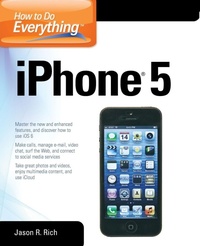
How to Do Everything
iPhone 5
Will be published approx. on 16. February 2013
Book
Paperback/Softback
512 pages
978-0-07-180333-5 (ISBN)
Description
Publisher's Note: Products purchased from Third Party sellers are not guaranteed by the publisher for quality, authenticity, or access to any online entitlements included with the product.
Maximize the power of your iPhone 5Master the versatile features of your iPhone 5 and stay organized, connected, informed, and entertained. How to Do Everything: iPhone 5 covers iOS 6 and the new capabilities added to the core functions and apps, such as Contacts, Calendar, Reminders, Notes, Safari, Mail, Camera, Maps, FaceTime, and iTunes. You'll also learn how to use iCloud, Notification Center, and Siri. Plus, discover tips on finding and downloading additional apps that can dramatically increase your iPhone's performance. This hands-on guide covers it all!
Get assistance from Siri and use the Dictation feature
Import and sync data from your computer, iCloud, and other iOS devices
Discover preinstalled apps and download additional apps
Make and receive calls, use voicemail, and set up custom ringtones
Manage Contacts and stay organized with Calendar, Reminders, and Notes
Surf the Web with Safari
Shoot, edit, and share photos and videos
Navigate with turn-by-turn directions using the newly redesigned Maps app
Manage e-mail accounts, use text messaging, and connect to social media networks, including Facebook and TwitterVideo chat via FaceTime or Skype
Experience multimedia entertainment and read e-books and digital editions of newspapers and magazines
Play exciting single- and multi-player games
Protect and troubleshoot your iPhone 5
Maximize the power of your iPhone 5Master the versatile features of your iPhone 5 and stay organized, connected, informed, and entertained. How to Do Everything: iPhone 5 covers iOS 6 and the new capabilities added to the core functions and apps, such as Contacts, Calendar, Reminders, Notes, Safari, Mail, Camera, Maps, FaceTime, and iTunes. You'll also learn how to use iCloud, Notification Center, and Siri. Plus, discover tips on finding and downloading additional apps that can dramatically increase your iPhone's performance. This hands-on guide covers it all!
Get assistance from Siri and use the Dictation feature
Import and sync data from your computer, iCloud, and other iOS devices
Discover preinstalled apps and download additional apps
Make and receive calls, use voicemail, and set up custom ringtones
Manage Contacts and stay organized with Calendar, Reminders, and Notes
Surf the Web with Safari
Shoot, edit, and share photos and videos
Navigate with turn-by-turn directions using the newly redesigned Maps app
Manage e-mail accounts, use text messaging, and connect to social media networks, including Facebook and TwitterVideo chat via FaceTime or Skype
Experience multimedia entertainment and read e-books and digital editions of newspapers and magazines
Play exciting single- and multi-player games
Protect and troubleshoot your iPhone 5
More details
Language
English
Place of publication
New York
United States
Publishing group
McGraw-Hill Education - Europe
Illustrations
375 Illustrations
Dimensions
Height: 235 mm
Width: 191 mm
Thickness: 27 mm
Weight
946 gr
ISBN-13
978-0-07-180333-5 (9780071803335)
Copyright in bibliographic data and cover images is held by Nielsen Book Services Limited or by the publishers or by their respective licensors: all rights reserved.
Schweitzer Classification
Other editions
Additional editions
E-Book
12/2012
1st Edition
McGraw-Hill Education
€41.69
Available for download
Person
Jason R. Rich, (www.jasonrich.com) Foxboro, MA is the bestselling author of numerous books and hundreds of feature articles about Apple products, including the iPhone, iPad, MacBooks and iMacs. He's an experienced journalist and technical writer who takes complex and often confusing material and makes it easy to understand by everyday consumers. Some of his recently published books include: How To Do Everything MacBook Air (McGraw-Hill), How To Do Everything iCloud (McGraw-Hill), How To Do Everything Kindle Fire (McGraw-Hill). Jason R. Rich is also an accomplished photographer. You can follow him on Twitter @JasonRich7. Rich has recently been a featured guest for Norwegian Cruise Lines on a series of 7-day cruises where he taught photography classes on board to cruise passengers. Rich also currently writes about travel, entertainment, career-related issues, personal finance, pets, credit repair, electronic entertainment (video and computer games), blogging, franchising, and the Internet (eCommerce) - along with a wide range of other topics.
Content
Part I. Get Up & running with Your iPhone
1. Get and Connect Your iPhone
2. Load Your iPhone
3. Connect to Wireless Networks and the Internet
4. Choose Essential Settings
5. Take Photos and Videos
6. Install and Manage Apps
Part II. Use iPhone for Communications
7. Make Phone and Video Calls
8. E-mail and Instant Messaging
9. Surf the Web
10. Calendar and Contacts
Part III. Use Your Phone for Entertainment
11. Enjoy Music and Video
12. Make Most of the Built-In Apps
13. Create Audio and Video Library
14. Backup, Storage, and Transfer
Part IV. Use iPhone as a Work Tool
15. Connect to Company by VPN
16. Connect to Exchange Server
17. Create and Edit Documents
Part V. Advanced Moves
18. Take Your iPhone to the Limit
19. Troubleshoot Your iPhone
20. Troubleshoot iTunes
1. Get and Connect Your iPhone
2. Load Your iPhone
3. Connect to Wireless Networks and the Internet
4. Choose Essential Settings
5. Take Photos and Videos
6. Install and Manage Apps
Part II. Use iPhone for Communications
7. Make Phone and Video Calls
8. E-mail and Instant Messaging
9. Surf the Web
10. Calendar and Contacts
Part III. Use Your Phone for Entertainment
11. Enjoy Music and Video
12. Make Most of the Built-In Apps
13. Create Audio and Video Library
14. Backup, Storage, and Transfer
Part IV. Use iPhone as a Work Tool
15. Connect to Company by VPN
16. Connect to Exchange Server
17. Create and Edit Documents
Part V. Advanced Moves
18. Take Your iPhone to the Limit
19. Troubleshoot Your iPhone
20. Troubleshoot iTunes