

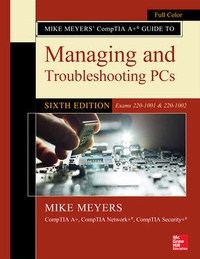
Mike Meyers' CompTIA A+ Guide to Managing and Troubleshooting PCs, Sixth Edition (Exams 220-1001 & 220-1002)
6th Edition
Published on 12. June 2019
Book
Paperback/Softback
1312 pages
978-1-260-45506-9 (ISBN)
Description
Publisher's Note: Products purchased from Third Party sellers are not guaranteed by the publisher for quality, authenticity, or access to any online entitlements included with the product.
Fully Updated, Essential Skills for a Successful IT Career
Written by the leading authority on CompTIA A+ certification and training, this four-color guide will help you pass CompTIA A+ exams 220-1001 and 220-1002 and become a certified IT professional with proven expertise in hardware and software. Mike Meyers' CompTIA A+ (R) Guide to Managing and Troubleshooting PCs, Sixth Edition offers complete coverage of the latest exam objectives. You'll get on-the-job tips, end-of-chapter review questions, and hundreds of photographs and illustrations.
Learn how to:
*Work with CPUs, RAM, BIOS, motherboards, power supplies, and other personal computer components*Install, configure, and maintain hard drives*Manage input devices and removable media*Set up, upgrade, and maintain all versions of Windows*Troubleshoot and fix computer problems*Establish users and groups*Set up video and multimedia cards*Administer smartphones, tablets, and other mobile devices*Set up wired and wireless networks*Connect to the Internet*Protect your personal computer and your network*Install printers and other peripherals*Implement virtualization and cloud-based technologies*Understand safety and environmental issues
Online content includes:
*Practice exams for 1001 & 1002*One hour+ of free video training from Mike Meyers*TotalSim online simulations of performance-based questions*A list of free networking utilities
Fully Updated, Essential Skills for a Successful IT Career
Written by the leading authority on CompTIA A+ certification and training, this four-color guide will help you pass CompTIA A+ exams 220-1001 and 220-1002 and become a certified IT professional with proven expertise in hardware and software. Mike Meyers' CompTIA A+ (R) Guide to Managing and Troubleshooting PCs, Sixth Edition offers complete coverage of the latest exam objectives. You'll get on-the-job tips, end-of-chapter review questions, and hundreds of photographs and illustrations.
Learn how to:
*Work with CPUs, RAM, BIOS, motherboards, power supplies, and other personal computer components*Install, configure, and maintain hard drives*Manage input devices and removable media*Set up, upgrade, and maintain all versions of Windows*Troubleshoot and fix computer problems*Establish users and groups*Set up video and multimedia cards*Administer smartphones, tablets, and other mobile devices*Set up wired and wireless networks*Connect to the Internet*Protect your personal computer and your network*Install printers and other peripherals*Implement virtualization and cloud-based technologies*Understand safety and environmental issues
Online content includes:
*Practice exams for 1001 & 1002*One hour+ of free video training from Mike Meyers*TotalSim online simulations of performance-based questions*A list of free networking utilities
More details
Edition
6th edition
Language
English
Place of publication
OH
United States
Target group
Adult education
Illustrations
788 Illustrations
Dimensions
Height: 274 mm
Width: 216 mm
Thickness: 43 mm
Weight
2279 gr
ISBN-13
978-1-260-45506-9 (9781260455069)
Copyright in bibliographic data and cover images is held by Nielsen Book Services Limited or by the publishers or by their respective licensors: all rights reserved.
Schweitzer Classification
Other editions
New editions
Mike Meyers | Travis Everett | Andrew Hutz
Mike Meyers' CompTIA A+ Guide to Managing and Troubleshooting PCs, Seventh Edition (Exams 220-1101 & 220-1102)
Book
01/2023
7th Edition
McGraw-Hill Education
€87.00
Article exhausted; check different version
Additional editions

Mike Meyers
Mike Meyers' CompTIA A+ Guide to Managing and Troubleshooting PCs, Sixth Edition (Exams 220-1001 & 220-1002)
E-Book
05/2019
1st Edition
McGraw Hill LLC
€156.99
Available for download
Person
Michael Meyers, MCP, CompTIA A+, CompTIA Network+, CompTIA Security+ (Houston, TX), is one of the industry's leading authorities on CompTIA certification. He is the president and founder and Total Seminars, LLC, a major provider of PC and network repair seminars for thousands of organizations including IBM, Lucent Technologies, GE, the FBI, the FAA and the United Nations. Mike is the best-selling author of the A+ Certification All-in-One Exam Guide.
Content
Chapter 1: Safety and Professionalism
Chapter 2: The Visible Computer
Chapter 3: CPUs
Chapter 4: RAM
Chapter 5: Firmware
Chapter 6: Motherboards
Chapter 7: Power Supplies
Chapter 8: Mass Storage Technologies
Chapter 9: Implementing Mass Storage
Chapter 10: Essential Peripherals
Chapter 11: Building a PC
Chapter 12: Windows Under the Hood
Chapter 13: Users, Groups, and Permissions
Chapter 14: Maintaining and Optimizing Operating Systems
Chapter 15: Working with the Command-Line Interface
Chapter 16: Troubleshooting Operating Systems
Chapter 17: Display Technologies
Chapter 18: Essentials of Networking
Chapter 19: Local Area Networking
Chapter 20: Wireless Networking
Chapter 21: The Internet
Chapter 22: Virtualization
Chapter 23: Portable Computing
Chapter 24: Understanding Mobile Devices
Chapter 25: Care and Feeding of Mobile Devices
Chapter 26: Printers and Multifunction Devices
Chapter 27: Securing Computers
Chapter 28: Operational Procedures
Appendix A: Mapping to the CompTIA A+ Objectives
Glossary
Chapter 2: The Visible Computer
Chapter 3: CPUs
Chapter 4: RAM
Chapter 5: Firmware
Chapter 6: Motherboards
Chapter 7: Power Supplies
Chapter 8: Mass Storage Technologies
Chapter 9: Implementing Mass Storage
Chapter 10: Essential Peripherals
Chapter 11: Building a PC
Chapter 12: Windows Under the Hood
Chapter 13: Users, Groups, and Permissions
Chapter 14: Maintaining and Optimizing Operating Systems
Chapter 15: Working with the Command-Line Interface
Chapter 16: Troubleshooting Operating Systems
Chapter 17: Display Technologies
Chapter 18: Essentials of Networking
Chapter 19: Local Area Networking
Chapter 20: Wireless Networking
Chapter 21: The Internet
Chapter 22: Virtualization
Chapter 23: Portable Computing
Chapter 24: Understanding Mobile Devices
Chapter 25: Care and Feeding of Mobile Devices
Chapter 26: Printers and Multifunction Devices
Chapter 27: Securing Computers
Chapter 28: Operational Procedures
Appendix A: Mapping to the CompTIA A+ Objectives
Glossary