

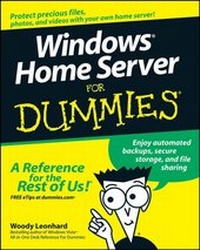
Windows Home Server For Dummies
1st Edition
Published on 23. November 2007
Book
Paperback/Softback
358 pages
978-0-470-18592-6 (ISBN)
Description
Have a home network? Make it safer and more useful
Share your stuff, access it remotely, back it up, and play movies on your Xbox
What happens when your hard drive hiccups, or the kids accidentally let loose an unfriendly computer virus? If you have Windows Home Server installed, your precious pictures and documents are still safe, and you can access them from anywhere. This friendly guide helps you get it up and running and shows you all its cool tricks!
Discover how to:
*
Choose and install Windows Home Server
*
Set up users and use shared folders
*
Share multimedia across your network
*
Play music or video on your Xbox
*
Set up automated backups
More details
Product info
PB
Edition
1., Auflage
Language
English
Place of publication
United States
Publishing group
John Wiley & Sons Inc
Target group
Professional and scholarly
Product notice
Paperback (trade)
Unsewn / adhesive bound
Dimensions
Height: 235 mm
Width: 191 mm
Thickness: 21 mm
Weight
719 gr
ISBN-13
978-0-470-18592-6 (9780470185926)
Schweitzer Classification
Other editions
Additional editions
Person
Woody Leonhard is a bestselling author and has been a Microsoft beta tester since Word for Windows 1.1. He covers Windows and Office topics on his popular Web site, AskWoody.com.
Content
Introduction.
Part I: Getting Windows Home Server to Serve.
Chapter 1: Bringing Windows Home Server to Life.
Chapter 2: Installing the WHS Software.
Part II: Setting Up the Network.
Chapter 3: Bringing Computers into the Home Server Fold.
Chapter 4: Adding Users and Controlling Passwords.
Chapter 5: Using Built-In Shared Folders.
Part III: Making the Most of Multimedia.
Chapter 6: Sharing Music and Videos.
Chapter 7: Recording and Playing TV.
Chapter 8: Streaming with the Xbox.
Chapter 9: Nailing Down Your Photos.
Part IV: Sharing in the Wild.
Chapter 10: Starting Remote Access.
Chapter 11: Using Remote Access.
Part V: Backing Up.
Chapter 12: Running Backups.
Chapter 13: Restoring a Dead Computer from Backup.
Chapter 14: Restoring Files from Backup.
Chapter 15: Backing Up the Server.
Part VI: Staying Alive and Well.
Chapter 16: Monitoring System Health.
Chapter 17: Breaking into the Server.
Chapter 18: Adding and Retiring Drives.
Chapter 19: Repairing and Recovering the Server.
Part VII: The Part of Tens.
Chapter 20: Top Ten Health Traps Triaged.
Chpter 21: Ten More Tricks with Windows Home Server.
Index.