

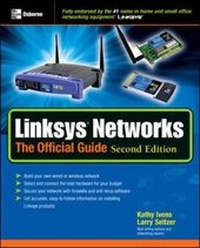
Linksys Networks
The Official Guide, Second Edition
2nd Edition
Published on 22. September 2003
Book
Paperback/Softback
448 pages
978-0-07-223072-7 (ISBN)
Description
This guide shows readers how to build a home/or small office network using Linksys products. It includes wire and wireless networks containing desktops and laptops. It also covers mixing network types so that wireless or phoneline networks can share an Internet device that's connected via Ethernet.
More details
Edition
2nd Revised edition
Language
English
Place of publication
New York
United States
Publishing group
McGraw-Hill Education - Europe
Edition type
Revised edition
Illustrations
100 Illustrations
Dimensions
Height: 231 mm
Width: 185 mm
Thickness: 21 mm
Weight
645 gr
ISBN-13
978-0-07-223072-7 (9780072230727)
Copyright in bibliographic data and cover images is held by Nielsen Book Services Limited or by the publishers or by their respective licensors: all rights reserved.
Schweitzer Classification
Other editions
New editions
Walter Glenn
Linksys (R) Networks: The Official Guide, 3rd Ed.
Book
03/2005
3rd Edition
McGraw-Hill Professional
€22.27
Article is exhausted; no reprint
Previous edition
Book
10/2002
Osborne/McGraw-Hill
€27.22
Shipment within 15-20 days
Person
Kathy Ivens has been a computer consultant since 1984, and several years ago she began writing books. She has authored, co-authored, contributed to, and ghost written more than forty volumes on computer subjects. Kathy is a frequent contributor to national magazines on computer topics, writing reviews and articles, and is a contributing editor for Windows 2000 Magazine and Windows NT Magazine. She is the author of QuickBooks 2002: The Official Guide, Windows 2000: The Complete Reference among many other best-selling McGraw-Hill/Osborne titles.
Content
Part I: Getting Started
1: Networking Choices
2: Purchasing and Connecting Hardware
3: Internet Connection Hardware
Part II: Installing Your Network
4: Installing an Ethernet Cable Network
5: Installing a Wireless Network
6: Using Telephone Lines
7: Plugging In to Electric Wires
Part III: Advanced Networking
8: Configuring Network Settings
9: Security
10: Tips, Tricks, and Troubleshooting
11: Sharing Network Resources
Part IV: Appendixes
A: Glossary of Network Terminology
B: Advanced Network Tools
1: Networking Choices
2: Purchasing and Connecting Hardware
3: Internet Connection Hardware
Part II: Installing Your Network
4: Installing an Ethernet Cable Network
5: Installing a Wireless Network
6: Using Telephone Lines
7: Plugging In to Electric Wires
Part III: Advanced Networking
8: Configuring Network Settings
9: Security
10: Tips, Tricks, and Troubleshooting
11: Sharing Network Resources
Part IV: Appendixes
A: Glossary of Network Terminology
B: Advanced Network Tools