

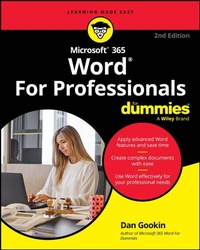
Microsoft 365 Word For Professionals For Dummies
2nd Edition
Published on 1. May 2025
Book
Paperback/Softback
416 pages
978-1-394-32386-9 (ISBN)
Description
A beyond-the-basics guide to leveling up your skills in Microsoft Word
Microsoft 365 Word For Professionals For Dummies is an easy-to-understand guide to the more advanced features available in the Microsoft 365 version of Word. You can enhance the quality of your documents and boost productivity in any field, with this in-depth resource. You'll delve into topics that you may not have encountered in school or on-the-job training, such as collaborating on a document and using Copilot to improve text. Complete your Word-related tasks more efficiently as you unlock lesser-known tools and learn to organize the application so you can quickly access the features you need. You're on your way to becoming a Word superhero, with this fun resource.
Learn advanced formatting and template creation techniques
Work more efficiently with graphics, tables, and other objects
Get a handle on document sharing, reviewing, and collaboration
Automate writing and editing tasks to speed up tedious jobs
For Word users seeking to take their knowledge to the next level, this in-depth guide covers the professional tasks and topics you most need to know.
Microsoft 365 Word For Professionals For Dummies is an easy-to-understand guide to the more advanced features available in the Microsoft 365 version of Word. You can enhance the quality of your documents and boost productivity in any field, with this in-depth resource. You'll delve into topics that you may not have encountered in school or on-the-job training, such as collaborating on a document and using Copilot to improve text. Complete your Word-related tasks more efficiently as you unlock lesser-known tools and learn to organize the application so you can quickly access the features you need. You're on your way to becoming a Word superhero, with this fun resource.
Learn advanced formatting and template creation techniques
Work more efficiently with graphics, tables, and other objects
Get a handle on document sharing, reviewing, and collaboration
Automate writing and editing tasks to speed up tedious jobs
For Word users seeking to take their knowledge to the next level, this in-depth guide covers the professional tasks and topics you most need to know.
More details
Edition
2nd edition
Language
English
Place of publication
United States
Publishing group
John Wiley & Sons Inc
Dimensions
Height: 187 mm
Width: 235 mm
Thickness: 29 mm
Weight
766 gr
ISBN-13
978-1-394-32386-9 (9781394323869)
Copyright in bibliographic data and cover images is held by Nielsen Book Services Limited or by the publishers or by their respective licensors: all rights reserved.
Schweitzer Classification
Other editions
Additional editions
E-Book
03/2025
2nd Edition
Wiley
€19.99
Available for download
E-Book
03/2025
2nd Edition
Wiley
€19.99
Available for download
Previous edition
Dan Gookin
Word 2016 For Professionals For Dummies
Book
09/2016
Wiley
€33.00
Shipment within 15-20 days
Person
Dan Gookin is the bestselling author of Word For Dummies. His previous books have been translated into 32 languages and have sold over 11 million copies. He's been writing for the For Dummies series for 34 years.
Content
Introduction 1
Part 1: Fancy Formatting and Froufrou 5
Chapter 1: Font Fun 7
Chapter 2: Paragraph and Page Preparation 25
Chapter 3: Terrific Tables 45
Chapter 4: Styles and Templates 61
Part 2: Go Graphical 75
Chapter 5: Text and Graphics Layout 77
Chapter 6: Shapes and Drawings 89
Chapter 7: Pretty Pictures 107
Chapter 8: Insert Objects Weird and Amazing 121
Part 3: Word at Work 133
Chapter 9: Beyond Routine Documents 135
Chapter 10: Document Formats and Printer Control 151
Chapter 11: Collaboration and Sharing 165
Chapter 12: Word for Lawyers 181
Chapter 13: Document Security 193
Chapter 14: Final Document Preparation and Review 207
Part 4: Word for Writers 225
Chapter 15: Tools for Every Author 227
Chapter 16: From Brainstorm to Outline 243
Chapter 17: Humongous Documents 257
Chapter 18: Document References 267
Chapter 19: eBook Publishing 285
Part 5: Document Automation 297
Chapter 20: AutoCorrect, AutoText, and AutoFormat 299
Chapter 21: Document Fields 311
Chapter 22: The Big Macro Picture 323
Chapter 23: Dynamic Templates with Content Controls 337
Part 6: The Part of Tens 349
Chapter 24: Ten Ways to Customize Word 351
Chapter 25: Ten Ways to Solve Word Problems 367
Index 379
Part 1: Fancy Formatting and Froufrou 5
Chapter 1: Font Fun 7
Chapter 2: Paragraph and Page Preparation 25
Chapter 3: Terrific Tables 45
Chapter 4: Styles and Templates 61
Part 2: Go Graphical 75
Chapter 5: Text and Graphics Layout 77
Chapter 6: Shapes and Drawings 89
Chapter 7: Pretty Pictures 107
Chapter 8: Insert Objects Weird and Amazing 121
Part 3: Word at Work 133
Chapter 9: Beyond Routine Documents 135
Chapter 10: Document Formats and Printer Control 151
Chapter 11: Collaboration and Sharing 165
Chapter 12: Word for Lawyers 181
Chapter 13: Document Security 193
Chapter 14: Final Document Preparation and Review 207
Part 4: Word for Writers 225
Chapter 15: Tools for Every Author 227
Chapter 16: From Brainstorm to Outline 243
Chapter 17: Humongous Documents 257
Chapter 18: Document References 267
Chapter 19: eBook Publishing 285
Part 5: Document Automation 297
Chapter 20: AutoCorrect, AutoText, and AutoFormat 299
Chapter 21: Document Fields 311
Chapter 22: The Big Macro Picture 323
Chapter 23: Dynamic Templates with Content Controls 337
Part 6: The Part of Tens 349
Chapter 24: Ten Ways to Customize Word 351
Chapter 25: Ten Ways to Solve Word Problems 367
Index 379