

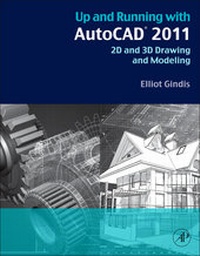
Up and Running with AutoCAD 2011
2D and 3D Drawing and Modeling
Published on 22. September 2010
Book
Paperback/Softback
708 pages
978-0-12-375717-3 (ISBN)
Description
Up and Running with AutoCAD 2011: 2D and 3D Drawing and Modeling provides an introduction to the fundamental concepts of AutoCAD. These concepts have been distilled down to basic, easy to understand explanations for the benefit of beginner students. Each chapter explains the new concept or command and why it is important. Readers are given the chance to apply just-learned knowledge to a real-life exercise, drawing, or model. They can also test their knowledge with end-of-chapter quizzes and drawing exercises.
The book is organized into three parts: Level 1, Level 2, and Level 3. Level 1 offers a wide breadth of knowledge on many topics. Its chapters comprise the complete essential knowledge set of an intermediate user. Students can then work on, if not necessarily set up and manage, moderate to complex drawings. Level 2 is meant for advanced users who are CAD managers, full-time AutoCAD draftspersons, architects, or self-employed and must do everything themselves. The goal here is depth, and several features not deemed critically important in Level 1 are revisited to explore additional advanced options. Also introduced are advanced topics necessary to set up and manage complex drawings. Level 3 is all about 3D. Solid knowledge of the previous two levels is highly recommended before starting these chapters. The 3D material covers all aspects of AutoCAD solid modeling, including lights and rendering.
The book is organized into three parts: Level 1, Level 2, and Level 3. Level 1 offers a wide breadth of knowledge on many topics. Its chapters comprise the complete essential knowledge set of an intermediate user. Students can then work on, if not necessarily set up and manage, moderate to complex drawings. Level 2 is meant for advanced users who are CAD managers, full-time AutoCAD draftspersons, architects, or self-employed and must do everything themselves. The goal here is depth, and several features not deemed critically important in Level 1 are revisited to explore additional advanced options. Also introduced are advanced topics necessary to set up and manage complex drawings. Level 3 is all about 3D. Solid knowledge of the previous two levels is highly recommended before starting these chapters. The 3D material covers all aspects of AutoCAD solid modeling, including lights and rendering.
More details
Language
English
Place of publication
San Diego
United States
Publishing group
Elsevier Science Publishing Co Inc
Target group
Professional and scholarly
Beginner through advanced users of AutoCAD. Architectural engineers, drafting, civil/construction engineers, mechanical engineers. Students taking drafting/engineering drawing courses in engineering and engineering technology programs.
Illustrations
Approx. 700 illustrations (700 in full color)
Dimensions
Height: 276 mm
Width: 216 mm
Weight
1600 gr
ISBN-13
978-0-12-375717-3 (9780123757173)
Copyright in bibliographic data and cover images is held by Nielsen Book Services Limited or by the publishers or by their respective licensors: all rights reserved.
Schweitzer Classification
Other editions
New editions
Book
09/2012
3rd Edition
Academic Press
€83.50
Shipment within 15-20 days
Book
08/2011
2nd Edition
Academic Press
€68.09
Article exhausted; check for reprint
Additional editions
E-Book
09/2010
Academic Press
€63.95
Available for download
Person
Elliot Gindis is the founding author of the Up and Running with AutoCAD series of textbooks. He is a former AutoCAD drafter and designer who got his start in New York City in 1996 and has logged in over 25,000 hours of screen time with a wide variety of architecture and engineering companies. From 1999 to 2008 he was on staff with the Pratt Institute of Design and as visiting instructor at the New York Institute of Technology (NYIT), teaching beginner, intermediate, and advanced (3D) AutoCAD classes. He was also the president of Vertical Technologies Consulting and Design, an AutoCAD training firm, and has advised, consulted, or assisted more than 60 companies nationwide in using and optimizing AutoCAD. Elliot was part of the AutoDesk Developers Network and was a Certified Technical Trainer. He published the first edition of the Up and Running textbook with Elsevier in 2010, and has supported each subsequent edition until 2020, when Robert Kaebisch took over full-time. Elliot currently resides in the Los Angeles area, and is an engineer in the defense industry.
Content
Part One Beginner to Intermediate
Chapter One AutoCAD Fundamentals 1
Chapter Two AutoCAD Fundamentals 2
Chapter Three Layers, Colors, Linetypes and Properties
Chapter Four DText, MText, Style and Editing
Chapter Five Bhatch
Chapter Six Dimensions
Chapter Seven Blocks and Wblocks
Chapter Eight Polar and Rectangular Arrays, Polygon and Circle/TTR
Chapter Nine Isometric
Chapter Ten Basic Printing and Output
Part II Intermediate to Advanced
Chapter Eleven Advanced Linework
Chapter Twelve Advanced Layers
Chapter Thirteen Advanced Dimensions
Chapter Fourteen Options, Shortcuts, CUI, Design Center & Exp. Tools
Chapter Fifteen Miscellaneous Topics
Chapter Sixteen Importing and Exporting Data
Chapter Seventeen External References
Chapter Eighteen Paper Space
Chapter Nineteen Attributes
Chapter Twenty Advanced Output and Pen Settings
Part III 3D
Chapter Twenty One 3D Basics
Chapter Twenty Two Primitives
Chapter Twenty Three Object Manipulation
Chapter Twenty Four Boolean Operations
Chapter Twenty Five Advanced 3D Tools I
Chapter Twenty Six Advanced 3D Tools II
Chapter Twenty Seven Meshes and Surfaces
Chapter Twenty Eight UCS, Vports, Text and Dims in 3D
Chapter Twenty Nine Cameras, Walk and Fly
Chapter Thirty Lighting and Rendering
Appendices
Chapter One AutoCAD Fundamentals 1
Chapter Two AutoCAD Fundamentals 2
Chapter Three Layers, Colors, Linetypes and Properties
Chapter Four DText, MText, Style and Editing
Chapter Five Bhatch
Chapter Six Dimensions
Chapter Seven Blocks and Wblocks
Chapter Eight Polar and Rectangular Arrays, Polygon and Circle/TTR
Chapter Nine Isometric
Chapter Ten Basic Printing and Output
Part II Intermediate to Advanced
Chapter Eleven Advanced Linework
Chapter Twelve Advanced Layers
Chapter Thirteen Advanced Dimensions
Chapter Fourteen Options, Shortcuts, CUI, Design Center & Exp. Tools
Chapter Fifteen Miscellaneous Topics
Chapter Sixteen Importing and Exporting Data
Chapter Seventeen External References
Chapter Eighteen Paper Space
Chapter Nineteen Attributes
Chapter Twenty Advanced Output and Pen Settings
Part III 3D
Chapter Twenty One 3D Basics
Chapter Twenty Two Primitives
Chapter Twenty Three Object Manipulation
Chapter Twenty Four Boolean Operations
Chapter Twenty Five Advanced 3D Tools I
Chapter Twenty Six Advanced 3D Tools II
Chapter Twenty Seven Meshes and Surfaces
Chapter Twenty Eight UCS, Vports, Text and Dims in 3D
Chapter Twenty Nine Cameras, Walk and Fly
Chapter Thirty Lighting and Rendering
Appendices