

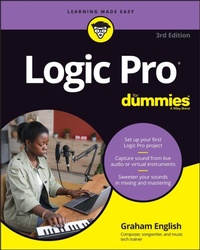
Logic Pro For Dummies
Description
Every minute you spend trying to figure out how to set up a new track or build a drum loop is a minute you don't spend creating and recording your music. This guide to the recording software favored by Mac users helps you bypass the time needed to search for tech answers and spend more time capturing sounds. Discover the full recording power of Logic Pro, starting with launching a project and recording your audio. Explore the built-in digital instruments and beat makers, augment your recording power with plug-ins, and finalize your song by editing, adding effects, mixing, mastering, and sharing. The final step is music stardom!
Learn your way around the Logic Pro interface and understand the workflow
Set up your project and add tracks and regions
Record acoustic audio or conduct your orchestra of MIDI instruments
Edit, mix, automate, export, and feel proud of your audio files
For beginning music creators and producers, this Dummies guide makes it simple to get started with Logic Pro.
<b>This one-stop source for Logic Pro insight helps you spend more time creating music </b>
Every minute you spend trying to figure out how to set up a new track or build a drum loop is a minute you don't spend creating and recording your music. This guide to the recording software favored by Mac users helps you bypass the time needed to search for tech answers and spend more time capturing sounds. Discover the full recording power of Logic Pro, starting with launching a project and recording your audio. Explore the built-in digital instruments and beat makers, augment your recording power with plug-ins, and finalize your song by editing, adding effects, mixing, mastering, and sharing. The final step is music stardom!
<ul><li>Learn your way around the Logic Pro interface and understand the workflow</li><li>Set up your project and add tracks and regions</li><li>Record acoustic audio or conduct your orchestra of MIDI instruments</li><li>Edit, mix, automate, export, and feel proud of your audio files</li></ul>For beginning music creators and producers, this Dummies guide makes it simple to get started with Logic Pro.
More details
Other editions
Additional editions
Previous edition
Person
<b>Graham English</b> is a performer, songwriter, multi-instrumentalist, and jazz-trained keyboard player. Graham has shared the stage with legendary performers like Cheap Trick, Grover Washington Jr., and James Moody. He is the author of the previous editions of this book, a songwriting course at Speed Songwriting, and content at Logic Studio Training.
Content
Introduction 1
<b>Part 1: Leaping into Logic Pro 5</b>
Chapter 1: Getting Logic Pro Up and Sprinting 7
Chapter 2: Examining Logic Pro Projects 21
Chapter 3: Exploring the Main Window and Tracks Area 37
Chapter 4: Embracing Tracks and Regions 65
<b>Part 2: Digital Recording and Using Prerecorded Media 81</b>
Chapter 5: Introducing Digital Audio and MIDI 83
Chapter 6: Recording Audio 97
Chapter 7: Recording MIDI 111
Chapter 8: Adding Media to Your Project 123
<b>Part 3: Making Music with Virtual Instruments 135</b>
Chapter 9: Making Beats with Drum and Percussion Software Instruments 137
Chapter 10: Playing Virtual Vintage Instruments 163
Chapter 11: Sound Design with Synths and Samplers 185
Chapter 12: Conducting a Virtual Orchestra 213
<b>Part 4: Arranging and Editing Your Project 225</b>
Chapter 13: Arranging Your Music 227
Chapter 14: Editing Audio Tracks 255
Chapter 15: Editing MIDI Tracks 277
<b>Part 5: Mixing, Mastering, and Sharing Your Music 297</b>
Chapter 16: Mixing Your Project 299
Chapter 17: Shaping Your Mix with Effects 321
Chapter 18: Automating Your Mix 341
Chapter 19: Mastering Your Final Track 347
Chapter 20: Bouncing and Sharing Your Music 355
<b>Part 6: The Part of Tens 363</b>
Chapter 21: Ten Ways to Use an iPad with Logic Pro 365
Chapter 22: Ten Tips to Speed Your Workflow 377
Index 383