

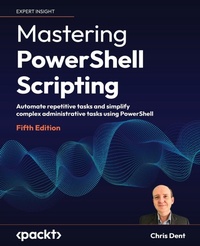
Mastering PowerShell Scripting
Automate repetitive tasks and simplify complex administrative tasks using PowerShell
5th Edition
Published on 24. May 2024
Book
Paperback/Softback
826 pages
978-1-80512-027-8 (ISBN)
Description
Master PowerShell to automate real-world administrative tasks, streamline workflows, and enhance security across Windows environments
Purchase of the print or Kindle book includes a free PDF eBook.
Key Features
Build practical scripts to automate system tasks, manage files, users, and services, and optimize daily operations
Leverage PowerShell's advanced features for error handling, modular scripting, and secure automation
Apply best practices to create reusable, maintainable, and production-ready automation workflows
Book DescriptionMastering PowerShell Scripting, Fifth Edition, is your comprehensive guide to harnessing PowerShell's full potential. This edition introduces new chapters on debugging, troubleshooting, and creating GUIs while covering the latest enhancements in PowerShell 7.3, including parameters, objects, and .NET classes.
The book takes you from foundational concepts to advanced techniques, covering asynchronous processing, desired state configuration, and managing large datasets. You'll explore PowerShell's automation features, error-handling strategies, and integration with external services. Additionally, this guide provides practical insights into working with regular expressions, Windows Management Instrumentation, and complex scripting methods.
By the end of this book, you'll have the skills to efficiently automate tasks, troubleshoot scripts, and leverage PowerShell's advanced capabilities for real-world scenarios.
Be sure to explore the online bonus chapters 8, 9, and 20, where we dive into Strings, Numbers, and Dates, Regular Expressions, and Building Modules.What you will learn
Create scripts that run across systems for automation
Extend PowerShell by integrating it with other languages
Use PowerShell's command-line interface for efficient operations
Develop reusable scripts and functions to streamline tasks
Apply PowerShell for administration, automation, and data processing
Integrate with .NET, COM, and WMI for advanced functionality
Work with XML, JSON, and CSV for structured data handling
Build custom modules and cmdlets to enhance scripting
Who this book is forThis book is for system administrators who want to automate and speed up their processes using PowerShell and Windows PowerShell. You'll need to know the basics of operating systems, but beginners with no prior experience with PowerShell will have no trouble following along.
Purchase of the print or Kindle book includes a free PDF eBook.
Key Features
Build practical scripts to automate system tasks, manage files, users, and services, and optimize daily operations
Leverage PowerShell's advanced features for error handling, modular scripting, and secure automation
Apply best practices to create reusable, maintainable, and production-ready automation workflows
Book DescriptionMastering PowerShell Scripting, Fifth Edition, is your comprehensive guide to harnessing PowerShell's full potential. This edition introduces new chapters on debugging, troubleshooting, and creating GUIs while covering the latest enhancements in PowerShell 7.3, including parameters, objects, and .NET classes.
The book takes you from foundational concepts to advanced techniques, covering asynchronous processing, desired state configuration, and managing large datasets. You'll explore PowerShell's automation features, error-handling strategies, and integration with external services. Additionally, this guide provides practical insights into working with regular expressions, Windows Management Instrumentation, and complex scripting methods.
By the end of this book, you'll have the skills to efficiently automate tasks, troubleshoot scripts, and leverage PowerShell's advanced capabilities for real-world scenarios.
Be sure to explore the online bonus chapters 8, 9, and 20, where we dive into Strings, Numbers, and Dates, Regular Expressions, and Building Modules.What you will learn
Create scripts that run across systems for automation
Extend PowerShell by integrating it with other languages
Use PowerShell's command-line interface for efficient operations
Develop reusable scripts and functions to streamline tasks
Apply PowerShell for administration, automation, and data processing
Integrate with .NET, COM, and WMI for advanced functionality
Work with XML, JSON, and CSV for structured data handling
Build custom modules and cmdlets to enhance scripting
Who this book is forThis book is for system administrators who want to automate and speed up their processes using PowerShell and Windows PowerShell. You'll need to know the basics of operating systems, but beginners with no prior experience with PowerShell will have no trouble following along.
More details
Edition
5th Revised edition
Language
English
Place of publication
Birmingham
United Kingdom
Target group
Professional and scholarly
US School Grade: College Graduate Student
Edition type
Revised edition
Dimensions
Height: 235 mm
Width: 191 mm
Thickness: 44 mm
Weight
1510 gr
ISBN-13
978-1-80512-027-8 (9781805120278)
Copyright in bibliographic data and cover images is held by Nielsen Book Services Limited or by the publishers or by their respective licensors: all rights reserved.
Schweitzer Classification
Other editions
Additional editions
Chris Dent
Mastering PowerShell Scripting
Automate repetitive tasks and simplify complex administrative tasks using PowerShell
E-Book
09/2024
5th Edition
Packt Publishing
from
€29.99
Available for download
Person
Chris Dent is an automation specialist with deep expertise in the PowerShell language. Chris is often found answering questions about PowerShell in both the UK and virtual PowerShell user groups. Chris has been developing in PowerShell since 2007 and has released several modules over the years.
Content
Table of Contents
Introduction to PowerShell
Modules
Variables, Arrays, and Hashtables
Working with Objects in PowerShell
Operators
Conditional Statements and Loops
Working with .NET
Files, Folders, and the Registry
Windows Management Instrumentation
Working with HTML, XML, and JSON
Web Requests and Web Services
Remoting and Remote Management
Asynchronous Processing
Graphical User Interfaces
Scripts, Functions, and Script Blocks
Parameters, Validation, and Dynamic Parameters
Classes and Enumerations
Testing
Error Handling
Debugging
Introduction to PowerShell
Modules
Variables, Arrays, and Hashtables
Working with Objects in PowerShell
Operators
Conditional Statements and Loops
Working with .NET
Files, Folders, and the Registry
Windows Management Instrumentation
Working with HTML, XML, and JSON
Web Requests and Web Services
Remoting and Remote Management
Asynchronous Processing
Graphical User Interfaces
Scripts, Functions, and Script Blocks
Parameters, Validation, and Dynamic Parameters
Classes and Enumerations
Testing
Error Handling
Debugging