

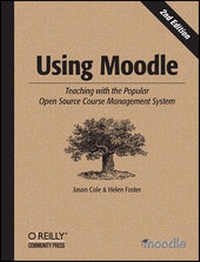
Using Moodle
Teaching with the Popular Open Source Course Management System
2nd Edition
Published on 25. December 2007
Book
282 pages
978-0-596-52918-5 (ISBN)
Description
Using Moodle is a complete, hands-on guide for instructors learning how to use Moodle, the popular course management system (CMS) that enables remote web-based learning and supplements traditional classroom learning. Updated for the latest version, this new edition explains exactly how Moodle works by offering plenty of examples, screenshots and best practices for its many features and plug-in modules.
Moodle gives teachers and trainers a powerful set of web-based tools for a flexible array of activities, including assignments, forums, journals, quizzes, surveys, chat rooms, and workshops. This book is not just a how-to manual. Every chapter includes suggestions and case studies for using Moodle effectively. By itself, Moodle won't make your course better. Only by applying effective educational practices can you truly leverage its power. With this book, you will:
* Get a complete overview CMS in general and Moodle in particular. Review Moodle's basic interface and learn to start a course.
* Learn to add Moodle tools to your course, and how different tools allow you to give quizzes and assignments, write journals, create pathed lessons, collaboratively develop documents, and record student grades.
* Discover some of the creative ways teachers have used Moodle. There are plenty of ideas for effectively using each tool.
* Effectively manage your Moodle course, such as adding and removing users, and creating user groups. Learn to use Moodle's built-in survey functions for assessing your class.
* Find out how to administer an entire Moodle site. A system administrator usually handles these functions, but if you're on your own, there's a lot of power behind the curtain.
Using Moodle is both a guide and a reference manual for this incredibly powerful and flexible CMS. Authored by the Moodle community, this authoritative book also exposes little known but powerful hacks for more technically savvy users, and includes coverage of blogs, RSS, databases, and more. For anyone who is using, or thinking of using, this CMS, Using Moodle is required reading.
More details
Other editions
Additional editions
E-Book
11/2007
1st Edition
O'Reilly
€26.49
Available for download
E-Book
11/2007
1st Edition
O'Reilly
€33.99
Available for download
Previous edition
Book
08/2005
1st Edition
O'Reilly
€32.00
Article exhausted; check for reprint
Persons
Jason Cole is currently the academic technology manager at San Francisco State University, where he's responsible for managing a Blackboard implementation that has over 15,000 users. A member of the Moodle community, he has developed a student data integration tool for the system, and contributed to discussions regarding a document management system and object model for version 2.0. Jason earned a Ph.D. in educational technology from the University of Northern Colorado.Helen Foster is a Moodle administrator for the site with the most users (over 300,000 at the time of writing) - Moodle.org - and holds a key Moodle role of Documentation Steward. Helen is a facilitator for the Using Moodle course, which provides free 24-hour support for Moodle users worldwide.Prior to relocating to Belgium, Helen was the Information Learning Technology Manager at Alton College in the UK, where she implemented Moodle and managed the development the third-party Object module and other Moodle code. Helen has a BSc. in Mathematics from the University of London and a Post Graduate Certificate in Education from the University of Cambridge.
Content
Preface;
What Is Moodle?;
Who Is This Book For?;
Prerequisites-What Do You Need Before You Start?;
About Us;
How to Use This Book;
Conventions Used in This Book;
Safari® Enabled;
Acknowledgments;
Chapter 1: Introduction;
1.1 What Is a Course Management System?;
1.2 What Makes Moodle Special?;
Chapter 2: Moodle Basics;
2.1 Getting Started;
2.2 Creating an Account;
2.3 A First Look at a Course;
2.4 Adding Content to a Course;
2.5 Summary;
Chapter 3: Creating and Managing Content;
3.1 Adding Content to Moodle;
3.2 Managing and Updating Your Content;
3.3 Effective Content Practices;
3.4 Summary;
Chapter 4: Managing Your Class;
4.1 Understanding and Using Roles;
4.2 Student Groups;
4.3 Backups;
4.4 Restoring and Copying Courses;
4.5 Reports;
Chapter 5: Forums, Chats, and Messaging;
5.1 Forums;
5.2 Chats;
5.3 Messaging;
5.4 Summary;
Chapter 6: Quizzes;
6.1 How to Create a Quiz;
6.2 Managing Quizzes;
6.3 Quiz Capabilities;
6.4 Effective Quiz Practices;
Chapter 7: Assignments;
7.1 Assignment Types;
7.2 Creating Assignments;
7.3 Assignment Capabilities;
7.4 Managing Assignment Submissions;
7.5 Effective Assignment Practices;
7.6 Summary;
Chapter 8: Glossaries;
8.1 Creating Glossaries;
8.2 Using Glossaries;
8.3 Glossary Capabilities;
8.4 Effective Glossary Practices;
8.5 Summary;
Chapter 9: Lessons;
9.1 Creating a Lesson;
9.2 Managing Lessons;
9.3 Lesson Capabilities;
9.4 Effective Lesson Practices;
Chapter 10: Wikis;
10.1 Creating Wikis;
10.2 Managing Wikis;
10.3 Wiki Capabilities;
10.4 Effective Wiki Practices;
Chapter 11: Blogs;
11.1 Using Blogs;
11.2 Blog Capabilities;
11.3 Effective Blog Practices;
Chapter 12: Databases;
12.1 Creating Databases;
12.2 Managing Databases;
12.3 Database Capabilities;
12.4 Effective Database Practices;
Chapter 13: Grades and Scales;
13.1 Using Grades;
13.2 Creating Scales;
13.3 Effective Grade and Scale Practices;
Chapter 14: Surveys and Choices;
14.1 Surveys;
14.2 Choices;
14.3 Using Surveys and Choices;
Chapter 15: Putting It All Together;
15.1 What Is a Learning Environment?;
15.2 Course Design Patterns;
Chapter 16: Moodle Administration;
16.1 Notifications;
16.2 Users;
16.3 Courses;
16.4 Location;
16.5 Language;
16.6 Modules;
16.7 Security;
16.8 Appearance;
16.9 Front Page;
16.10 Server;
16.11 Networking;
16.12 Reports;
16.13 Miscellaneous;
16.14 Moodle Support;
What Is Moodle?;
Who Is This Book For?;
Prerequisites-What Do You Need Before You Start?;
About Us;
How to Use This Book;
Conventions Used in This Book;
Safari® Enabled;
Acknowledgments;
Chapter 1: Introduction;
1.1 What Is a Course Management System?;
1.2 What Makes Moodle Special?;
Chapter 2: Moodle Basics;
2.1 Getting Started;
2.2 Creating an Account;
2.3 A First Look at a Course;
2.4 Adding Content to a Course;
2.5 Summary;
Chapter 3: Creating and Managing Content;
3.1 Adding Content to Moodle;
3.2 Managing and Updating Your Content;
3.3 Effective Content Practices;
3.4 Summary;
Chapter 4: Managing Your Class;
4.1 Understanding and Using Roles;
4.2 Student Groups;
4.3 Backups;
4.4 Restoring and Copying Courses;
4.5 Reports;
Chapter 5: Forums, Chats, and Messaging;
5.1 Forums;
5.2 Chats;
5.3 Messaging;
5.4 Summary;
Chapter 6: Quizzes;
6.1 How to Create a Quiz;
6.2 Managing Quizzes;
6.3 Quiz Capabilities;
6.4 Effective Quiz Practices;
Chapter 7: Assignments;
7.1 Assignment Types;
7.2 Creating Assignments;
7.3 Assignment Capabilities;
7.4 Managing Assignment Submissions;
7.5 Effective Assignment Practices;
7.6 Summary;
Chapter 8: Glossaries;
8.1 Creating Glossaries;
8.2 Using Glossaries;
8.3 Glossary Capabilities;
8.4 Effective Glossary Practices;
8.5 Summary;
Chapter 9: Lessons;
9.1 Creating a Lesson;
9.2 Managing Lessons;
9.3 Lesson Capabilities;
9.4 Effective Lesson Practices;
Chapter 10: Wikis;
10.1 Creating Wikis;
10.2 Managing Wikis;
10.3 Wiki Capabilities;
10.4 Effective Wiki Practices;
Chapter 11: Blogs;
11.1 Using Blogs;
11.2 Blog Capabilities;
11.3 Effective Blog Practices;
Chapter 12: Databases;
12.1 Creating Databases;
12.2 Managing Databases;
12.3 Database Capabilities;
12.4 Effective Database Practices;
Chapter 13: Grades and Scales;
13.1 Using Grades;
13.2 Creating Scales;
13.3 Effective Grade and Scale Practices;
Chapter 14: Surveys and Choices;
14.1 Surveys;
14.2 Choices;
14.3 Using Surveys and Choices;
Chapter 15: Putting It All Together;
15.1 What Is a Learning Environment?;
15.2 Course Design Patterns;
Chapter 16: Moodle Administration;
16.1 Notifications;
16.2 Users;
16.3 Courses;
16.4 Location;
16.5 Language;
16.6 Modules;
16.7 Security;
16.8 Appearance;
16.9 Front Page;
16.10 Server;
16.11 Networking;
16.12 Reports;
16.13 Miscellaneous;
16.14 Moodle Support;