

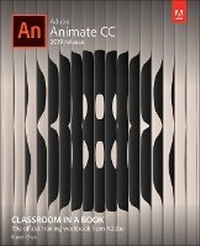
Adobe Animate CC Classroom in a Book
Published on 18. February 2019
Book
Paperback/Softback
304 pages
978-0-13-529888-6 (ISBN)
Description
Creative professionals seeking the fastest, easiest, most comprehensive way to learn Adobe Animate choose Adobe Animate CC Classroom in a Book from Adobe Press. The project-based lessons in this book show users step-by-step the key techniques for working in Animate. Adobe Animate CC provides more expressive tools, powerful controls for animation, and robust support for playback across a wide variety of platforms.
The online companion files include all the necessary assets for readers to complete the projects featured in each chapter. All buyers of the book get full access to the Web Edition: a Web-based version of the complete eBook enhanced with video and interactive multiple-choice quizzes.
The online companion files include all the necessary assets for readers to complete the projects featured in each chapter. All buyers of the book get full access to the Web Edition: a Web-based version of the complete eBook enhanced with video and interactive multiple-choice quizzes.
More details
Series
Language
English
Place of publication
Boston
United States
Publishing group
Pearson Education (US)
Target group
Professional and scholarly
Dimensions
Height: 231 mm
Width: 188 mm
Thickness: 23 mm
Weight
930 gr
ISBN-13
978-0-13-529888-6 (9780135298886)
Copyright in bibliographic data and cover images is held by Nielsen Book Services Limited or by the publishers or by their respective licensors: all rights reserved.
Schweitzer Classification
Other editions
New editions
Russell Chun
Adobe Animate Classroom in a Book (2020 release)
Book
05/2020
Addison Wesley
€55.70
Shipment within 15-20 days
Additional editions
Russell Chun
Adobe Animate CC Classroom in a Book
E-Book
01/2019
1st Edition
Adobe Press,U.S.
€56.49
Available for download
Person
Russell S. Chun is Assistant Professor at the L. Herbert School of Communication at Hofstra University. He has more than 20 years of experience in visual communication as a multimedia designer for the sciences and as a consultant to the news industry. He previously taught at the City University of New York (CUNY) Graduate School of Journalism, the Columbia University Graduate School of Journalism, and at the University of California at Berkeley Graduate School of Journalism. He served as the Department Head of the Illustration program at Sessions College for Professional Design.
He is the published author of over a dozen technical books, interactive, and video products on multimedia software from Adobe, including their official training manuals.
He is the published author of over a dozen technical books, interactive, and video products on multimedia software from Adobe, including their official training manuals.
Content
Getting Started
1?Getting Acquainted
2?Creating Graphics and Text
3 Creating and Editing Symbols
4?Animating Symbols
5?Advanced Motion Tweening
6?Animating Shapes and Using Masks
7?Natural and Character Animation
8?Creating Interactive Navigation
9?Working with Sound and Video
10?Publishing
1?Getting Acquainted
2?Creating Graphics and Text
3 Creating and Editing Symbols
4?Animating Symbols
5?Advanced Motion Tweening
6?Animating Shapes and Using Masks
7?Natural and Character Animation
8?Creating Interactive Navigation
9?Working with Sound and Video
10?Publishing