

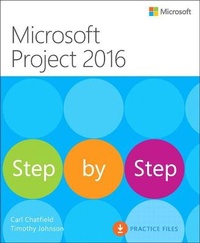
Microsoft Project 2016 Step by Step
Published on 5. May 2016
Book
Paperback/Softback
576 pages
978-0-7356-9874-1 (ISBN)
Description
The quick way to learn Microsoft Project 2016!
This is learning made easy. Get more done quickly with Project 2016. Jump in wherever you need answers-brisk lessons and colorful screenshots show you exactly what to do, step by step.
Quickly start a new plan, build task lists, and assign resources
Share your plan and track your progress
Capture and fine-tune work and cost details
Use Gantt charts and other views and reports to visualize project schedules
Share resources across multiple plans and consolidate projects
Master project management best practices while you learn Project
Look up just the tasks and lessons you need
This is learning made easy. Get more done quickly with Project 2016. Jump in wherever you need answers-brisk lessons and colorful screenshots show you exactly what to do, step by step.
Quickly start a new plan, build task lists, and assign resources
Share your plan and track your progress
Capture and fine-tune work and cost details
Use Gantt charts and other views and reports to visualize project schedules
Share resources across multiple plans and consolidate projects
Master project management best practices while you learn Project
Look up just the tasks and lessons you need
More details
Other editions
New editions
Cindy Lewis | Cindy M. Lewis | Carl Chatfield
Microsoft Project 2019 Step by Step
Book
06/2019
1st Edition
Microsoft Press
€37.49
Shipment within 3-4 weeks
Additional editions
E-Book
04/2016
1st Edition
Microsoft Press
€26.09
Available for download
E-Book
04/2016
1st Edition
Microsoft Press
€34.09
Available for download
Previous edition
Carl Chatfield | Timothy Johnson
Microsoft Project 2013 Step by Step
Book
03/2013
Microsoft Press
€56.50
Shipment within 10-20 days
Persons
Tim Johnson's first connection with Project began as a product support professional at Microsoft, starting with Project 3.0 for MS-DOS. Later, Tim worked on the Project user assistance team, where he brought his firsthand knowledge of customers' issues to new learning solutions for Project. Tim remains involved in the computer industry and continues to look for ways to help customers better understand and use their computer applications. Tim is a Microsoft Certified Technology Specialist (MCTS) and Microsoft Certified Professional (MCP).
Carl Chatfield is a content strategist and technical writer in the software development industry. Carl teaches in the Professional Technical Writing program at the University of Washington. He is a graduate of the masters program in Technical Communication at the University of Washington and is certified as a Project Management Professional (PMP) by the Project Management Institute.
Carl Chatfield is a content strategist and technical writer in the software development industry. Carl teaches in the Professional Technical Writing program at the University of Washington. He is a graduate of the masters program in Technical Communication at the University of Washington and is certified as a Project Management Professional (PMP) by the Project Management Institute.
Content
Table of Contents from previous edition:
Introduction to Microsoft Project
Chapter 1: Microsoft Project, project management and you
Chapter 2: A guided tour of Project
Simple Scheduling Basics
Chapter 3: Starting a new plan
Chapter 4: Building a task list
Chapter 5: Setting up resources
Chapter 6: Assigning resources to tasks
Chapter 7: Formatting and sharing your plan
Chapter 8: Tracking progress
Advanced Scheduling Techniques
Chapter 9: Advanced task scheduling
Chapter 10: Fine-tuning task details
Chapter 11: Fine-tuning resource and assignment details
Chapter 12: Fine-tuning the Project plan
Chapter 13: Organizing project details
Chapter 14: Tracking progress on tasks and assignments
Chapter 15: Viewing and reporting project status
Chapter 16: Getting your project back on track
In-Depth and Special Subjects
Chapter 17: Applying advanced formatting and printing
Chapter 18: Advanced report formatting
Chapter 19: Customizing Project
Chapter 20: Sharing information with other programs
Chapter 21: Consolidating projects and resources
Appendices
Introduction to Microsoft Project
Chapter 1: Microsoft Project, project management and you
Chapter 2: A guided tour of Project
Simple Scheduling Basics
Chapter 3: Starting a new plan
Chapter 4: Building a task list
Chapter 5: Setting up resources
Chapter 6: Assigning resources to tasks
Chapter 7: Formatting and sharing your plan
Chapter 8: Tracking progress
Advanced Scheduling Techniques
Chapter 9: Advanced task scheduling
Chapter 10: Fine-tuning task details
Chapter 11: Fine-tuning resource and assignment details
Chapter 12: Fine-tuning the Project plan
Chapter 13: Organizing project details
Chapter 14: Tracking progress on tasks and assignments
Chapter 15: Viewing and reporting project status
Chapter 16: Getting your project back on track
In-Depth and Special Subjects
Chapter 17: Applying advanced formatting and printing
Chapter 18: Advanced report formatting
Chapter 19: Customizing Project
Chapter 20: Sharing information with other programs
Chapter 21: Consolidating projects and resources
Appendices