

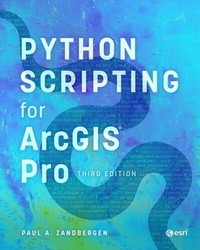
Python Scripting for ArcGIS Pro
Description

Unlock the power of Python in ArcGIS® Pro with this definitive, easy-to-follow guide designed for users with limited programming or scripting experience.
Get started learning to write Python scripts to automate tasks in ArcGIS Pro with Python Scripting for ArcGIS Pro. This book begins with the fundamentals of Python programming and then dives into how to write useful Python scripts that work with spatial data in ArcGIS Pro. You'll learn how to use geoprocessing tools; describe, create, and update data; and execute specialized tasks. With step-by-step instructions, practical examples, and insightful guidance, you'll be able to write scripts that will automate and improve your ArcGIS Pro workflows.
Helpful points to remember, key terms, and review questions are included at the end of each chapter to reinforce your understanding of Python. Corresponding data and tutorials are available online. This third edition has been updated for ArcGIS Pro 3.2 and Python 3.9.18 and includes updated images, a fully updated chapter 2, and expanded chapters 4, 8, 9, and 10.
Whether you're new to Python or already have some experience, Python Scripting for ArcGIS Pro is the go-to resource for learning the versatility of Python coding to solve problems and enhance productivity and efficiency in ArcGIS Pro.
Dr. Paul A. Zandbergen is a professor in the GIS program at Vancouver Island University. His research focuses on the robustness of spatial analytical techniques in crime analysis, environmental science, public health, spatial ecology, and water resources. His research has been funded by the National Science Foundation, the National Institute of Justice, and the National Institutes of Health. In addition to this book and Advanced Python Scripting for ArcGIS, he has published over 50 journal articles and book chapters. He lives with his family in Vancouver, British Columbia, Canada.
All prices
More details
Other editions
Additional editions
Person
Dr. Paul A. Zandbergen is a professor in the GIS program at Vancouver Island University. His teaching includes courses in introductory GIS, spatial analysis and modeling, spatial statistics, and GIS programming. His work focuses on the robustness of spatial analytical techniques in the areas of crime analysis, environmental science, public health, spatial ecology, and water resources. Dr. Zandbergen's research has been funded by the National Science Foundation, the National Institute of Justice, and the National Institutes of Health. He has published over 50 journal articles and book chapters, and is the author of Python Scripting for ArcGIS Pro and Advanced Python Scripting for ArcGIS Pro. Dr. Zandbergen lives with his family in Vancouver, British Columbia, Canada.
Content
Preface
Acknowledgments
Chapter 1. Introducing Python
Chapter 2. Working with Python editors
Chapter 3. Geoprocessing in ArcGIS Pro
Chapter 4. Learning Python language fundamentals
Chapter 5. Geoprocessing using Python
Chapter 6. Exploring spatial data
Chapter 7. Debugging and error handling
Chapter 8. Manipulating spatial and tabular data
Chapter 9. Working with geometries
Chapter 10. Working with rasters
Chapter 11. Map scripting
Index
