

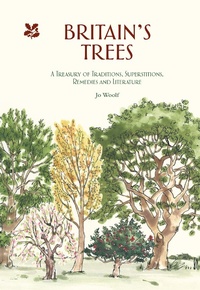
Britain's Trees
A Treasury of Traditions, Superstitions, Remedies and Literature
Published on 1. April 2020
240 pages
978-1-911657-17-0 (ISBN)
Description

A cornucopia of some of Britain's oldest and most beloved native trees, this book weaves together their rich history, folklore and traditions.
This lovely book will enable the reader to identify Britain's trees and enjoy reading the rich folklore and traditions connected with them. From hawthorn to holly, from beech to blackthorn, each of Britain's 40 or so native trees are illustrated and a text weaves together the fascinating natural history, folklore, traditions, and remedies connected with them. The stories of some of Britain's oldest and most beloved trees, some dating back thousands of years, are included too. As well as a fascinating book to dip into, the illustrations mean it also functions as a handy identification guide.
This lovely book will enable the reader to identify Britain's trees and enjoy reading the rich folklore and traditions connected with them. From hawthorn to holly, from beech to blackthorn, each of Britain's 40 or so native trees are illustrated and a text weaves together the fascinating natural history, folklore, traditions, and remedies connected with them. The stories of some of Britain's oldest and most beloved trees, some dating back thousands of years, are included too. As well as a fascinating book to dip into, the illustrations mean it also functions as a handy identification guide.
Reviews / Votes
'This light but interesting work makes a useful companion to more formal identification titles.' * The English Garden *More details
Language
English
Place of publication
Minneapolis
United Kingdom
Publishing group
HarperCollins Publishers
Product notice
Reflowable
File size
16,49 MB
ISBN-13
978-1-911657-17-0 (9781911657170)
Copyright in bibliographic data and cover images is held by Nielsen Book Services Limited or by the publishers or by their respective licensors: all rights reserved.
Schweitzer Classification
Other editions
Additional editions
Jo Woolf | National Trust Books
Britain's Trees
A Treasury of Traditions, Superstitions, Remedies and Literature
Book
03/2020
National Trust Books
€19.00
Article exhausted; check different version
Persons
Jo was born in Shropshire, and now lives with her husband in Argyll. She has always had a passion for writing, along with a lively fascination for history and the natural world. In 2016 she was invited to become Writer in Residence at the Royal Scottish Geographical Society.
Content
- Cover
- Title
- Dedication
- Contents
- Introduction
- The Trees
- Acknowledgements
- Select Bibliography
- Index
- Copyright
