

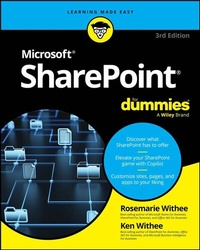
SharePoint For Dummies
Description

Become a SharePoint power user with this quick-and-easy guide to its many features
SharePoint For Dummies is your trusted instruction manual as you learn to create sites, upload and manage documents, collaborate with coworkers, and streamline workflows. Updated to include new AI functionality with Copilot, this edition walks you through the steps you'll need to take to customize SharePoint and take advantage of all it has to offer. You'll also learn how to integrate SharePoint with the tools you already use, so it's easy and seamless to make the shift to online file sharing and version control. You can manage who has access to view and edit files, and you can track, automate, and summarize content-all with this powerful Microsoft platform, and SharePoint For Dummies as your guide.
- Learn what SharePoint does and discover features that can improve your processes
- Integrate Microsoft's AI Copilot to do more with Sharepoint
- Customize your SharePoint sites by applying styles and custom layouts
- Improve collaboration and boost efficiency with advanced SharePoint features
This easy-to-follow book is a must for anyone looking for quick answers to SharePoint questions-whether you have experience with SharePoint or are just getting started.
More details
Other editions
Additional editions
Persons
Rosemarie Withee is a technology professional and the coauthor of the most recent editions of Microsoft Teams For Dummies and Office 365 For Dummies.
Ken Withee is now part of the Microsoft Azure team. He is a former SharePoint consultant and a coauthor of previous editions of the SharePoint For Dummies series.
Content
Introduction 1
Part 1: Getting Started with SharePoint 5
Chapter 1: Getting to Know SharePoint 7
Chapter 2: Introducing SharePoint in Microsoft 365 25
Chapter 3: Embracing Artificial Intelligence with Copilot 33
Chapter 4: Wrangling SharePoint Functionality 41
Part 2: Diving Headfirst into SharePoint 49
Chapter 5: Discovering SharePoint in Your Pocket 51
Chapter 6: Understanding SharePoint Sites 59
Chapter 7: Working with Web Pages and Web Parts 71
Chapter 8: Adding Content to SharePoint 93
Chapter 9: Discovering SharePoint in Microsoft Teams 103
Chapter 10: Working with SharePoint from Microsoft Office 111
Chapter 11: Getting Social 121
Part 3: Customizing SharePoint 139
Chapter 12: Customizing SharePoint with Apps 141
Chapter 13: Developing a Custom App 159
Chapter 14: Taking Control of Your Profile and Content 177
Chapter 15: Organizing and Viewing Content 185
Chapter 16: Creating Workflows with Microsoft Power Automate 211
Chapter 17: Getting Answers with Microsoft Forms 219
Part 4: Becoming a SharePoint Administrator 229
Chapter 18: Building Business Apps with Power Apps 231
Chapter 19: Realizing You Are a SharePoint Administrator 241
Chapter 20: Configuring Site Navigation 261
Chapter 21: Creating a Client or Partner Portal 277
Chapter 22: Securing SharePoint 285
Part 5: Managing Enterprise Content 305
Chapter 23: Managing Content and the Content Lifecycle 307
Chapter 24: Finding What You Need with Search 325
Chapter 25: Integrating with Power BI 341
Part 6: The Part of Tens 351
Chapter 26: Ten Ways to Maintain Control with Governance 353
Chapter 27: Ten Ways to Become a SharePoint Server Guru 359
Chapter 28: Ten Hot SharePoint Topics 365
Index 371
