

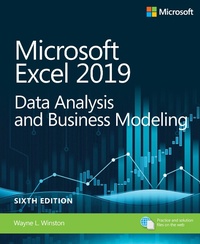
Microsoft Excel 2019 Data Analysis and Business Modeling
6th Edition
Published on 28. March 2019
864 pages
978-1-5093-0608-4 (ISBN)
Description

Master business modeling and analysis techniques with Microsoft Excel 2019 and Office 365 and transform data into bottom-line results. Written by award-winning educator Wayne Winston, this hands-on, scenario-focused guide helps you use Excel to ask the right questions and get accurate, actionable answers. New coverage ranges from Power Query/Get & Transform to Office 365 Geography and Stock data types. Practice with more than 800 problems, many based on actual challenges faced by working analysts.
Solve real business problems with Excel-and build your competitive advantage:
Quickly transition from Excel basics to sophisticated analytics
Use PowerQuery or Get & Transform to connect, combine, and refine data sources
Leverage Office 365's new Geography and Stock data types and six new functions
Illuminate insights from geographic and temporal data with 3D Maps
Summarize data with pivot tables, descriptive statistics, histograms, and Pareto charts
Use Excel trend curves, multiple regression, and exponential smoothing
Delve into key financial, statistical, and time functions
Master all of Excel's great charts
Quickly create forecasts from historical time-based data
Use Solver to optimize product mix, logistics, work schedules, and investments-and even rate sports teams
Run Monte Carlo simulations on stock prices and bidding models
Learn about basic probability and Bayes' Theorem
Use the Data Model and Power Pivot to effectively build and use relational data sources inside an Excel workbook
Automate repetitive analytics tasks by using macros
Solve real business problems with Excel-and build your competitive advantage:
Quickly transition from Excel basics to sophisticated analytics
Use PowerQuery or Get & Transform to connect, combine, and refine data sources
Leverage Office 365's new Geography and Stock data types and six new functions
Illuminate insights from geographic and temporal data with 3D Maps
Summarize data with pivot tables, descriptive statistics, histograms, and Pareto charts
Use Excel trend curves, multiple regression, and exponential smoothing
Delve into key financial, statistical, and time functions
Master all of Excel's great charts
Quickly create forecasts from historical time-based data
Use Solver to optimize product mix, logistics, work schedules, and investments-and even rate sports teams
Run Monte Carlo simulations on stock prices and bidding models
Learn about basic probability and Bayes' Theorem
Use the Data Model and Power Pivot to effectively build and use relational data sources inside an Excel workbook
Automate repetitive analytics tasks by using macros
More details
Edition
6th edition
Language
English
Place of publication
Boston
United States
Publishing group
Microsoft Press,U.S.
Target group
Professional and scholarly
ISBN-13
978-1-5093-0608-4 (9781509306084)
Copyright in bibliographic data and cover images is held by Nielsen Book Services Limited or by the publishers or by their respective licensors: all rights reserved.
Schweitzer Classification
Other editions
Additional editions
Wayne Winston
Microsoft Excel 2019 Data Analysis and Business Modeling
Book
04/2019
6th Edition
Microsoft Press
€47.00
Shipment within 3-4 weeks
Person
Wayne L. Winston is Professor Emeritus of Decision Sciences at Indiana University's Kelley School of Business, where he won 40+ teaching awards. He developed spreadsheet modeling coursework for Harvard Business School Publishing, and has taught or consulted on using Excel to improve decision-making at Microsoft, Cisco, Morgan Stanley, Pfizer, Verizon, the U.S. Navy, U.S. Army, and many other organizations. A two-time Jeopardy! Champion, he co-developed the Dallas Mavericks' player tracking and rating system.
Content
Chapter 1 Basic spreadsheet modeling
Chapter 2 Range names
Chapter 3 Lookup functions
Chapter 4 The INDEX function
Chapter 5 The MATCH function
Chapter 6 Text functions
Chapter 7 Dates and date functions
Chapter 8 Evaluating investment by using net present value criteria
Chapter 9 Internal rate of return
Chapter 10 More Excel financial functions
Chapter 11 Circular references
Chapter 12 IF statements
Chapter 13 Time and time functions
Chapter 14 The Paste Special command
Chapter 15 Three-dimensional formulas and hyperlinks
Chapter 16 The auditing tool
Chapter 17 Sensitivity analysis with data tables
Chapter 18 The Goal Seek command
Chapter 19 Using the Scenario Manager for sensitivity analysis
Chapter 20The COUNTIF, COUNTIFS, COUNT, COUNTA, and COUNTBLANK functions
Chapter 21 The SUMIF, AVERAGEIF, SUMIFS, and AVERAGEIFS functions
Chapter 22 The OFFSET function
Chapter 23 The INDIRECT function
Chapter 24 Conditional formatting
Chapter 25 Sorting in Excel
Chapter 26 Tables
Chapter 27 Spin buttons, scroll bars, option buttons, check
boxes, combo boxes, and group list boxes
Chapter 28 The analytics revolution
Chapter 29 An introduction to optimization with Excel Solver
Chapter 30 Using Solver to determine the optimal product mix
Chapter 31 Using Solver to schedule your workforce
Chapter 32 Using Solver to solve transportation or distribution problems
Chapter 33 Using Solver for capital budgeting
Chapter 34 Using Solver for financial planning
Chapter 35 Using Solver to rate sports teams
Chapter 36 Warehouse location and the GRG Multistart and Evolutionary Solver engines
Chapter 37 Penalties and the Evolutionary Solver
Chapter 38 The traveling salesperson problem
Chapter 39 Importing data from a text file or document
C
Chapter 2 Range names
Chapter 3 Lookup functions
Chapter 4 The INDEX function
Chapter 5 The MATCH function
Chapter 6 Text functions
Chapter 7 Dates and date functions
Chapter 8 Evaluating investment by using net present value criteria
Chapter 9 Internal rate of return
Chapter 10 More Excel financial functions
Chapter 11 Circular references
Chapter 12 IF statements
Chapter 13 Time and time functions
Chapter 14 The Paste Special command
Chapter 15 Three-dimensional formulas and hyperlinks
Chapter 16 The auditing tool
Chapter 17 Sensitivity analysis with data tables
Chapter 18 The Goal Seek command
Chapter 19 Using the Scenario Manager for sensitivity analysis
Chapter 20The COUNTIF, COUNTIFS, COUNT, COUNTA, and COUNTBLANK functions
Chapter 21 The SUMIF, AVERAGEIF, SUMIFS, and AVERAGEIFS functions
Chapter 22 The OFFSET function
Chapter 23 The INDIRECT function
Chapter 24 Conditional formatting
Chapter 25 Sorting in Excel
Chapter 26 Tables
Chapter 27 Spin buttons, scroll bars, option buttons, check
boxes, combo boxes, and group list boxes
Chapter 28 The analytics revolution
Chapter 29 An introduction to optimization with Excel Solver
Chapter 30 Using Solver to determine the optimal product mix
Chapter 31 Using Solver to schedule your workforce
Chapter 32 Using Solver to solve transportation or distribution problems
Chapter 33 Using Solver for capital budgeting
Chapter 34 Using Solver for financial planning
Chapter 35 Using Solver to rate sports teams
Chapter 36 Warehouse location and the GRG Multistart and Evolutionary Solver engines
Chapter 37 Penalties and the Evolutionary Solver
Chapter 38 The traveling salesperson problem
Chapter 39 Importing data from a text file or document
C
