
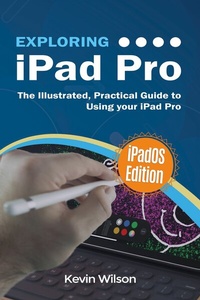
Exploring iPad Pro: iPadOS Edition
Description
Alles über E-Books | Antworten auf Fragen rund um E-Books, Kopierschutz und Dateiformate finden Sie in unserem Info- & Hilfebereich.
Exploring iPad Pro is the perfect companion for your new iPad Pro. Written by best-selling technology author, lecturer, and computer trainer Kevin Wilson, Exploring iPad Pro is packed with step-by-step instructions, full color photos, illustrations, helpful tips and video demos.
Updated to cover the iPadOS update, Exploring iPad Pro will help you :
Upgrade your iPad to iPadOS
The new features introduced in iPadOS
Find your way around the dock, menus, and icons
Navigate with touch gestures: tap, drag, pinch, spread and swipe
Multi-task with slide over, split view, and drag & drop
Use iPad as a second screen on your Mac with SideCar.
Use control centre, lock screen, notifications, and handoff
Connect external keyboards as well as the on-screen keyboard
Use Apple Pencil to draw, annotate, and take notes
Get to know Siri, voice dictation, and recording voice memos
Communicate with email, FaceTime, and iMessage
Use digital touch, and peer-to-peer payments
Browse the web with Safari web browser
Take, enhance, and share photos and video
Stream music with Apple Music, buy tracks & albums from iTunes Store
Stream TV programs & movies with the new Apple TV App
Use Files App, as well as Maps, News, Apple Books, and Notes
Get productive with Pages, Keynote, and Numbers
Setup and use Apple Pay, Calendar, and Contacts, and more...
In addition, you will learn how to make the most of the new features of iPadOS with clear explanations and video demos to help you along the way.
Finally, maintenance, system updates, backups, and general housekeeping tips complete this invaluable guide. You'll want to keep this edition handy as you explore the new iPadOS.
All prices
More details
Other editions
Additional editions

System requirements
File format: ePUB
Copy protection: Adobe-DRM (Digital Rights Management)
System requirements:
- Computer (Windows; MacOS X; Linux): Install the free reader Adobe Digital Editions prior to download (see eBook Help).
- Tablet/smartphone (Android; iOS): Install the free app Adobe Digital Editions or the app PocketBook before downloading (see eBook Help).
- E-reader: Bookeen, Kobo, Pocketbook, Sony, Tolino and many more (not Kindle).
The file format ePub works well for novels and non-fiction books – i.e., „flowing” text without complex layout. On an e-reader or smartphone, line and page breaks automatically adjust to fit the small displays.
This eBook uses Adobe-DRM, a „hard” copy protection. If the necessary requirements are not met, unfortunately you will not be able to open the eBook. You will therefore need to prepare your reading hardware before downloading.
Please note: We strongly recommend that you authorise using your personal Adobe ID after installation of any reading software.
For more information, see our ebook Help page.
File format: ePUB
Copy protection: without DRM (Digital Rights Management)
System requirements:
- Computer (Windows; MacOS X; Linux): Use a reader that can handle the file format ePUB, such as Adobe Digital Editions or FBReader – both free (see eBook Help).
- Tablet/Smartphone (Android; iOS): Install the free app Adobe Digital Editions or the app PocketBook (see eBook Help).
- E-reader: Bookeen, Kobo, Pocketbook, Sony, Tolino and many more (not Kindle).
The file format ePUB works well for novels and non-fiction books – i.e., 'flowing' text without complex layout. On an e-reader or smartphone, line and page breaks automatically adjust to fit the small displays.
This eBook does not use copy protection or Digital Rights Management
For more information, see our eBook Help page.