

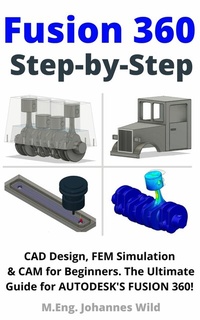
Fusion 360 | Step by Step
Description

!FUSION 360 is available as a free license for hobby and private users!
Fusion 360 Step by Step, the book for everyone who wants to learn CAD design, FEM simulation, animation, rendering and manufacturing of parts and assemblies from an engineer (M.Eng.) with ease. And all this, with a FREE (only for private users) professional software and by means of amazing hands-on examples and design projects (e.g. 4-cylinder-engine).
This book is the all-in-one for beginners!
Are you interested in CAD design, in creating three-dimensional objects for 3D printing or other applications (model making, prototypes, design elements,...)? Are you looking for a practical and compact beginner course for Fusion 360 from Autodesk?
Then this Fusion 360 basics book has got you covered! In this comprehensive beginner's course you will learn all the basics you need to use Fusion 360 in detail and step by step. Take a look inside the book right now and get your copy of this handy CAD, CAM, & FEM tutorial as an ebook or paperback!
Numerous illustrations (more than 200 full-color images) enhance the book's explanations, creating a clear and easy introduction to design, simulation, and manufacturing.
Fusion 360 combines and links several engineering disciplines such as CAD ('Computer Aided Design'), CAM ('Computer Aided Manufacturing') and FEM ('Finite Element Method'), summarized: CAE ('Computer Aided Engineering') in one software. With Fusion 360 you can not only design parts, but also perform simulations and animations, as well as create programming for a CNC machine. The main focus of this book is on design with Fusion 360, i.e. the CAD design section of the software. However, the other features of Fusion 360 will not be neglected and will of course be covered in detail, so don't worry!
This hands-on book covers everything you need to know to design (CAD), animate, render, simulate (FEM) and fabricate (CAM & Technical Drawings) 3D parts on your PC using Fusion 360. You will learn how to use Fusion 360 from Autodesk step by step and from scratch by the knowledge of an engineer. Everything from creating a 2D sketch to using Fusion 360's features to creating a three-dimensional object is included. The software and its features are presented in detail and easy to understand using amazing design projects.
The advantages of this book at a glance:
Learn step-by-step basic explanations on how to use FUSION 360 with the guidance of an engineer (Master of Engineering) and experienced user
Learn hands-on and through awesome sample projects
Get to know all sections of Fusion 360 (CAD/Design, FEM/Simulation, Rendering, Animation, Manufacturing/CAM, Technical Drawings)
Get a simple, straightforward & fast introduction to Fusion 360
Easy to follow explanations, therefore ideal for beginners, novices and intermediates.
Learn the essentials in no time! Compact and to the point:
Number of pages: approx. 179 pages
TAKE A LOOK INSIDE RIGHT NOW!
START LEARNING CAD DESIGN, FEM SIMULATION & CAM with FUSION 360!
All prices
More details
Other editions
Additional editions
Person
Johannes Wild is an engineer (B.Sc. & M.Eng.) and non-fiction author. The author is in his early 30s and lives in a small town in Bavaria, Germany. He also completed his bachelor's and master's degrees in Bavaria, Germany. Johannes Wild has a strong interest in modern technology, especially computer-aided design and simulation (CAD, CAM, FEM), as well as electrical engineering & electronics, programming, and 3D printing, both through his time at university and through his hobbies. Through his five years of regular study, he has been able to acquire a high level of knowledge in these areas. He uses this knowledge to create books and learning materials on many technical topics with a lot of passion and commitment. In this way, the author wants to reach people of all ages and backgrounds to share technical knowledge in a compact, and especially understandable and descriptive way. Many of his books have been translated into several languages.
Deutsch:
Johannes Wild ist Ingenieur (B.Sc. & M.Eng.) und Sachbuchautor. Der Autor ist Anfang 30 und lebt in einer Kleinstadt in Bayern. Sein Bachelor und Masterstudium hat er ebenfalls in Bayern absolviert. Johannes Wild hat sowohl durch seine Studienzeit, als auch durch seine Hobbys ein starkes Interesse an moderner Technologie, insbesondere an computergestützter Konstruktion und Simulation (CAD, CAM, FEM), sowie Elektrotechnik & Elektronik, Programmierung und dem 3D-Druck. Durch seine fünfjährige Regelstudienzeit hat er sich in diesen Bereichen ein hohes Wissensspektrum aneignen können. Er nutzt dieses Wissen, um mit viel Leidenschaft und Engagement, Bücher und Lernmaterialien zu vielen technischen Themenbereichen zu erstellen. Auf diese Weise möchte der Autor Menschen aller Altersklassen und Herkunft erreichen, um technisches Wissen auf eine kompakte, und vor allem verständliche und anschauliche Weise zu vermitteln. Viele seiner Bücher wurden bereits in
