

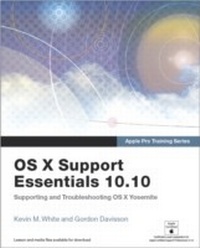
Apple Pro Training Series
OS X Support Essentials 10.10: Supporting and Troubleshooting OS X Yosemite
1st Edition
Published on 12. January 2015
936 pages
978-0-13-403771-4 (ISBN)
Description

This is the official curriculum of the Apple Yosemite 101: OS X Support Essentials 10.10 course and preparation for Apple Certified Support Professional (ACSP) 10.10 certification-as well as a top-notch primer for anyone who needs to support, troubleshoot, or optimize OS X Yosemite. This guide provides comprehensive coverage of Yosemite and is part of the Apple Pro Training series-the only Apple-certified books the market. Designed for support technicians, help desk specialists, and ardent Mac users, this guide takes you deep inside the Yosemite operating system. Readers will find in-depth, step-by-step instruction on everything from installing and configuring Yosemite to managing networks and system administration. Whether you run a computer lab or an IT department, you'll learn to set up users, configure system preferences, manage security and permissions, use diagnostic and repair tools, troubleshoot peripheral devices, and more-all on your way to preparing for the industry-standard ACSP certification.
Covers updated system utilities and new features of OS X Yosemite.
Features authoritative explanations of underlying technologies, troubleshooting, system administration, and much more.
Focused lessons take you step by step through practical, real-world tasks.
Lesson files and bonus material available for download-including lesson review questions summarizing what you've learned to prepare you for the Apple certification exam.
Covers updated system utilities and new features of OS X Yosemite.
Features authoritative explanations of underlying technologies, troubleshooting, system administration, and much more.
Focused lessons take you step by step through practical, real-world tasks.
Lesson files and bonus material available for download-including lesson review questions summarizing what you've learned to prepare you for the Apple certification exam.
More details
Series
Language
English
Place of publication
Berkeley
United States
Publishing group
Pearson Education (US)
Target group
College/higher education
ISBN-13
978-0-13-403771-4 (9780134037714)
Copyright in bibliographic data and cover images is held by Nielsen Book Services Limited or by the publishers or by their respective licensors: all rights reserved.
Schweitzer Classification
Other editions
Additional editions
Kevin M. White | Gordon Davisson
Apple Pro Training Series
OS X Support Essentials 10.10: Supporting and Troubleshooting OS X Yosemite
Book
02/2015
Peachpit Press Publications
€60.70
Article exhausted; check for reprint
Persons
Kevin M. White has been an Apple Certified Trainer since 2000 and is a regular presenter at industry events. Kevin co-authored his first book in 2005 and has subsequently authored or co-authored several books including OS X Support Essentials 10.9 and Managing Apple Devices. Kevin also serves the Apple community through his company, Macjutsu Inc., which is dedicated to sharing knowledge of the "Apple way."
Gordon Davisson has spent over 20 years working with Apple hardware and software and designing and implementing networking solutions. An Apple Certified System Administrator, Gordon has also been an Apple Certified Trainer since 2002 and is currently a consultant and instructor teaching multiple Mac and OS X courses. Gordon was the co-author of OS X Support Essentials 10.9.
Gordon Davisson has spent over 20 years working with Apple hardware and software and designing and implementing networking solutions. An Apple Certified System Administrator, Gordon has also been an Apple Certified Trainer since 2002 and is currently a consultant and instructor teaching multiple Mac and OS X courses. Gordon was the co-author of OS X Support Essentials 10.9.
Content
About This Guide
Installation and Configuration
Lesson 1 Install OS X Yosemite
Lesson 2 Setup and Configuration
Lesson 3 OS X Recovery
Lesson 4 OS X Software Updates
User Accounts
Lesson 5 User Accounts
Lesson 6 User Home Folders
Lesson 7 System Security
Lesson 8 Keychain Management
File Systems
Lesson 9 File Systems and Storage
Lesson 10 FileVault
Lesson 11 Permissions and Sharing
Lesson 12 File System Troubleshooting
Data Management
Lesson 13 Hidden Items, Shortcuts, and File Archives
Lesson 14 System Resources
Lesson 15 Metadata and Spotlight
Lesson 16 Time Machine
Applications and Processes
Lesson 17 Application Installation
Lesson 18 Document Management
Lesson 19 Application Management and Troubleshooting
Network Configuration
Lesson 20 Network Essentials
Lesson 21 Advanced Network Configuration
Lesson 22 Network Troubleshooting
Network Services
Lesson 23 Network Services
Lesson 24 Host Sharing and Personal Firewall
System Management
Lesson 25 Peripherals and Drivers
Lesson 26 Print and Scan
Lesson 27 System Troubleshooting
Index
Appendix A Lesson Review Questions and Answers (ONLINE)
Appendix B Additional Resources (ONLINE)
Installation and Configuration
Lesson 1 Install OS X Yosemite
Lesson 2 Setup and Configuration
Lesson 3 OS X Recovery
Lesson 4 OS X Software Updates
User Accounts
Lesson 5 User Accounts
Lesson 6 User Home Folders
Lesson 7 System Security
Lesson 8 Keychain Management
File Systems
Lesson 9 File Systems and Storage
Lesson 10 FileVault
Lesson 11 Permissions and Sharing
Lesson 12 File System Troubleshooting
Data Management
Lesson 13 Hidden Items, Shortcuts, and File Archives
Lesson 14 System Resources
Lesson 15 Metadata and Spotlight
Lesson 16 Time Machine
Applications and Processes
Lesson 17 Application Installation
Lesson 18 Document Management
Lesson 19 Application Management and Troubleshooting
Network Configuration
Lesson 20 Network Essentials
Lesson 21 Advanced Network Configuration
Lesson 22 Network Troubleshooting
Network Services
Lesson 23 Network Services
Lesson 24 Host Sharing and Personal Firewall
System Management
Lesson 25 Peripherals and Drivers
Lesson 26 Print and Scan
Lesson 27 System Troubleshooting
Index
Appendix A Lesson Review Questions and Answers (ONLINE)
Appendix B Additional Resources (ONLINE)
