

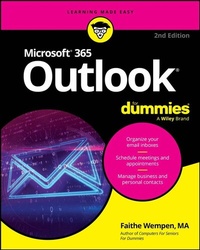
Microsoft 365 Outlook For Dummies
Description

Get up to speed on Microsoft's world-famous emailing, scheduling, collaborating, and organizing super-app
Microsoft Outlook can do pretty much anything for you-short of cooking you a steak dinner. It can deliver and sort your email, filter out the junk, help you organize your life, send data to the cloud, sync up your various devices, and even integrate with iOS and Android. And in the latest edition of Microsoft Outlook For Dummies you'll learn how to do all of that, and more!
Discover how to create automated mail-handling rules, translate messages into English or other languages, and share your calendar with other people. This latest edition even walks you through each of the four different versions of Outlook and their ideal use cases. You'll also find:
- Straightforward content that shows you how to draft and send emails, organize your calendars, and set up to-do lists, tasks, and reminders
- Easy explanations of hidden and advanced features that very few people know about or use, setting you up to impress your coworkers!
- Navigation tips for the Microsoft Outlook interface
Perfect for novices who are brand-new to Outlook, Microsoft Outlook For Dummies is also a must-buy resource for email veterans looking to pick up the latest tips for the newest versions of Microsoft's world-famous email software.
More details
Other editions
Additional editions
Person
Faithe Wempen, M.A., is a Microsoft Office Master Instructor, an instructional designer, and the author of over 160 books-including Computers For Seniors For Dummies-that empower consumers to make the most of their personal computers and applications.
Content
Introduction 1
Part 1: Getting Started with Outlook 365 5
Chapter 1: A First Look at Outlook 365 7
Chapter 2: Taking a Tour of the Outlook 365 Interface 21
Chapter 3: Getting on the Fast Track with Handy Shortcuts 37
Part 2: Taming the Email Beast 51
Chapter 4: Email Essentials 53
Chapter 5: Taking Email to the Next Level 75
Chapter 6: Conquering Your Mountain of Messages 99
Chapter 7: Managing Multiple Email Accounts and Data Files 139
Chapter 8: Merging Mail from Outlook to Microsoft Word 159
Part 3: Keeping Track of Contacts, Dates, Tasks, and More 173
Chapter 9: Your Little Black Book: Managing Your Contacts 175
Chapter 10: Organizing Your Schedule with the Calendar 197
Chapter 11: Staying on Task: To-Do Lists and More 223
Chapter 12: Using Exchange-Only Features 249
Chapter 13: Integrating Outlook with Google and iCloud 271
Part 4: Exploring Other Versions of Outlook 283
Chapter 14: Using Outlook for Windows 285
Chapter 15: Using Outlook on the Web 301
Chapter 16: Using Outlook for iOS and Android Devices 317
Part 5: The Part of Tens 331
Chapter 17: Ten (Plus One) Shortcuts Worth Taking 333
Chapter 18: Ten Ways to Customize Outlook 341
Chapter 19: Ten Things You Can't Do with Outlook 361
Index 367
