

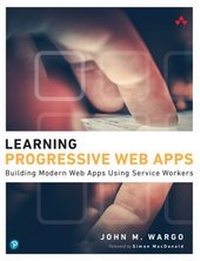
Learning Progressive Web Apps
1st Edition
Published on 27. April 2021
272 pages
978-0-13-648425-7 (ISBN)
Description

Use Service Workers to Turbocharge Your Web Apps
"You have made an excellent decision in picking up this book. If I was just starting on my learning path to mastery of Progressive Web Apps, there are not many folks I would trust more to get me there than John."
-Simon MacDonald, Developer Advocate, Adobe Software developers have two options for the apps they build: native apps targeting a specific device or web apps that run on any device. Building native apps is challenging, especially when your app targets multiple system types-i.e., desktop computers, smartphones, televisions-because user experience varies dramatically across devices.
Service Workers-a relatively new technology-make it easier for web apps to bridge the gap between native and web capabilities. In Learning Progressive Web Apps, author John M. Wargo demonstrates how to use Service Workers to enhance the capabilities of a web app to create Progressive Web Apps (PWA). He focuses on the technologies that enable PWAs and how to use those technologies to enhance your web apps to deliver a more native-like experience.
Build web apps a user can easily install on their local system and that work offline or on low-quality networks
Utilize caching strategies that give you control over which app resources are cached and when
Deliver background processing in a web application
Implement push notifications that enable an app to easily engage with users or trigger action from a remote server
Throughout the book, Wargo introduces each core concept and illustrates the implementation of each capability through several complete, operational examples. You'll start with simple web apps, then incrementally expand and extend them with state-of-the-art features. All example source code is available on GitHub, and additional resources are available on the author's companion site, learningpwa.com.
Register your book for convenient access to downloads, updates, and/or corrections as they become available. See inside book for details.
"You have made an excellent decision in picking up this book. If I was just starting on my learning path to mastery of Progressive Web Apps, there are not many folks I would trust more to get me there than John."
-Simon MacDonald, Developer Advocate, Adobe Software developers have two options for the apps they build: native apps targeting a specific device or web apps that run on any device. Building native apps is challenging, especially when your app targets multiple system types-i.e., desktop computers, smartphones, televisions-because user experience varies dramatically across devices.
Service Workers-a relatively new technology-make it easier for web apps to bridge the gap between native and web capabilities. In Learning Progressive Web Apps, author John M. Wargo demonstrates how to use Service Workers to enhance the capabilities of a web app to create Progressive Web Apps (PWA). He focuses on the technologies that enable PWAs and how to use those technologies to enhance your web apps to deliver a more native-like experience.
Build web apps a user can easily install on their local system and that work offline or on low-quality networks
Utilize caching strategies that give you control over which app resources are cached and when
Deliver background processing in a web application
Implement push notifications that enable an app to easily engage with users or trigger action from a remote server
Throughout the book, Wargo introduces each core concept and illustrates the implementation of each capability through several complete, operational examples. You'll start with simple web apps, then incrementally expand and extend them with state-of-the-art features. All example source code is available on GitHub, and additional resources are available on the author's companion site, learningpwa.com.
Register your book for convenient access to downloads, updates, and/or corrections as they become available. See inside book for details.
All prices
More details
Edition
1. Auflage
Language
English
Place of publication
Boston
United States
Publishing group
Pearson Education (US)
Target group
Professional and scholarly
File size
7,89 MB
ISBN-13
978-0-13-648425-7 (9780136484257)
Copyright in bibliographic data and cover images is held by Nielsen Book Services Limited or by the publishers or by their respective licensors: all rights reserved.
Schweitzer Classification
Other editions
Additional editions
Person
John M. Wargo is a product manager, software developer, writer, presenter, father, husband, and geek. He spent more than 30 years working as a professional software developer, first as a hobbyist, then in enterprise software, and finally, for the last 15 years, in mobile development. He is the author of six books on mobile development and was a long-time contributor to the open-source Apache Cordova project. By day, he's a principal program manager on the App + Cloud Experiences team at Microsoft. His website is johnwargo.com.
Content
Foreword xi
Preface xii
Acknowledgments xv
About the Author xvi
Chapter 1: Introducing Progressive Web Apps 1
First, a Little Bit of History 2
PWAs Are . . . 2
Making a Progressive Web App 4
PWA Market Impact 6
PWAs and App Stores 7
Wrap-Up 7
Chapter 2: Web App Manifest Files 9
Save to Home Screen 11
Making a Web App Installable 16
Anatomy of a Web App Manifest 17
Controlling the Installation Experience 26
Preparing to Code 27
App Installation in Action 29
Troubleshooting 41
Manifest Generation and More 42
Wrap-Up 42
Chapter 3: Service Workers 43
PWA News 43
Introducing Service Workers 44
Preparing to Code 46
Registering a Service Worker 52
Service Worker Scope 60
The Service Worker Lifecycle 60
Wrap-Up 66
Chapter 4: Resource Caching 67
Service Worker Cache Interface 67
Preparing to Code 69
Caching Application Resources 70
Implementing Additional Caching Strategies 91
Wrap-Up 98
Chapter 5: Going the Rest of the Way Offline with Background Sync 99
Introducing Background Sync 100
Offline Data Sync 103
Choosing a Sync Database 105
Preparing to Code 110
Enhancing the PWA News Application 111
Wrap-Up 128
Chapter 6: Push Notifications 129
Introducing Push Notifications 129
Remote Notification Architecture 132
Preparing to Code 134
Generating Encryption Keys 134
Validating Notification Support 138
Checking Notification Permission 138
Getting Permission for Notifications 139
Local Notifications 142
Notification Options 144
Subscribing to Notifications 148
Unsubscribing from Notifications 154
Remote Notifications 156
Dealing with Subscription Expiration 162
Sending Notifications to Push Services 162
Wrap-Up 164
Chapter 7: Passing Data between Service Workers and Web Applications 165
Preparing to Code 166
Send Data from a Web App to a Service Worker 167
Send Data from a Service Worker to a Web App 169
Two-Way Communication Using MessageChannel 171
Wrap-Up 180
Chapter 8: Assessment, Automation, and Deployment 181
Assessing PWA Quality Using Lighthouse 181
Preparing to Code 182
PWABuilder 190
PWAs and the Microsoft Store 202
Wrap-Up 205
Chapter 9: Automating Service Workers with Google Workbox 207
Introducing Workbox 207
Generating a Precaching Service Worker 208
Add Precaching to an Existing Service Worker 215
Controlling Cache Strategies 218
Wrap-Up 224
Index 225
Preface xii
Acknowledgments xv
About the Author xvi
Chapter 1: Introducing Progressive Web Apps 1
First, a Little Bit of History 2
PWAs Are . . . 2
Making a Progressive Web App 4
PWA Market Impact 6
PWAs and App Stores 7
Wrap-Up 7
Chapter 2: Web App Manifest Files 9
Save to Home Screen 11
Making a Web App Installable 16
Anatomy of a Web App Manifest 17
Controlling the Installation Experience 26
Preparing to Code 27
App Installation in Action 29
Troubleshooting 41
Manifest Generation and More 42
Wrap-Up 42
Chapter 3: Service Workers 43
PWA News 43
Introducing Service Workers 44
Preparing to Code 46
Registering a Service Worker 52
Service Worker Scope 60
The Service Worker Lifecycle 60
Wrap-Up 66
Chapter 4: Resource Caching 67
Service Worker Cache Interface 67
Preparing to Code 69
Caching Application Resources 70
Implementing Additional Caching Strategies 91
Wrap-Up 98
Chapter 5: Going the Rest of the Way Offline with Background Sync 99
Introducing Background Sync 100
Offline Data Sync 103
Choosing a Sync Database 105
Preparing to Code 110
Enhancing the PWA News Application 111
Wrap-Up 128
Chapter 6: Push Notifications 129
Introducing Push Notifications 129
Remote Notification Architecture 132
Preparing to Code 134
Generating Encryption Keys 134
Validating Notification Support 138
Checking Notification Permission 138
Getting Permission for Notifications 139
Local Notifications 142
Notification Options 144
Subscribing to Notifications 148
Unsubscribing from Notifications 154
Remote Notifications 156
Dealing with Subscription Expiration 162
Sending Notifications to Push Services 162
Wrap-Up 164
Chapter 7: Passing Data between Service Workers and Web Applications 165
Preparing to Code 166
Send Data from a Web App to a Service Worker 167
Send Data from a Service Worker to a Web App 169
Two-Way Communication Using MessageChannel 171
Wrap-Up 180
Chapter 8: Assessment, Automation, and Deployment 181
Assessing PWA Quality Using Lighthouse 181
Preparing to Code 182
PWABuilder 190
PWAs and the Microsoft Store 202
Wrap-Up 205
Chapter 9: Automating Service Workers with Google Workbox 207
Introducing Workbox 207
Generating a Precaching Service Worker 208
Add Precaching to an Existing Service Worker 215
Controlling Cache Strategies 218
Wrap-Up 224
Index 225
