

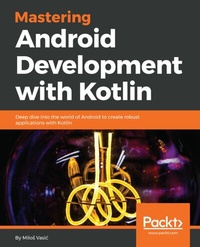
Mastering Android Development with Kotlin
Deep dive into the world of Android to create robust applications with Kotlin
Published on 8. July 2025
378 pages
978-1-78847-466-5 (ISBN)
Description

No detailed description available for "Mastering Android Development with Kotlin".
More details
Edition
Digital original
Language
English
Place of publication
Birmingham
United Kingdom
Target group
Professional and scholarly
US School Grade: College Graduate Student
Edition type
Digital original
File size
18,20 MB
ISBN-13
978-1-78847-466-5 (9781788474665)
Copyright in bibliographic data and cover images is held by Nielsen Book Services Limited or by the publishers or by their respective licensors: all rights reserved.
Schweitzer Classification
Other editions
Additional editions
Milo¿ Vasi¿
Mastering Android Development with Kotlin
Book
11/2017
Packt Publishing
€56.60
Shipment within 3-4 weeks
Person
Vasic Milos :
Milo Vasi is a software engineer, author and open source enthusiasts. Milo holds a Bachelor degree in Programming of computer graphics and Master degree in the field of Android programming, both degrees he obtained at the Singidunum University. He published his first book Fundamental Kotlin in October 2016 and thus achieved his dream of becoming an author.
Milo Vasi is a software engineer, author and open source enthusiasts. Milo holds a Bachelor degree in Programming of computer graphics and Master degree in the field of Android programming, both degrees he obtained at the Singidunum University. He published his first book Fundamental Kotlin in October 2016 and thus achieved his dream of becoming an author.
Content
- Cover
- Title Page
- Copyright
- Credits
- About the Author
- Acknowledgments
- About the Reviewer
- www.PacktPub.com
- Customer Feedback
- Table of Contents
- Preface
- Chapter 1: Starting with Android
- Why Kotlin?
- Kotlin for Android - it's official
- Downloading and configuring Android Studio
- Setting up Android emulators
- Creating a new AVD instance
- Duplicating an existing AVD and modifying it by need
- Android Debug Bridge
- Other important tools
- Initializing a Git repository
- Creating an Android project
- Setting up Gradle
- Explaining directory structure
- Defining build types and flavors
- Additional libraries
- Getting familiar with Android Manifest
- Main Application class
- Your first screen
- Summary
- Chapter 2: Building and Running
- Running your first Android application
- Meet the Logcat
- First case
- Using the Gradle build tool
- Debug your application
- Summary
- Chapter 3: Screens
- Analyzing the mockup plan
- Defining application activities
- Android layouts
- Using EditText views
- The margins attribute
- The padding attribute
- Checking out the gravity attribute
- Looking at other attributes
- Understanding Android Context
- Understanding fragments
- Fragment manager
- Fragments stack
- Creating View Pager
- Making animations with transitions
- Dialog fragments
- Notifications
- Other important UI components
- Summary
- Chapter 4: Connecting Screen Flow
- Creating an application bar
- Using the navigation drawer
- Connecting activities
- Looking deeper into Android Intents
- Passing information between activities and fragments
- Summary
- Chapter 5: Look and Feel
- Themes in the Android Framework
- Styles in Android
- Working with assets
- Using custom fonts
- Applying coloring
- Make your buttons look pretty
- Setting animations
- Animation sets in Android
- Summary
- Chapter 6: Permissions
- Permissions from Android Manifest
- Requesting permissions
- Doing it the Kotlin way
- Summary
- Chapter 7: Working with Databases
- Introduction to SQLite
- Benefits
- Describing our database
- CRUD operations
- Insert CRUD operation
- Update CRUD operation
- Delete CRUD operation
- Select CRUD operation
- Tying things together
- Summary
- Chapter 8: Android Preferences
- What are Android preferences?
- How can you use them?
- Editing (storing) preferences
- Removing preferences
- Defining your own preferences manager
- Summary
- Chapter 9: Concurrency in Android
- Introduction to Android concurrency
- Main thread
- Handlers and threads
- AsyncTask
- Understanding Android Looper
- Preparing the Looper
- Delayed execution
- Summary
- Chapter 10: Android Services
- Service categorization
- Foreground Android services
- Background Android services
- Bound Android services
- Android service basics
- Declaring your service
- Starting the service
- Stopping the service
- Binding to Android service
- Stopping the service
- Service lifecycle
- Defining the main application service
- Defining the intent service
- Summary
- Chapter 11: Messaging
- Understanding Android broadcasts
- System broadcasts
- Listening for broadcasts
- Registering from the context
- Receivers execution
- Sending broadcasts
- Creating your own broadcast messages
- Using on boot and on shutdown broadcasts
- Listening for network events
- Summary
- Chapter 12: Backend and API
- Identifying entities used
- Working with data classes
- Connect data models to a database
- Introduction to Retrofit
- Defining Retrofit service
- Building a Retrofit service instance
- Introduction to Gson with Kotson library
- What else is available?
- Retrofit alternative
- Gson alternative
- Executing our first API call
- Content providers
- Android adapters
- Content loaders
- Data binding
- Using lists
- Using grids
- Implementing drag and drop
- Summary
- Chapter 13: Tuning Up for High Performance
- Optimizing layouts
- Optimizing battery life
- Keeping your application responsive
- Summary
- Chapter 14: Testing
- Adding dependencies
- Updating folder structure
- Writing your first test
- Using test suites
- How to test UI
- Running tests
- Running unit tests
- Running instrumentation tests
- Summary
- Chapter 15: Migration to Kotlin
- Preparing the migration
- Danger signs
- Updating dependencies
- Converting classes
- Refactoring and cleanup
- Summary
- Chapter 16: Deploying Your Application
- Preparing for deployment
- Code obfuscation
- Signing your application
- Publishing to Google Play
- Summary
- Index
