

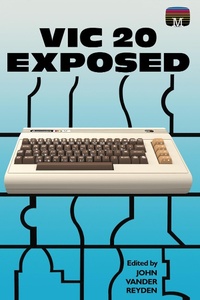
VIC20 Exposed
Published on 31. March 2022
174 pages
978-1-78982-956-3 (ISBN)
Description

First published in 1983, this user-friendly guide to the VIC 20 helped many owners of the much-loved home computer understand their machine to a whole new level. Considered now to have been well ahead of its time, the VIC 20 was the first computer ever to sell one million units and still has a dedicated fanbase.* * *As the original publisher Melbourne House wrote:Now you can understand all the mysteries of your VIC 20, without having to struggle through its complex user's guide. VIC 20 Exposed gives an in-depth explanation of the entire VIC 20 system in a clear and easy to follow manner. With this book, every VIC 20 owner will be able to understand how this versatile home computer actually works.Every function and programming variable is carefully explained, and with the aid of the many demonstration programs, this book will teach you how to take full advantage of all the VIC 20's impressive capabilities. You'll soon be achieving effects more spectacular than you believed possible from a standard VIC 20.VIC 20 Exposed even contains a special section that gives an excellent insight into every aspect of the VIC 20's hardware operation. Because this book is designed to take you through the VIC 20's entire operation from beginning to end, VIC 20 Exposed is an essential aid to every VIC 20 owner, from first time computer users right up to the serious programmer.* * *Acorn Books is proud to present its Retro Reproduction Series, a collection of classic computing works from the 1980s and 90s, lovingly reproduced in the 21st century. From standards of programming reference no self-respecting microcomputer programmer would be without, to obscure works not found in print anywhere else, these modern reprints are perfect for any connoisseur of retro computing.
More details
Other editions
Additional editions
Content
- Cover
- Contents
- Front Matter
- Publisher Information
- VIC 20 Exposed
- Chapter 1
- Programming in Basic
- Immediate and Program Modes
- Control Structures
- Data Structures
- Bits and Bytes
- Characters
- Variables
- Arrays
- Operators
- Arithmetic Operators
- String Operators
- Relational Operators
- Binary and Hexidecimal Number Systems
- Masks
- Table of Operator Procedences
- Chapter 2
- VIC20 BASIC commands
- Chapter 3
- Advanced BASIC techniques
- Compressing BASIC Programs
- Abbreviations for BASIC keywords
- Appending BASIC Programs
- BASIC Program Storage format
- VIC20 BASIC Keyword codes
- Clearing the Keyboard Buffer
- Routines Using the Keyboard Buffer
- Merge Routine
- Chapter 4
- Graphics
- Graphics Memory
- Low Resolution Graphics
- Screen Background and Border Colours
- Character Colour
- Multicolour Mode
- Screen Memory
- Character Memory
- The Character Table
- Designing your own Characters
- Accessing both Custom and Built-in Character Sets
- Where to put the New Character Set
- High Resolution Graphics
- Multicolour Characters
- Chapter 5
- Sound
- Tone Registers
- Attack and Decay of Notes
- Saving and Loading Music
- Noise Register
- Chapter 6
- External Devices
- Datasette
- Floppy Disk Drives
- 1515 Graphics Printer
- Chapter 7
- Games Controls
- Keyboard
- Joystick
- Paddles
- Chapter 8
- Hardware
- Inside the VIC20
- The microprocessory
- The Video Interface Chip
- The Video RAM
- The Colour RAM
- The Internal Registers of the VIC
- Chapter 9
- Machine Language Programming
- The Case for Machine Language
- Inputting, Saving, and Loading Machine Language Programs
- Programming in Machine Language
- Registers
- Addressing Modes
- The 6502 Instruction Set
- Interrupt driven Subroutines
- Examples and Handy Routines
- Back Matter
- Appendices
- A: CHR$ Value Codes/Screen Codes/ASCII Codes
- B: Complete Memory Map
- C: Keyboard Graphics and how to get them
- D: Useful ROM Routines (KERNAL)
- E: Background/Border Colour Codes
- F: Memory Allocation
- G: Basic Error Messages
- H: Current Key Pressed
- I: Basic Routines available from M/C
