

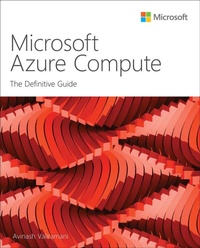
Microsoft Azure Compute
The Definitive Guide
1st Edition
Published on 17. June 2022
320 pages
978-0-13-756466-8 (ISBN)
Description

Proven best practices for success with every Azure compute service!
Compute services are key to most Azure cloud solutions, but maximizing their value requires best-practice planning, design, deployment, and operations. Now, leading consultant Avinash Valiramani presents expert guidance for driving maximum value from Microsoft's portfolio of Azure compute services for IaaS, PaaS, and FaaS. Drawing on his extensive work with Microsoft's Azure teams, he covers Azure VMs, VM Scale Sets, App Services, Azure Virtual Desktops, Azure Container Instances, Azure Functions, Azure Batch, and other Compute services. Whatever your role in delivering efficient, scalable compute services, this deep dive will help you make the most of your Azure investment.
Leading Azure consultant Avinash Valiramani shows how to:
Dive deeply into the frequently used Azure Compute services to better understand how each service works
Walk through configuring each compute service and its related features and options
Size, price, and create Azure VMs, and deliver the right levels of redundancy and availability
Use VM Scale Sets (VMSS) to integrate VMs with load balancing and autoscaling
Host web applications, mobile app back ends, and REST APIs via Azure App Service
Run desktops-as-a-service at scale with Azure Virtual Desktop (AVD)
Easily deploy containers on demand with Azure Container Instances (ACIs)
Use serverless Azure Functions to build web APIs, process streams, and manage message queues
About this Book
For everyone interested in Azure infrastructure, including IT/cloud admins, security specialists, developers, engineers, and others at all levels of Azure compute experience.
Especially useful for experienced IT pros in mid-sized to large organizations who have deployed, operated, monitored, upgraded, migrated, or designed infrastructure services.
Compute services are key to most Azure cloud solutions, but maximizing their value requires best-practice planning, design, deployment, and operations. Now, leading consultant Avinash Valiramani presents expert guidance for driving maximum value from Microsoft's portfolio of Azure compute services for IaaS, PaaS, and FaaS. Drawing on his extensive work with Microsoft's Azure teams, he covers Azure VMs, VM Scale Sets, App Services, Azure Virtual Desktops, Azure Container Instances, Azure Functions, Azure Batch, and other Compute services. Whatever your role in delivering efficient, scalable compute services, this deep dive will help you make the most of your Azure investment.
Leading Azure consultant Avinash Valiramani shows how to:
Dive deeply into the frequently used Azure Compute services to better understand how each service works
Walk through configuring each compute service and its related features and options
Size, price, and create Azure VMs, and deliver the right levels of redundancy and availability
Use VM Scale Sets (VMSS) to integrate VMs with load balancing and autoscaling
Host web applications, mobile app back ends, and REST APIs via Azure App Service
Run desktops-as-a-service at scale with Azure Virtual Desktop (AVD)
Easily deploy containers on demand with Azure Container Instances (ACIs)
Use serverless Azure Functions to build web APIs, process streams, and manage message queues
About this Book
For everyone interested in Azure infrastructure, including IT/cloud admins, security specialists, developers, engineers, and others at all levels of Azure compute experience.
Especially useful for experienced IT pros in mid-sized to large organizations who have deployed, operated, monitored, upgraded, migrated, or designed infrastructure services.
More details
Series
Edition
1. Auflage
Language
English
Place of publication
Boston
United States
Publishing group
Pearson Education (US)
Target group
Professional and scholarly
File size
38,55 MB
ISBN-13
978-0-13-756466-8 (9780137564668)
Copyright in bibliographic data and cover images is held by Nielsen Book Services Limited or by the publishers or by their respective licensors: all rights reserved.
Schweitzer Classification
Other editions
Additional editions
Book
07/2022
1st Edition
Addison Wesley
€41.49
Shipment within 15-20 days
Person
Avinash Valiramani is an IT Infrastructure and Cloud Architect with more than 15 years of expertise in areas of Microsoft Technologies such as Microsoft Azure, Microsoft 365, Office365, Windows Server, Microsoft Exchange, SCCM, Intune, Hyper-V, and others. He is a certified Architect on Azure and Microsoft365 and primarily helps enterprises globally in their Cloud Roadmap Architecture and Onboarding/Migration Strategies & Implementation. Avinash is publishing four books on Microsoft Azure Best Practices series including this current one, collating real-world experiences to deliver a comprehensive and concise experience for new and budding technologists. Avinash also holds certifications in Barracuda, AWS, Citrix, VMware, and many other IT/Security industry certifications to complement his Microsoft expertise. He has authored a course of Azure Virtual Desktop for O'Reilly Media and is planning many others in the coming months. You can follow Avinash on Twitter at @avaliramani.
Content
Chapter 1 Azure virtual machines
Chapter 2 Azure virtual machine scale sets
Chapter 3 Azure App Service
Chapter 4 Azure Virtual Desktop
Chapter 5 Azure Container Instances
Chapter 6 Azure Functions
Chapter 2 Azure virtual machine scale sets
Chapter 3 Azure App Service
Chapter 4 Azure Virtual Desktop
Chapter 5 Azure Container Instances
Chapter 6 Azure Functions
