

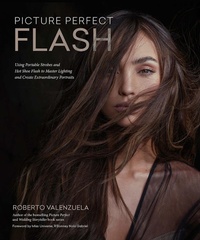
Picture Perfect Flash
Description

Whether you use small, portable strobes or hot shoe flash, flash photography has always been daunting for most photographers. Without a system and workflow for thinking about and working with flash, you can easily end up feeling stuck, or you end up flailing?randomly changing settings, positions, and modifiers?and hoping for the best. It's not surprising that this leads to failure and frustration.
Enter bestselling author Roberto Valenzuela and the Picture Perfect Flash System, which he created to empower you to finally conquer your flash and create photographs that fulfill your intention and vision. There are two key components to this system, which Roberto calls FACES and NAME. The FACES component provides a framework for thinking about how you want or need to use flash in a particular scene:
Once you've found your purpose for the light, the NAME component provides an essential workflow for carrying out your flash photography in a methodical way so that you get consistent and predictable results:
The Picture Perfect Flash System is covered in Part One: The Flash Advantage, which is the core framework of the book. In Part Two: Flash Basics Explained, Roberto covers the flash features you need to know: TTL, Manual, 1st and 2nd Curtain Sync, High Speed Sync, and Channels and Groups. Finally, in Part Three: Dynamic Flash Exercises, Roberto gives you a dozen lighting exercises that will substantially hone and advance your skills. With Picture Perfect Flash, you'll finally be able to conquer your flash...and make the kind of portraits you've always wanted to create.
TABLE OF CONTENTSForeword by Miss Universe, R'Bonney Nola Gabriel Introduction PART ONE: The Flash Advantage Chapter 1: The Picture Perfect Flash System Chapter 2: Fix the Light Chapter 3: Add Light Chapter 4: Create a Mood Chapter 5: Effects with Flash Chapter 6: Sculpt the Light Chapter 7: NAME: Your Game Plan PART TWO: Flash Basics Explained Chapter 8: TTL: Let the Flash Decide Chapter 9: Manual Mode Chapter 10: 1st Curtain Sync, 2nd Curtain Sync, and High Speed Sync Chapter 11: Channels and Groups PART THREE: Dynamic Flash Exercises Chapter 12: Lighting Exercises
More details
Other editions
Additional editions
Content
- Cover
- Title Page
- Copyright
- Dedication
- Contents
- Acknowledgments
- About the Author
- Foreword
- Introduction
- Part One: The Flash Advantage
- Chapter 1. The Picture Perfect Flash System
- The Challenge with This Book
- The Solution This Book Offers
- Step 1: Scenario
- Step 2: FACES
- Step 3: NAME
- A Note about Flash, Strobe, and Portable Strobe Terminology
- Scenario
- FACES of What's Possible
- Fix the Light
- Add Light
- Create a Mood
- Effects with Flash
- Sculpt the Light
- Are You Getting Excited?
- Chapter 2. Fix the Light
- Not Enough Light
- Fixing a Not Enough Light Problem
- Options for Working with a Not Enough Light Problem
- Too Much Light
- Blown-Out Light
- Quick Fixes to Solve Blown-Out Light
- Splotchy Light
- Uncomfortable Facial Expression with Heavy Squinting
- Unflattering Light Problems
- Poor Quality of Light
- Unwanted Color Cast
- Wrong Direction and Size of Light Source Relative to Subject
- Clashing Moods Between the Ambient Light and Artificial Light
- Final Words on Fixing the Light
- Chapter 3. Add Light
- Snapshot Versus Photograph Versus Portrait
- A Snapshot
- A Photograph
- A Portrait
- Add Light to Achieve the Lighting Benchmark
- Add Light to Create Shape, Contrast, and Drama in a Portrait
- Add Light to Lift Shadows
- Add Light to Create Separation Between Subject and Background
- Add Light to Control Contrast Throughout the Entire Frame
- Add Light to Bring Attention to a Specific Area in the Photograph
- Chapter 4. Create a Mood
- Hard Light Mood Versus Soft Light Mood
- High-Key Mood Versus Low-Key Mood
- Create Mood with Colored Gels
- Create Mood by Shooting Light Through Objects
- Chapter 5. Effects with Flash
- Freezing Motion Via Flash Duration Speed
- t0.5 Flash Duration Speed Measurement
- t0.1 Flash Duration Speed Measurement
- Flash Duration Speed Depends on Your Power Setting
- Multiple (Multi) / Stroboscopic Mode
- Four Settings You Need to Know for Multi/Stroboscopic Mode
- Dragged Shutter
- Dragged Shutter with Flash (1st and 2nd Curtain Sync)
- Multiple Exposures
- Flash Flaring
- Chapter 6. Sculpt the Light
- Sculpting Light by Increasing the Intensity of Light
- Intensity of Light Explained
- Inverse Square Law of Light in Simple Terms
- Controlling the Throw and Spread of Light for Sculpting
- Shallow Modifiers Versus Deep Modifiers
- Light Sculpting Illustrations
- Final Words about Sculpting Light
- Chapter 7. NAME: Your Game Plan
- Number of Flashes and Grouping
- Number of Lights
- Grouping the Lights
- Angle of the Lights
- Direct Angle Versus Indirect Angle (Feathered)
- Flash Angle and Color for Mimicking Another Light Source
- The Effect of Light Angles on Shadows
- Modifiers for Each Light
- Energy of Each Light
- NAME Case Studies
- Adda
- Fernando
- R'Bonney
- Hanoi Portrait
- Sarah
- Part Two: Flash Basics Explained
- Chapter 8. TTL: Let the Flash Decide
- TTL Explained in Simple Terms
- What Is the Camera Meter For?
- The Three Main Metering Modes You Should Know
- Understanding TTL Flash Behavior
- So Why Bother with TTL Flash?
- TTL & Flash Exposure Compensation
- Chapter 9. Manual Mode
- Manual Versus TTL
- Making Exposure Changes Using Flash Power Only
- If You Are Using a Hot Shoe Flash, the Flash Output/Power Is Displayed Differently
- Making Exposure Changes Using Aperture Only
- Making Exposure Changes Using ISO Only
- F-Stop Compensation Game
- Chapter 10. 1st Curtain Sync, 2nd Curtain Sync, and High Speed Sync
- 1st Curtain Sync
- 2nd Curtain Sync
- High Speed Sync (HSS)
- Chapter 11. Channels and Groups
- Channels
- Sharing or Not Sharing Flashes with Channels
- Groups
- A Word About Line-of-Sight (Infrared) Flash Triggering
- Part Three: Dynamic Flash Exercises
- Chapter 12. Lighting Exercises
- Lighting Exercise #1: Diffusing Hard Light and Sculpting
- Purpose of Exercise
- Conditions
- Goals
- Lighting Exercise #2: Relationship Between Light Distance and Modifier Point of Failure
- Purpose of Exercise
- Conditions
- Goals
- Lighting Exercise #3: Feathering the Light from Modifiers
- Purpose of Exercise
- Conditions
- Goals
- Lighting Exercise #4: Three-Point Lighting Setup- Combinations and Creativity
- Purpose of Exercise
- Conditions
- Goals
- Lighting Exercise #5: Complementary Colors Using Gels
- Purpose of Exercise
- Conditions
- Goals
- Lighting Exercise #6: Creating Accurate and Specific Separation Between Subject and Background Using a Light Meter
- Purpose of Exercise
- Conditions
- Goals
- Lighting Exercise #7: Profile Portrait Lighting Using the Inverse Square Law
- Purpose of Exercise
- Conditions
- Goals
- Lighting Exercise #8: Bounced Light Using the Inverse Square Law
- Purpose of Exercise
- Conditions
- Goals
- Lighting Exercise #9: Combining High-Contrast and Low-Contrast Lighting Using the Opposite Spectrums of the Inverse Square Law
- Purpose of Exercise
- Conditions
- Goals
- Lighting Exercise #10: In-Camera Skin Softening Using a Slow Shutter Speed and 2nd Curtain Sync
- Purpose of Exercise
- Conditions
- Goals
- Lighting Exercise #11: Short Versus Broad Lighting
- Purpose of Exercise
- Goals
- Lighting Exercise #12: Butterfly Lighting Analysis
- Purpose of Exercise
- Definition of Butterfly Lighting
- Goals
- Index
