

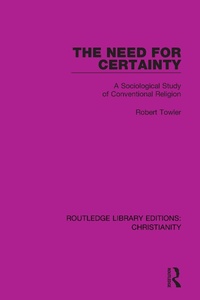
The Need for Certainty
A Sociological Study of Conventional Religion
1st Edition
Published on 17. December 2020
138 pages
978-1-000-22820-5 (ISBN)
Description

Originally published in 1984, The Need for Certainty explores the different ways in which people can be religious within the conventional traditions of the main Christian denominations.
Based on in-depth analysis of letters sent to John Robinson, then Bishop of Woolwich, after the publication of his book Honest to God, The Need for Certainty describes five contrasting ways of being religious and explores how, despite being mutually incompatible, they are able to coexist in the churches. In doing so, it argues that a proper grasp of this wide variation in styles of religiousness is a prerequisite for quantitative surveys of religion. Each contrasting religious style is explored in turn and illustrated with quotations from the original letters. The intense desire for religious certainty is extensively explored and presented as a debased, but common, form of religious aspiration that often leads to the degeneration of faith.
The Need for Certainty is ideal for those with an interest in Christianity, the sociology of religion, and theology.
Based on in-depth analysis of letters sent to John Robinson, then Bishop of Woolwich, after the publication of his book Honest to God, The Need for Certainty describes five contrasting ways of being religious and explores how, despite being mutually incompatible, they are able to coexist in the churches. In doing so, it argues that a proper grasp of this wide variation in styles of religiousness is a prerequisite for quantitative surveys of religion. Each contrasting religious style is explored in turn and illustrated with quotations from the original letters. The intense desire for religious certainty is extensively explored and presented as a debased, but common, form of religious aspiration that often leads to the degeneration of faith.
The Need for Certainty is ideal for those with an interest in Christianity, the sociology of religion, and theology.
More details
Series
Edition
1. Auflage
Language
English
Place of publication
London
United Kingdom
Publishing group
Taylor & Francis Ltd
Target group
College/higher education
Product notice
Reflowable
ISBN-13
978-1-000-22820-5 (9781000228205)
Copyright in bibliographic data and cover images is held by Nielsen Book Services Limited or by the publishers or by their respective licensors: all rights reserved.
Schweitzer Classification
Other editions
Additional editions
Book
01/2023
1st Edition
Routledge
€52.40
Shipment within 15-20 days
Book
12/2020
1st Edition
Routledge
€139.80
Shipment within 15-20 days
Person
Robert Towler
Content
Preface; 1: Varieties of Religion; 2: Exemplarism; 3: Conversionism; 4: Theism; 5: Gnosticism; 6: Traditionalism; 7: Implications and Conclusions; Notes; Appendix; Index
