

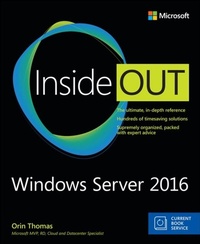
Windows Server 2016 Inside Out
1st Edition
Published on 1. May 2017
720 pages
978-1-5093-0254-3 (ISBN)
Description

Conquer Windows Server 2016-from the inside out!
Dive into Windows Server 2016-and really put your Windows Server expertise to work. Focusing on Windows Server 2016's most powerful and innovative features, this supremely organized reference packs hundreds of timesaving solutions, tips, and workarounds-all you need to plan, implement, or manage Windows Server in enterprise, data center, cloud, and hybrid environments. Fully reflecting Windows Server new capabilities for the cloud-first era, Orin covers everything from Nano Server to Windows Server and Hyper-V Containers. You'll discover how experts tackle today's essential tasks-and challenge yourself to new levels of mastery.
* Optimize the full Windows Server 2016 lifecycle, from planning and configuration through rollout and administration
* Ensure fast, reliable upgrades and migrations
* Seamlessly deliver core DNS, DHCP, file, print, storage, and Internet services
* Use IPAM to centrally manage all enterprise DNS and DHCP infrastructure
* Gain dramatic storage utilization improvements with built-in deduplication and storage replica
* Build flexible cloud and hybrid environments with Windows Containers and Shielded VMs
* Seamlessly integrate Azure IaaS services with Windows Server 2016
* Slash resource usage and improve availability with tiny Nano Server installations
* Improve configuration management with Desired State Configuration and Chef
* Deliver Active Directory identity, certificate, federation, and rights management services
* Protect servers, clients, assets, and users with advanced Windows Server 2016 security features including Just Enough Administration
For Experienced Windows Server Users and IT Professionals
* Your role: Experienced intermediate-to-advanced level Windows Server user or IT professional
* Prerequisites: Basic understanding of Windows Server procedures, techniques, and navigation
Current Book Service
In addition, this book is part of the Current Book Service from Microsoft Press. Books in this program receive periodic updates to address significant software changes for 12 to 18 months following the original publication date via a free Web Edition. Learn more at https://www.microsoftpressstore.com/cbs.
Dive into Windows Server 2016-and really put your Windows Server expertise to work. Focusing on Windows Server 2016's most powerful and innovative features, this supremely organized reference packs hundreds of timesaving solutions, tips, and workarounds-all you need to plan, implement, or manage Windows Server in enterprise, data center, cloud, and hybrid environments. Fully reflecting Windows Server new capabilities for the cloud-first era, Orin covers everything from Nano Server to Windows Server and Hyper-V Containers. You'll discover how experts tackle today's essential tasks-and challenge yourself to new levels of mastery.
* Optimize the full Windows Server 2016 lifecycle, from planning and configuration through rollout and administration
* Ensure fast, reliable upgrades and migrations
* Seamlessly deliver core DNS, DHCP, file, print, storage, and Internet services
* Use IPAM to centrally manage all enterprise DNS and DHCP infrastructure
* Gain dramatic storage utilization improvements with built-in deduplication and storage replica
* Build flexible cloud and hybrid environments with Windows Containers and Shielded VMs
* Seamlessly integrate Azure IaaS services with Windows Server 2016
* Slash resource usage and improve availability with tiny Nano Server installations
* Improve configuration management with Desired State Configuration and Chef
* Deliver Active Directory identity, certificate, federation, and rights management services
* Protect servers, clients, assets, and users with advanced Windows Server 2016 security features including Just Enough Administration
For Experienced Windows Server Users and IT Professionals
* Your role: Experienced intermediate-to-advanced level Windows Server user or IT professional
* Prerequisites: Basic understanding of Windows Server procedures, techniques, and navigation
Current Book Service
In addition, this book is part of the Current Book Service from Microsoft Press. Books in this program receive periodic updates to address significant software changes for 12 to 18 months following the original publication date via a free Web Edition. Learn more at https://www.microsoftpressstore.com/cbs.
More details
Series
Language
English
Place of publication
Boston
United States
Publishing group
Microsoft Press,U.S.
Target group
Professional and scholarly
ISBN-13
978-1-5093-0254-3 (9781509302543)
Copyright in bibliographic data and cover images is held by Nielsen Book Services Limited or by the publishers or by their respective licensors: all rights reserved.
Schweitzer Classification
Other editions
Additional editions
Orin Thomas
Windows Server 2016 Inside Out
Book
05/2017
Microsoft Press
€84.36
Shipment within 3-4 weeks
Person
Orin Thomas is an MVP, a Microsoft Regional Director, an MCT, and has a string of Microsoft MCSE and MCITP certifications. He has written more than 3 dozen books for Microsoft Press on topics including Windows Server, Windows Client, Azure, System Center, Exchange Server, Security, and SQL Server. He is an author at PluralSight and is a candidate in the Doctor of Information Technology program at Charles Sturt University. You can follow him on twitter at http://twitter.com/orinthomas
Content
Chapter 1: Administration Tools
Chapter 2: Installation Options
Chapter 3: Deployment and Configuration
Chapter 4: Active Directory
Chapter 5: Network Infrastructure
Chapter 6: Hyper-V
Chapter 7: Storage Services
Chapter 8: File and Print Services
Chapter 9: IIS
Chapter 10: Containers
Chapter 11: Clustering and High Availability
Chapter 12: Active Directory Certificate Services
Chapter 13: Active Directory Federation Services
Chapter 14: Active Directory Rights Management Services
Chapter 15: Network Policy and Access Services
Chapter 16: VDI and Remote Desktop
Chapter 17: Windows Server 2016 and Azure IaaS
Chapter 18: Security
Chapter 19: Maintenance
Chapter 20: Upgrade and Migration
Chapter 21: Troubleshooting
Chapter 2: Installation Options
Chapter 3: Deployment and Configuration
Chapter 4: Active Directory
Chapter 5: Network Infrastructure
Chapter 6: Hyper-V
Chapter 7: Storage Services
Chapter 8: File and Print Services
Chapter 9: IIS
Chapter 10: Containers
Chapter 11: Clustering and High Availability
Chapter 12: Active Directory Certificate Services
Chapter 13: Active Directory Federation Services
Chapter 14: Active Directory Rights Management Services
Chapter 15: Network Policy and Access Services
Chapter 16: VDI and Remote Desktop
Chapter 17: Windows Server 2016 and Azure IaaS
Chapter 18: Security
Chapter 19: Maintenance
Chapter 20: Upgrade and Migration
Chapter 21: Troubleshooting
