

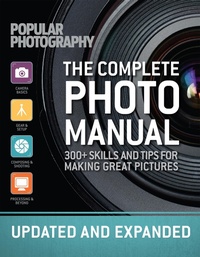
The Complete Photo Manual
300+ Skills and Tips for Making Great Pictures
Published on 30. November 2021
272 pages
978-1-68188-713-5 (ISBN)
Description

Focus on capturing the best images ever with tips from choosing the right gear to composition to processing-plus tutorials and updated software advice.
This comprehensive, all-in-one guide demystifies today's DSLRs and ILCs, walking you through their basic functions and setting you up for photo-making success, as well as offering creative projects for more advanced photographers. From setting a proper exposure to Photoshopping images together into clever composites,
The Complete Photo Manual Revised Edition has you covered!
With chapters on:
Camera Basics: Take a crash course in exposure, focus, aperture, shutter speed, white balance, and more so you can master the fundamentals.
Composition & Shooting: Get out there and start shooting! This chapter helps you pick subjects, compose on the fly, work your camera settings as you go, correct for problematic situations, use a tripod, choose the right lens for your scene, and explore different storytelling idioms.
Setup & Gear: Graduate to a more robust photography kit with discussions of lights, light modifiers, and more. Here, you'll learn how to shoot more ambitious portraits, still lifes, and action shots.
Photo Editing & Beyond:
Make your photos even better with tried-and-tested tutorials in Photoshop and Lightroom, plus quick tips and image organization hacks.
More details
Other editions
Additional editions
The Editors of Popular Photography
The Complete Photo Manual (Revised Edition)
Skills + Tips for Making Great Pictures
Book
10/2017
Weldon Owen, Incorporated
€27.50
Article exhausted; check different version
Person
Combining stunning images, expert advice, and rigorous product testing and analysis,Popular Photographygives photographers at every level of experience all the tools, techniques, and inspiration they need to make great pictures. It shares both unmatched authority and you-can-do-it enthusiasm with its audience in print and digital editions, social media and mobile apps, and on the Web. Withover 70 years of expertise,Popular Photographyis the world's largest how-to monthly magazine for image-making enthusiasts.
Content
- Intro
- Title
- Contents
- INTRODUCTION
- CAMERA BASICS
- 001 Get to Know Your Camera
- 002 Prep Your Camera for Quick Shooting
- 003 Wake Your Camera with the Half-Press
- 004 Get Familiar with Camera Types
- 005 Get a Grip
- 006 Read the Manual
- 007 Capture Raw Images
- 008 Start Out in Program Mode
- 009 Get Organized
- 010 Learn Your Camera's Limits
- 011 Protect Your New Purchase
- 012 Experiment with Camera Functions
- 013 Understand Exposure
- 014 Look at a Graph of Your Exposure
- 015 Discover Light Metering
- 016 Choose a Metering Mode
- 017 Meter Manually with AEL
- 018 Fix Photo Problems with Exposure Compensation
- 019 Bracket to Ensure Good Exposure
- 020 Understand Shutter Speed
- 021 Freeze Megafast Action
- 022 Play with Slow Shutter Speeds
- 023 Take Full Control of Shutter with S Mode
- 024 Understand Aperture
- 025 Get a Handle on F-Stops
- 026 Go Deep-or Shallow
- 027 Explore the Reciprocity Law
- 028 Try Out Aperture-Priority Mode
- 029 Meet Manual Mode
- 030 Pick the Right Time for Manual
- 031 Count the Clicks
- 032 Set Manual Exposure
- 033 Understand ISO
- 034 Minimize Noise at High ISOs
- 035 Go Low with ISO
- 036 Control the How of Autofocus
- 037 Control the Where of Autofocus
- 038 Understand Why Autofocus Goofs (or Quits Outright)
- 039 Experiment with White Balance
- 040 Set a Custom White Balance
- 041 Control Color More with Presets
- 042 Explore the Built-in Flash
- 043 Choose Your Level of Flash Control
- 044 Cope with the Flaws of Built-in Flash
- 045 Understand Focal Length
- 046 Take Care of Your Lenses
- 047 Understand Lens Speed
- 048 See How Focal Length Measures Up on Different Sensors
- COMPOSING & SHOOTING
- 049 Understand Light
- 050 Go with Hard or Soft Illumination
- 051 Opt for Diffused Light
- 052 Embrace Harsh Light
- 053 Learn the ABCs of Composition
- 054 Explore an Urban Canyon
- 055 Mix Up Scale
- 056 Break the Rules
- 057 Picture Nature's Patterns
- 058 Add Fun Lenses to Your Phone
- 059 Pick a Lens for Patterns
- 060 Follow the Rule of Thirds
- 061 Leverage the Landscape
- 062 Get to Know Tripods
- 063 Paint a Panorama
- 064 Find the No-Parallax Point
- 065 Style a Food Shoot
- 066 Respect the Restaurant
- 067 Shoot Dinner from Above
- 068 Flatter Your Food
- 069 Protect Your Gear in Extreme Climates
- 070 Track Light with a Compass
- 071 Explore a Cave
- 072 Seek Out a Sherpa
- 073 Scout Sites
- 074 Shoot Sky-High Photos
- 075 Shoot Through a Window
- 076 Go Fly a Kite
- 077 Bag a Bird's-Eye View
- 078 Locate Lost Sites
- 079 Explore Safely
- 080 Get the OK to Shoot Ruins
- 081 Light Up Hidden Spaces
- 082 Reimagine a Monument
- 083 Theme Your Travel Shots
- 084 Tell the Story of Your Journey
- 085 Shoot Overseas
- 086 Pose a Nude Portrait
- 087 Light the Body's Contours
- 088 Write a Basic Model Release
- 089 Always Get a Model Release
- 090 Get Familiar with Lenses
- 091 Stay Straight with Tilt/Shift
- 092 Play with the Scheimp ug Effect
- 093 Reverse the Scheimp ug Effect
- 094 Do the Vampire Tilt/Shift
- 095 Improvise a Macro Lens
- 096 Do the Macro Math
- 097 Learn Focus Stacking
- 098 Invest in Macro Tools
- 099 Use a Beanbag Support
- 100 Make Everyday Objects Appear Cosmic
- 101 Toy with Abstraction
- 102 Prowl for Urban Patterns
- 103 Consider All the Angles
- 104 Go Abstract
- 105 Highlight Detail with a Ring Light
- 106 Frame with the Foreground
- 107 Switch the Perspective
- 108 Clean a Lens with Vodka
- 109 Look Deeply into a Subject
- 110 Be Shallow
- 111 Straighten Out a Skyscraper
- 112 Fake Depth
- 113 Get Hyper About Focal Depth
- 114 Hold That Horizon
- 115 Shoot with a Mosaic in Mind
- 116 Zap Specks with Dust Mapping
- 117 Fight Zoom Creep
- 118 Take Notes Without a Notebook
- 119 Create a Portable Camera Manual
- 120 Perfect Your Optics with Lens Correction
- 121 Adjust Exposure on Your Phone
- 122 Make the Most of Live View
- 123 Consider Color
- 124 Cope with Color in Mixed Light
- 125 Float Above It All
- 126 Experiment with Flash Exposure
- 127 Picture Neon
- 128 Shoot Fairs at Night
- 129 Get Fired Up About Fireworks
- 130 Snag Many Salvos in One Shot
- 131 Blur the Bursts
- 132 Amp Up the Magic
- 133 Light a Portrait Like Rembrandt
- 134 Embrace the Darkness
- 135 Light the Way with Candles
- 136 Sharpen Shadows
- 137 Explore the Dark Side
- 138 Work with Available Light
- 139 Factor in Color Temperatures
- 140 Shoot Outdoors with Ambient Light
- 141 Make Poetry with Motion
- 142 Extend Exposure in Action Shots
- 143 Make People Disappear
- 144 Beat Mirror Shake
- 145 Capture the Blue Hour
- 146 Fake Motion
- 147 Factor in Blur
- 148 Get Familiar with Filters
- 149 Keep Snow White
- 150 Catch a Falling Snow ake
- 151 Find Nice Ice
- 152 Make the Most of Fog
- 153 Capture Mist in B&W
- 154 Find Fog
- 155 Keep Dry in the Damp
- 156 Master the Mist
- 157 Go Shooting in the Rain
- 158 Create Your Own Weather
- 159 Chase Raindrops
- 160 Hack a Rain Hood
- 161 Tackle Surf Safely
- 162 Brush Up on Sea Shooting Basics
- 163 Soften Surf
- 164 Protect Gear from Saltwater
- 165 Play with Tiny Waves
- 166 Seize a Starburst
- 167 Shoot into the Sun
- 168 Grab a "God Ray"
- 169 Outrun Ghosts
- 170 Capture the City's Bustle
- 171 Shoot a Stranger
- 172 Sneak a Smartphone Snap
- 173 Snap a Candid
- 174 Smooth Out Skin
- 175 Slim Down a Model
- 176 Sculpt a Face
- 177 Flatter with Color
- 178 Pack Away Eye Bags
- 179 Catch a Family Candid
- 180 Use Fast Lenses for Family
- 181 Stage Manage Your Crew
- 182 Light Your Kin Right
- 183 Try Posing Primers
- 184 Catch the Band Offstage
- 185 Make the Most of Burst
- 186 Shoot a Dress Rehearsal
- 187 Picture a Live Performance
- 188 Get in the Game with Basic Gear
- 189 Spotlight True Emotion
- 190 Capture Essential Wedding Shots
- 191 Rely on Your Assistant
- 192 Follow the Five-Second Rule
- 193 Limit Focus with a Lensbaby
- 194 Go for Blooming Beauty
- 195 Make Your Flowers Dance
- 196 Master Flight Fundamentals
- 197 Fool the Birdie
- 198 Try a Medium-Length Lens for Birdlife
- 199 Create Catchlights
- 200 Background Your Bird
- 201 Photograph Wildlife Safely
- 202 Play to Animal Instincts
- 203 Zero in on Zoo Creatures
- 204 See Eye to Eye
- 205 Lure Animals to Your Lens
- 206 Delve into Detail
- GEAR & SETUP
- 207 Know Your Lighting Gear
- 208 Pan Like a Pro
- 209 Show Motion with Flash
- 210 Freeze Motion with Flash
- 211 Finesse Flash Exposure
- 212 Work Your Shoe Mount
- 213 Use a Flashmeter
- 214 Make the Best of Phone Flash
- 215 Turn on TTL Flash
- 216 Smooth Skin with a Clamshell
- 217 Use Clothes as Re ectors
- 218 Turn a Room into a Portrait Studio
- 219 Go with a Single Light Source
- 220 Let There Be Light
- 221 Carry a Lighting Setup in Your Backpack
- 222 Move On Up to Car Kits
- 223 Create a Closet Lighting Cache
- 224 Bring Everyday Essentials
- 225 Learn About Light Falloff
- 226 Punch It Up with Hard Light
- 227 Take a Leap in the Dark
- 228 Soar with Strobe Power
- 229 Amp Up the Action
- 230 Shoot an Easy Rider
- 231 Sync at High Speed
- 232 Fire Up a Flash Party
- 233 Catch Speed from the Passenger Seat
- 234 Free Yourself with Wireless Flash
- 235 Capture Dancing Paint
- 236 Experiment with an Audio Trigger
- 237 Acquaint Yourself with Light Accessories
- 238 Shoot Flowers in a Light Tent
- 239 Protect Your Knees During Fieldwork
- 240 Craft a V-Card Re ector
- 241 Mimic a Dutch Masterpiece
- 242 Use Wet-Weather Re ectors
- 243 Shoot in Snow Light
- 244 Capture Cool Pinhole Shots
- 245 Build a Pinhole Camera
- 246 Learn the Bene ts of Film
- 247 Know Your Film
- 248 Have Film in the Bag
- 249 Explore Out-of-Date Film
- 250 Shoot with a Film Camera
- 251 Manually Focus Your Camera
- 252 Use Old Lenses on Your DSLR
- 253 Turn Back Time with Tintypes
- 254 Pick Tintype Subjects
- 255 Expose Using the Colloidal Process
- 256 Get the Lo-Fi Lowdown
- 257 Try a Retro Lo-Fi Camera
- 258 Go for Bokeh
- 259 Consider the Realm of Infrared
- 260 Shoot with IR Film
- 261 Set Up the Ideal IR Shot
- 262 Preserve Pupils
- 263 Make Your Own Ring Flash
- 264 Avoid Red-Eye
- 265 Paint with Light
- 266 Draw with a Flashlight
- 267 Know Your Lightbrushes
- 268 Photograph Star Trails
- 269 Shoot the Moon
- 270 Capture Stars without Trails
- 271 Prepare for Takeoff
- 272 Augment Your Aerial Photography Kit
- 273 Snag the Best Drone Shots
- 274 Rock Out with an Action Cam
- 275 See Things in Black and White
- 276 Tether Your Camera to Your Computer
- 277 Try a Tethered Still Life
- 278 Build a Smartphone Tripod Mount
- 279 Mix Up a Drink Shot
- 280 Fake Ice Cubes
- 281 Use Treats to Photograph Puppies
- 282 Capture the Shine of Creatures' Coats
- 283 Shoot a Portuguese Man-of-War
- 284 Swim with Sharks
- 285 Prepare to Go Deep
- 286 Plunge into the Pool with a Compact
- 287 Snap Easy Snorkeling Shots
- 288 Light and Shoot Deepwater Photos
- PROCESSING & BEYOND
- 289 Know Your Image Tools
- 290 Polish Your Photos in Lightroom
- 291 Customize Photoshop For Optimal Work ow
- 292 Optimize a Computer for Editing Performance
- 293 Protect Your Pictures
- 294 Sample a Scrubby Slider
- 295 Use Layers for Superior Editing
- 296 Master Selections
- 297 Dive into Layers
- 298 Make Masks for More Editing Control
- 299 Double Up Your Layers
- 300 Fake a Neutral-Density Filter
- 301 Unlock the Background
- 302 Stack Layers to Enhance a Macro Photo
- 303 Edit Your Photos On the Go
- 304 Rotate Shots
- 305 Clean Up a Background
- 306 Super Undo It
- 307 Crop to Improve Your Shots
- 308 Uncrop a Photo
- 309 Put a Twist in Your Shot
- 310 Scratch Up Some Polaroid Art
- 311 Cook with Raw Files
- 312 Learn When to Go Raw
- 313 Choose a Raw-Speci c Program
- 314 Dodge and Burn Digitally
- 315 Convert an Image to B&W
- 316 Make Yours Monochrome with Efex
- 317 Fade (a Background) to Black
- 318 Cruise with Curves
- 319 Up a Silhouette's Contrast
- 320 Get Perfect Contrast
- 321 Fix It with Levels
- 322 Fix It with Curves
- 323 Soften with Blur
- 324 Replace Odd Color with One Color
- 325 Use Grayscale to Fix Color
- 326 Restore Some Original Color
- 327 Tone with Masks
- 328 Add Selective Grayscale with Hue/Saturation
- 329 Split Tones with Curves
- 330 Add Color by Hand
- 331 Control Tone with Lightroom
- 332 Light-Proof Your Darkroom
- 333 Set Up a Home Darkroom
- 334 Buy the Right Enlarger Lens
- 335 Clean a Negative
- 336 Make Your First Darkroom Print
- 337 Store Film Securely
- 338 Dodge and Burn
- 339 Protect Your Photo Paper
- 340 Go Pro for Top-Notch Prints
- 341 Fake an Antique Photo
- 342 Create Contact Sheets
- 343 Determine Maximum Size
- 344 Understand Resolution
- 345 Save Files as TIFFs
- 346 Fix Noise Without Losing Detail
- 347 Pick the Right Printer
- 348 Choose a Printer Ink
- 349 Display Your Best Shots
- 350 Comprehend Copyright
- 351 Protect with Metadata
- 352 Choose the Right Color Pro le
- 353 Store Images in the Cloud
- 354 Be a Picky Editor
- 355 Bring an Old Photo Back to Life
- 356 Edit Eyes
- 357 Undo a Squint
- 358 Remove Red-Eye
- 359 Extend Eyelashes
- 360 Retouch Subtly for Perfect Portraits
- 361 Save Face with Software
- 362 Preview Your Retouching
- 363 Fix Facial Flaws with Your Phone
- 364 Emphasize Motion by Faking Blur
- 365 Decipher Distorted Images
- 366 Warp a Wild Panorama
- 367 Wield the Warp Tool
- 368 Give a Photo the Fisheye Look
- 369 Widen Your World with Panoramas
- 370 Go Global
- 371 Make a Vertorama
- 372 Ditch Distortion
- 373 Create an Optical Illusion
- 374 Craft a Composite
- 375 Animate a GIF on a Smartphone
- 376 Switch Out Colors for Graphic Pop
- 377 Fake a Re ection
- 378 Quickly Sharpen a Landscape
- 379 Cut Off Fringe
- 380 Level Your Horizon
- 381 Pump Up the Clouds
- 382 Add Spot Contrast
- GLOSSARY
- INDEX
- CREDITS & ACKNOWLEDGMENTS
