

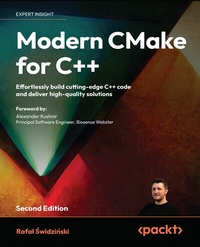
Modern CMake for C++
Description

Key Features
Get to grips with CMake and take your C++ development skills to enterprise standards
Use hands-on exercises and self-assessment questions to lock-in your learning
Understand how to build in an array of quality checks and tests for robust code
Book DescriptionModern CMake for C++ isn't just another reference book, or a repackaging of the documentation, but a blueprint to bridging the gap between learning C++ and being able to use it in a professional setting. It's an end-to-end guide to the automation of complex tasks, including building, testing, and packaging software. This second edition is significantly rewritten, restructured and refreshed with latest additions to CMake, such as support of C++20 Modules. In this book, you'll not only learn how to use the CMake language in CMake projects but also discover how to make those projects maintainable, elegant, and clean. As you progress, you'll dive into the structure of source directories, building targets, and packages, all while learning how to compile and link executables and libraries. You'll also gain a deeper understanding of how those processes work and how to optimize builds in CMake for the best results. You'll discover how to use external dependencies in your project - third-party libraries, testing frameworks, program analysis tools, and documentation generators. Finally, you'll gain profi ciency in exporting, installing, and packaging for internal and external purposes. By the end of this book, you'll be able to use CMake confi dently at a professional level.What you will learn
Understand best practices to build ++ code
Gain practical knowledge of the CMake language
Guarantee code quality with tests and static and dynamic analysis
Discover how to manage, discover, download, and link dependencies with CMake
Build solutions that can be reused and maintained in the long term
Understand how to optimize build artifacts and the build process
Program modern CMake and manage your build processes
Acquire expertise in complex subjects such as CMake presets
Who this book is forThe book is for build engineers and software developers with knowledge of C/C++ programming who are looking to learn CMake to automate the process of building small and large software solutions. If you're just getting started with CMake, a long-time GNU Make user, or simply looking to brush up on the latest best practices, this book is for you.
More details
Other editions
Additional editions
Previous edition
Persons
Rafal Swidzinski, a seasoned staff engineer at Google, boasts over 12 years of full-stack development expertise. With a track record of spearheading projects for industry giants like Cisco Meraki, Amazon, and Ericsson, he embodies a commitment to innovation. As a Londoner by choice, he remains at the forefront of technological progress, engaging in a myriad of personal ventures. His recent pivot toward AI in healthcare refl ects his dedication to impactful advancements. Rafal values top-notch code quality and craftsmanship, sharing insights through his YouTube channel and published books.
Content
First Steps with CMake
The CMake Language
Using CMake in Popular IDEs
Setting Up Your First CMake Project
Working with Targets
Using Generator Expressions
Compiling C++ Sources with CMake
Linking Executables and Libraries
Managing Dependencies in CMake
Using the C++20 Modules
Testing Frameworks
Program Analysis Tools
Generating Documentation
Installing and Packaging
Creating Your Professional Project
Writing CMake Presets
Appendix
Preface
Creating top-notch software is no easy task. Developers researching this subject online often struggle to determine which advice is current and which methods have been superseded by newer, better practices. Moreover, most resources explain the process chaotically, lacking proper background, context, and structure.
Modern CMake for C++ provides an end-to-end guide that offers a simpler experience by treating the building of C++ solutions comprehensively. It not only teaches you how to use CMake in your projects but also highlights what makes them maintainable, elegant, and clean. The guide walks you through automating complex tasks common in many projects, including building, testing, and packaging.
The book instructs you on organizing source directories, building targets, and creating packages. As you progress, you will learn to compile and link executables and libraries, understand these processes in detail, and optimize each step for the best results. Additionally, you will discover how to incorporate external dependencies into your project, such as third-party libraries, testing frameworks, program analysis tools, and documentation generators. Finally, you'll learn how to export, install, and package your solution for both internal and external use.
After completing this book, you'll be able to use CMake confidently on a professional level.
Who this book is for
After you've learned C++, you'll quickly discover that proficiency with the language alone isn't enough to prepare you for delivering projects at the highest standards. This book fills that gap: it is addressed to anyone aspiring to become a better software developer or even a professional build engineer!
Read it if you want to learn modern CMake from scratch or elevate and refresh your current CMake skills. It will help you understand how to make top-notch C++ projects and transition from other build environments.
What this book covers
Chapter 1, First Steps with CMake, covers the installation of CMake, the use of its command line interface, and introduces the fundamental building blocks necessary for a CMake project.
Chapter 2, The CMake Language, cover the essential concepts of the CMake language, including command invocations, arguments, variables, control structures, and comments.
Chapter 3, Using CMake in Popular IDEs, emphasizes the importance of Integrated Development Environments (IDEs), guides you through selecting an IDE, and provides setup instructions for Clion, Visual Studio Code, and Visual Studio IDE.
Chapter 4, Setting up Your First CMake Project, will teach you how to configure a basic CMake project in its top-level file, structure the file tree, and prepare the toolchain necessary for development.
Chapter 5, Working with Targets, explores the concept of logical build targets, understand their properties and different types, and learn how to define custom commands for CMake projects.
Chapter 6, Using Generator Expressions, explains the purpose and syntax of generator expressions, including how to use them for conditional expansion, queries, and transformations.
Chapter 7, Compiling C++ Sources with CMake, delves into the compilation process, configure the preprocessor and optimizer, and discover techniques to reduce build time and improve debugging.
Chapter 8, Linking Executables and Libraries, understands the linking mechanism, different types of libraries, the One Definition Rule, the order of linking, and how to prepare your project for testing.
Chapter 9, Managing Dependencies in CMake, will teach you to manage third-party libraries, add CMake support for those that lack it, and fetch external dependencies from the internet.
Chapter 10, Using the C++20 Modules, introduces C++20 modules, shows how to enable their support in CMake, and configure the toolchain accordingly.
Chapter 11, Testing Frameworks, will help you understand the importance of automated testing, leverage built-in testing support in CMake, and get started with unit testing using popular frameworks.
Chapter 12, Program Analysis Tools, will show you how to automatically format source code and detect software errors during both build time and runtime.
Chapter 13, Generating Documentation, presents how to use Doxygen for automating documentation creation from source code and add styling to enhance your documentation's appearance.
Chapter 14, Installing and Packaging, prepares your project for release with and without installation, create reusable packages, and designate individual components for packaging.
Chapter 15, Creating Your Professional Project, applies all the knowledge acquired throughout the book to develop a comprehensive, professional-grade project.
Chapter 16, Writing CMake Presets, encapsulates high-level project configurations into workflows using CMake preset files, making project setup and management more efficient.
Appendix - Miscellaneous Commands, serves as a reference for various CMake commands related to strings, lists, files, and mathematical operations.
To get the most out of this book
Basic familiarity with C++ and Unix-like systems is assumed throughout the book. Although Unix knowledge isn't a strict requirement, it will prove helpful in fully understanding the examples given in this book.
This book targets CMake 3.26, but most of the techniques described should work from CMake 3.15 (features that were added after are usually highlighted). Some chapters have been updated to CMake 3.28 to cover the latest features.
Preparation of the environment to run examples is covered in Chapters 1-3, but we specifically recommend using the Docker image provided with this book if you're familiar with this tool.
Download the example code files
The code bundle for the book is hosted on GitHub at https://github.com/PacktPublishing/Modern-CMake-for-Cpp-2E. We also have other code bundles from our rich catalog of books and videos available at https://github.com/PacktPublishing/. Check them out!
Download the color images
We also provide a PDF file that has color images of the screenshots/diagrams used in this book. You can download it here: https://packt.link/gbp/9781805121800.
Conventions used
There are a number of text conventions used throughout this book.
CodeInText: Indicates code words in text, database table names, folder names, filenames, file extensions, pathnames, dummy URLs, user input, and Twitter handles. For example: "Mount the downloaded WebStorm-10*.dmg disk image file as another disk in your system."
A block of code is set as follows:
cmake_minimum_required(VERSION 3.26) project(Hello) add_executable(Hello hello.cpp) When we wish to draw your attention to a particular part of a code block, the relevant lines or items are set in bold:
cmake_minimum_required(VERSION 3.26) project(Hello) add_executable(Hello hello.cpp) add_subdirectory(api) Any command-line input or output is written as follows:
cmake --build <dir> --parallel [<number-of-jobs>] cmake --build <dir> -j [<number-of-jobs>] Bold: Indicates a new term, an important word, or words that you see on the screen. For example: "Select System info from the Administration panel."
Warnings or important notes appear like this.
Tips and tricks appear like this.
Get in touch
Feedback from our readers is always welcome.
General feedback: Email feedback@packtpub.com, and mention the book's title in the subject of your message. If you have questions about any aspect of this book, please email us at questions@packtpub.com.
Errata: Although we have taken every care to ensure the accuracy of our content, mistakes do happen. If you have found a mistake in this book we would be grateful if you would report this to us. Please visit, http://www.packtpub.com/submit-errata, selecting your book, clicking on the Errata Submission Form link, and entering the details.
Piracy: If you come across any illegal copies of our works in any form on the Internet, we would be grateful if you would provide us with the location address or website name. Please contact us at copyright@packtpub.com with a link to the material.
If you are interested in becoming an author: If there is a topic that you have expertise in and you are interested in either writing or contributing to a book, please visit http://authors.packtpub.com.
Share your thoughts
Once you've read Modern CMake for C++, Secon Edition, we'd love to hear your thoughts! Please click here to go...
