

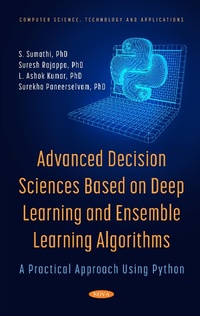
Advanced Decision Sciences Based on Deep Learning and Ensemble Learning Algorithms: A Practical Approach Using Python
Published on 20. September 2021
357 pages
978-1-68507-207-0 (ISBN)
Description

Advanced Decision Sciences Based on Deep Learning and Ensemble Learning Algorithms: A Practical Approach Using Python describes the deep learning models and ensemble approaches applied to decision-making problems. The authors have addressed the concepts of deep learning, convolutional neural networks, recurrent neural networks, and ensemble learning in a practical sense providing complete code and implementation for several real-world examples. The authors of this book teach the concepts of machine learning for undergraduate and graduate-level classes and have worked with Fortune 500 clients to formulate data analytics strategies and operationalize these strategies. The book will benefit information professionals, programmers, consultants, professors, students, and industry experts who seek a variety of real-world illustrations with an implementation based on machine learning algorithms.
More details
Other editions
Additional editions
Surekha Paneerselvam
Advanced Decision Sciences Based on Deep Learning and Ensemble Learning Algorithms
A Practical Approach Using Python
Book
11/2021
Nova Science Publishers Inc
€303.05
Shipment within 15-20 days
Content
- Intro
- Contents
- Preface
- Acknowledgments
- Chapter 1
- Introduction
- Learning Outcomes
- 1.1. Introduction
- 1.2. Rationale
- 1.3. Linear Algebra for Decision Science
- 1.3.1. Eigenvectors in Data Science
- 1.4. Fundamentals of Machine Learning
- 1.4.1. How Deep Learning Works
- 1.4.2. How Artificial Intelligence Deep Learning and Machine Learning Interconnected with Each Other?
- 1.5. History of Deep Learning
- 1.6. Fundamentals of Neural Networks
- 1.6.1. Advantages
- 1.6.2. Disadvantages
- 1.6.3. Applications
- 1.7. Shallow Neural Networks
- 1.7.1. Activation Functions
- 1.7.2. Weight Initialization
- 1.7.3. Forward and Backward Propagation
- 1.8. Deep Neural Networks
- 1.8.1. Deep L-layer Neural Network
- 1.8.2. Forward and Backward Propagation
- 1.8.3. Deep Representations
- 1.9. Ensemble Learning
- 1.10. Real World Examples
- 1.10.1. Self Driving Cars
- 1.10.2. Natural Language Processing
- 1.10.3. Image and Visual Recognition
- 1.10.4. Fraud Detection
- 1.10.5. Virtual Assistants
- 1.10.6. Healthcare
- 1.10.7. Developmental Disorders in Children
- Summary
- Review Questions
- Chapter 2
- Deep Learning
- Learning Outcomes
- 2.1. Introduction
- 2.2. Implementation Aspects of Deep Learning
- 2.2.1. Train/Dev/Test Data Sets
- 2.2.1.1.Training Data
- 2.2.2. Bias and Variance
- 2.2.3. Regularisation and Dropout
- 2.2.3.1. The Mathematical Background of the Dropout Concept
- 2.2.3.2. Dropout Equivalent to Regularized Network
- 2.2.4. Rectified Linear Units (ReLU)
- 2.2.4.1. ReLU Activation Function
- 2.2.4.2. ReLU in Python
- 2.2.4.3. Advantages of the ReLU
- Cheaper Computation
- Representational Sparsity
- Linear Behaviour
- Effective Training of Deep Neural Networks
- Effects of Rectified Linear Activation
- Default Activation Function
- Effect of Bias Input Value on ReLU
- ReLU for MLPs, CNNs, and Not for RNNs
- Weight Initialization
- Alternative Activation Functions to ReLU
- 2.2.5. Multi-Class Neural Networks: Softmax
- 2.2.5.1. Softmax Example
- 2.2.5.2. Softmax Using Python
- 2.3. Training a Deep Neural Network
- 2.3.1. Training Data
- 2.3.2. Choice of Activation Functions
- 2.3.3. Number of Hidden Units and Layers
- 2.3.4. Weight Initialization
- 2.3.5. Learning Rates
- 2.3.6. Hyperparameter Tuning
- 2.3.7. Learning Methods
- 2.3.7.1. Keep Dimensions of Weights in the Exponential Power of 2
- 2.3.7.2. Unsupervised Pretraining
- 2.3.7.3. Mini-Batch vs. Stochastic Learning
- 2.3.8. Dropout for Regularization
- 2.3.9. Training Iterations
- 2.4. Introduction to TensorFlow and Keras
- 2.4.1. TensorFlow
- 2.4.1.1.Getting Started with Tensorflow
- 2.4.1.2. Installing TensorFlow
- 2.4.1.3. Run a TensorFlow Container
- 2.4.1.4. Creating the First Program in Tensorflow
- 2.4.2. Keras
- 2.4.2.1. When to Use Keras
- 2.4.2.2. Getting Started with Keras
- STEP 1: Installation of Keras on a System
- STEP 2: Loading Data to Be Processed by the Deep Learning Net
- STEP 3: Splitting the Data into Training and Testing Sets
- STEP 4: Defining the Keras Based Deep Learning Model Architecture
- STEP 5: Compiling the Keras Based Deep Learning Model
- STEP 6: Training the Deep Learning Model on Your Training Data
- STEP 7: Evaluating the Deep Learning Model on the Test Data
- 2.5. Autoencoders
- 2.5.1. Properties of Autoencoders
- 2.5.2. Types of Autoencoders
- 2.5.2.1. Under Complete Autoencoders
- 2.5.2.2. Overcomplete Autoencoders
- 2.5.2.3. Denoising Autoencoders
- 2.5.2.4. Sparse Autoencoders
- 2.5.2.5. Contractive Autoencoders
- 2.5.3. AutoEncoders - A Practical Example
- 2.6. Introduction to Microsoft Azure AI and ML Framework
- 2.6.1. Azure Machine Learning Model Workflow
- 2.6.2. Tools for Azure Machine Learning
- Summary
- Review Questions
- Chapter 3
- Convolutional Neural Networks
- Learning Outcomes
- 3.1. Introduction
- 3.2. The Convolution Process
- 3.3. Convolutional Layer - The Kernel
- 3.4. Pooling Layer
- 3.5. The Architecture of CNN
- 3.6. CNN Training: Optimization
- 3.7. AlexNet
- 3.7.1. The Architecture
- 3.7.2. Training
- 3.7.3. AlexNet - A Practical Example
- 3.8. VGGNet
- 3.8.1. The Architecture
- 3.8.2. Training
- 3.8.3. Testing
- 3.8.4. VGGNet - A Practical Example
- 3.9. Residual Network
- 3.9.1. The Residual Block
- 3.9.2. ResNet Architecture
- 3.9.3. Training
- 3.9.4. ResNet - A Practical Example
- STEP 1: Importing the libraries (Keras and its APIs)
- STEP 2: Setting up Hyperparameters & Data Pre-proceSsing
- STEP 3: Setting Learning Rate for Different Number of Epochs
- STEP 4: Basic ResNet Building Block
- Output
- 3.10. Inception Network
- 3.10.1. The Effect of 1 × 1 Convolution
- 3.10.2. Inception Module
- 3.10.3. The Architecture
- 3.10.4. Training
- 3.10.5. InceptionNet - A Practical Example
- STEP 1: Importing the Required Module
- STEP 2: Creating Directories to Prepare for the Dataset
- STEP 3: Storing the Dataset in the Directories and Plot Some Sample Images
- STEP 4: Data Augmentation to Increase the Data Samples in the Dataset
- STEP 5: Define the Base Model Using Inception API and a Callback Function to Train the Model
- STEP 6: Plot the Training and Validation Accuracy along with Training and Validation Loss
- Summary
- Review Questions
- Chapter 4
- Recurrent Neural Networks
- Learning Outcomes
- 4.1. Introduction
- 4.2. The Architecture of Recurrent Neural Network
- 4.3. Types of RNN Architectures
- 4.4. Problems with RNNs
- 4.4.1. Vanishing Gradient Problem
- 4.4.2. Exploding Gradients Problem
- 4.4.3. Long Term Dependency Problem
- 4.5. Long Short-Term Memory (LSTM)
- 4.5.1. An Improvement over RNN: LSTM
- 4.5.2. Architecture
- 4.5.2.1. Forget Gate
- 4.5.2.2. Input Gate
- STEP 1: Regulating the information that has to be added to the cell state
- STEP 2: Adding new information by creating a vector
- STEP 3: Combining the regulated information and the new information and updating the cell state
- 4.5.2.3. Output Gate
- 4.6. Variants of LSTM
- 4.6.1. Peephole Connections
- 4.6.2. Coupled Gates
- 4.6.3. Gated Recurrent Unit
- 4.6.3.1. Update Gate
- 4.6.3.2. Reset Gate
- 4.6.3.3. Current Memory Content
- 4.6.3.4. Final Memory at Current Time Step
- 4.7. RNN - A Practical Example
- STEP 1: Data Cleanup and Pre Processing
- STEP 2: Making Data into Right Structure to Include Timesteps
- STEP 3: Recurrent Neural Network setup
- STEP 4: Prediction
- STEP 5: Plotting the Data in Matplotlib
- Summary
- Review Questions
- Chapter 5
- Ensemble Learning
- Learning Outcomes
- 5.1. Introduction
- 5.2. Ensemble Learning Methods
- 5.2.1. Hard Voting
- 5.2.2. Weighted Majority Voting
- 5.2.3. Soft Voting
- 5.2.4. Averaging and Weighted Averaging
- 5.2.5. Stacking
- 5.3. Bagging
- 5.3.1. Bagging Steps
- 5.3.2. Advantages
- 5.3.3. Disadvantages
- 5.3.4. Python Syntax
- 5.4. Boosting
- 5.4.1. Difference between Bagging and Boosting
- 5.5. Ensemble Learning Algorithms
- 5.5.1. Bagging and Random Forest Algorithm
- Algorithm 1 Bagging
- Random Forests
- Bagging in Random Forest
- 5.5.2. Boosting Algorithm
- 5.6. AdaBoost
- 5.6.1. AdaBoost Algorithm
- AdaBoost.M1
- 5.6.2. AdaBoost Ensemble
- 5.6.3. Making Predictions with AdaBoost
- 5.7. XGBoost
- 5.7.1. XGBoost Algorithm
- 5.8. Boosting and Problem Motivation
- 5.8.1. Pipeline Description
- 5.9. Ensemble Methods Using AdaBoost: A Practical Example
- 5.9.1. Regression for AdaBoost
- 5.10. Applications of Ensemble Methods
- Summary
- Review Questions
- Chapter 6
- Implementing DL and Ensemble Learning Models: Real World Use Cases
- Learning Outcomes
- 6.1. Introduction
- 6.2. Use Case 1: Plant Species Identification Using Image Classifier
- 6.2.1. The Python Program
- # Introduction: Tea Leaves Classification - Understanding the Data
- # Data Preparation
- # Model Building
- # Comparing Multiple Classifiers for Accuracy
- 6.2.2. Conclusion
- 6.3. Use Case 2: Using Ensemble Methods to Predict Customer Churn
- 6.3.1. Understanding the Data
- 6.3.2. Problem Statement
- 6.4. Use Case 3: Using Long Short-Term Memory (LSTM) RNN in Keras for Sequence Classification Using IMDB Movie Review Database
- 6.4.1. Background
- 6.4.2. Understanding the Data
- 6.4.3. Summary
- 6.5. Use Case 4: Loan Eligibility Prediction by Employing Gradient Boosting Classifier
- 6.5.1. Background
- 6.5.2. Understanding of the Data
- 6.5.3. Conclusion
- 6.6. Use Case 5: Resume Parsing with NLP Python OCR and Spacy
- 6.6.1. Background
- 6.6.2. Understanding the Data
- 6.6.3. Results and Discussion
- 6.6.4. Summary
- Review Questions
- Appendix
- Deep Learning Cheat Sheets
- Using KERAS
- Data Load
- Data Preprocessing
- Creating the Train and Test Datasets into X and y Variables
- Model Architecture
- Binary Classification
- Multi-Class Classification
- Regression
- Convolution Neural Network (CNN)
- Recurrent Neural Network (RNN)
- Model Compilation
- ANN: Multi-Class Classification
- ANN: Regression
- Model Training
- Model Prediction
- Save/Reload Models
- Using OpenCV
- Playing with Images
- Image Resize
- Image Rotation
- B & W Images
- Drawing Bounding Box in the Image
- Face Detection
- Saving the Image
- Suggested Reading
- References
- Websites
- About the Authors
- His Core Leadership Skills include:
- Index
- Blank Page
