

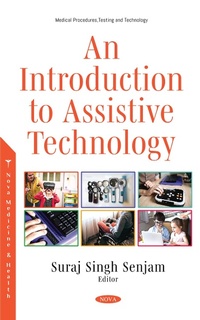
Introduction to Assistive Technology
Published on 24. November 2020
234 pages
978-1-5361-8970-4 (ISBN)
Description

Globally, more than one billion people suffer some form of disability and may require assistive devices for their functioning. Only 5 to 10% of them can access some level of rehabilitation services. Assistive technology is essential while providing rehabilitation services to people with disabilities or health impairment. The first edition of this book will help professionals working in habilitation and rehabilitation services, and the chapters cover various aspects of assistive technologies. The first chapter shares existing evidence on assistive technologies (ATs) that aid in rehabilitation intervention among children and adolescents with neurodevelopmental disorders. It provides the reader with a selective overview of the newest empirical contributions available in the literature on the use of AT-based interventions for enabling adaptive skills and reducing challenging behaviors in children with neurodevelopmental disabilities. The second chapter highlights the ViEW, a computer-based assistive technology for visual impairment. ViEW (Vision Enhancement for the World) is a portable device that uses a computer vision technique to extract textual information. The product can notify the nearest objects surrounding an individual with vision loss and read aloud with audio. The product will aid in teaching students at schools for the blind. The third and fourth chapters explain the existing classification for ATs for visual impairment and various devices that can be used to perform daily living tasks. This chapter is designed for people working in eye care services, teachers, trainers in schools for the blind, community based visual rehabilitation workers, or other interested persons. Chapter five presents advanced information and communication technologies (ICT) that may be used in bathroom safety without compromising personal privacy. Bathroom safety is extremely important, especially for older persons living independently at home. The chapter reviews trends in ICT development and presents state-of-the-art solutions for safe bathing, bath accident detection and prevention. Chapter six describes the applications of assistive software products in children with autism spectrum disorders, where researchers deal with multiple factors to get closer to creating a model for children with autism for use in creating interactive apps. Chapter seven sheds light on the newest contributions in virtual reality (VR) based intervention in neurodegenerative diseases (Alzheimer's and/or Parkinson's diseases, amyotrophic lateral sclerosis or multiple sclerosis). The outcomes in the majority of VR based interventions were positive. The final chapter critically reviews the use of ATs and other relevant literature on the patient-centered design of ATs, which will ultimately help adoption pathways.
More details
Other editions
Additional editions
Suraj Singh Senjam
An Introduction to Assistive Technology
Book
12/2020
Nova Science Publishers Inc
€210.94
Shipment within 15-20 days
Content
- Intro
- Contents
- Foreword
- Preface
- Acknowledgments
- Chapter 1
- Assistive Technology Based Interventions in Children with Neurodevelopmental Disorders: A Narrative Review
- Abstract
- 1.1. Introduction
- 1.2. Generating Evidence
- 1.3. Overview of Published Literature
- 1.3.1. Communication Skills
- 1.3.2. Adaptive and Social Skills
- 1.3.3. Life Skills
- 1.3.4. Challenging Behaviors
- 1.3.5. Academic Performance
- 1.3.6. Ambulation and Locomotion
- 1.4. Critical Appraisal on Effectivenss
- Conclusion
- Research Priorities
- References
- Chapter 2
- ViEW: Assistive Technology
- for Visual Impairment using Computer Technologies
- Abstract
- 1. Introduction
- 2. View: Product Overview
- 2.1. Target Group
- 2.2. The Product Use
- 3. Underlying Technology Driving the Product
- 3.1. Internet of Things (IoT) Integration
- 3.2. Role of Computer Vision
- 3.3. Optical Character Recognition
- 3.4. Object Recognition
- 3.5. Role of Language Translation
- 3.6. Role of Speech Synthesis
- 3.7. Features of the Product
- 4. Future Research Priorities
- 5. Other Assistive Technology Products
- Acknowledgments
- References
- Chapter 3
- Classification of Assistive Technology for Visual Impairment
- Abstract
- 1. Introduction
- 2. Classification of Assistive Technology
- for Disability
- 2.1. ISO Classification of Assistive Technology
- 3. Assistive Technology for Visual Impairment
- 3.1. Assistive Technology for Persons with Visual Impairment (PwVI)
- 3.2. Assistive Technology for Students with Visual Impairment
- 4. Benefits of Ats Use Among Students
- 4.1. Academic Benefits
- 4.2. Non-Academic Benefits
- Conclusion
- References
- Chapter 4
- Assistive Technology for People with Visual Disabilities
- Abstract
- 4.1. Introduction
- 4.2. Assistive Technology for Visual Impairment
- 4.2.1. Assistive Technologies for Reading
- 4.2.2. Assistive Technologies for Writing
- 4.2.3. Assistive Technologies for Mathematics
- 4.2.4. Assistive Technologies for Science Learning
- 4.2.5. Assistive Technology for Orientation and Mobility
- 4.2.6. Assistive Technology for Games and Leisure
- 4.2.7. Assistive Technology for Activities of Daily Living
- Conclusion
- References
- Chapter 5
- ICT Based Assistive Technologies for Safe Bathing: Challenges and Solutions
- Abstract
- 5.1. Introduction
- 5.2. Causes of Bathroom Accidents
- 5.2.1. Falls and Slips
- 5.2.1.1. Intrinsic Factors
- 5.2.1.2. Extrinsic Factors
- 5.2.2. Drowning in the Bathtub
- 5.2.3. Hazardous Equipment
- 5.2.4. Scalding by Hot Water
- 5.3. Traditional (Non-ICT) Assistive Technologies
- 5.4. ICT Based Assistive Technologies
- 5.4.1. First-Generation ICT: Personal Emergency Response Systems
- 5.4.2. Second-Generation ICT: Automatic Monitors
- 5.4.2.1. Wearable Sensors
- 5.4.2.2. Context-Aware Sensors
- 5.4.2.3. Video Sensors
- 5.4.2.4. Passive (or Pyroelectric) Infrared Sensors
- 5.4.2.5. Vibration Sensors
- 5.4.2.6. Pressure Sensors
- 5.4.2.7. Sonic Sensors
- 5.4.2.8. Doppler-Radar Sensors
- 5.4.2.9. WiFi Sensors
- 5.4.2.10. Robotic Sensors
- 5.5. Third-Generation ICT: Ambient Intelligence
- 5.5.1. Vital Sign Measuring Systems
- 5.5.2. Robotic Assistants
- Conclusion
- References
- Chapter 6
- Assistive Software Applications for Children with Autism Spectrum Disorders: Current Challenges of User Modelling and Graphical User Interface Design
- Abstract
- 6.1. Introduction
- 6.2. Autism Spectrum Disorder
- 6.2.1. Motor Function in Children with ASD
- 6.2.2. Executive Functions in Children with ASD
- 6.2.3. Executive Dysfunction Theory
- 6.2.4. Perception in Children with ASD
- 6.2.5. Language in Children with ASD
- 6.3. Software Applications and ASD
- 6.4. Current Developments in Interface Design for Users with ASD
- 6.4.1. Design Guidelines for Developing Application for Autistic User
- 6.4.2. Predictive Model for Users with ASD
- 6.4.3. The Necessity of Reducing the Cognitive Load in User Interfaces for Autistic Users
- 6.5. A Study Case: Assessing the Cognitive Load Involved in User Interface Patterns
- 6.5.1. The sample
- 6.5.2. Phases of the Study
- 6.5.3. Instruments Used
- 6.5.4. Methodology
- 6.5.5. Results and Discussion
- Conclusion
- References
- Chapter 7
- Virtual Reality Based Interventions in Neurodegenerative Diseases: A Review
- Abstract
- 7.1. Introduction
- 7.2. Generating Evidnece
- 7.3. Overview of Literature
- 7.3.1. Assessment
- 7.3.2. Recovery
- 7.4. Critical Appraisal on Effectivenss
- Conclusion
- Research Priorities
- References
- Chapter 8
- Assistive Technology In or Out of Context? - An Evolving Challenge to Increasing Utility and Adoption
- Abstract
- 8.1. Introduction
- 8.2. Assistive Technologies (ATs)
- 8.3. Disability
- 8.3.1. Impairment as Disability
- 8.3.2. Activity Limitation as Disability
- 8.3.3. Participation Restriction and Chronic Disease/Condition as Disabilities
- 8.3.4. The Problem
- 8.4. User-Centeredness and Design
- 8.4.1. Understand the User, the Task, and Environmental Requirements
- 8.4.2. Encourage Early and Active Involvement of Users
- 8.4.3. Address the Whole User Experience
- 8.4.4. Encourage Multi-Disciplinary Design
- 8.5. Gaps in Policy Formulation
- References
- About the Editor
- List of Contributors
- Index
- Blank Page
- Blank Page
