

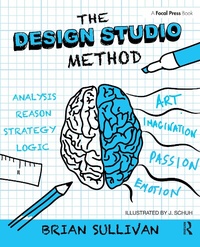
The Design Studio Method
Creative Problem Solving with UX Sketching
Published on 12. June 2015
200 pages
978-1-317-69223-2 (ISBN)
Description

The struggle with balancing creative products that are innovative, technically feasible, and financially sound is one designers and web professionals go through every day. The Design Studio Method is a creative problem solving process that allows you to quickly generate ideas, evaluate them, and reach consensus, achieving that balancing act. Brian Sullivan's The Design Studio Method gives answers that you have been looking for, showing you how to be innovative and efficient without sacrificing quality and collaboration. This book simplifies the complicated method, explaining each step, each participant's involvement, and how to adapt the method to your needs.
The Design Studio Method provides step-by-step procedures to ensure your success. From illumination, to generation, to presentation, all the way to iteration, this book provides the road map you'll need to start generating innovate products.
Shows you how to involve all members of the creative process-from clients to directors-so that everyone participates, critiques, and innovates.
Features real-world examples of Design Studio projects that highlight the successes of this method and ways to adapt it to your needs.
Includes a website that showcases videos covering each step of the method and other procedures that crop up along the way.
The Design Studio Method provides step-by-step procedures to ensure your success. From illumination, to generation, to presentation, all the way to iteration, this book provides the road map you'll need to start generating innovate products.
Shows you how to involve all members of the creative process-from clients to directors-so that everyone participates, critiques, and innovates.
Features real-world examples of Design Studio projects that highlight the successes of this method and ways to adapt it to your needs.
Includes a website that showcases videos covering each step of the method and other procedures that crop up along the way.
Reviews / Votes
"This book has a strong how-to-do-it perspective; software application and Web designers can follow this page-by-page and be successful. The best part is the liberal illustrations with exactly the kind of sketches the book promotes." Rex Hartson, Professor Emeritus, Computer Science, Virginia TechMore details
Language
English
Place of publication
London
United Kingdom
Publishing group
Taylor & Francis Ltd
Target group
Professional and scholarly
Illustrations
5 Tables, black and white; 86 Line drawings, black and white; 4 Halftones, color
File size
16,51 MB
ISBN-13
978-1-317-69223-2 (9781317692232)
Copyright in bibliographic data and cover images is held by Nielsen Book Services Limited or by the publishers or by their respective licensors: all rights reserved.
Schweitzer Classification
Other editions
Additional editions
Book
08/2017
1st Edition
Routledge
€259.98
Shipment within 10-20 days
Book
08/2015
1st Edition
Routledge
€62.00
Shipment within 10-20 days
Person
Brian Sullivan is the Director of UX Testing and Research for Tonic3. In his practice, Brian is called upon to facilitate Design Studio Workshops, Brainstorming Sessions, Design Walkthroughs, UX Inspections, and Usability Testing. Brian is the founder of the Big Design Conference, where experts talk on design, usability, and strategy. Brian founded the Big Design Workshops series in 2009, where he teaches UX topics, such as Collaborative Sketching with Design Studios, UX Inspections, and a Usability Boot Camp. Brian is the President of the Dallas User Experience Professionals organization, which meets monthly in Dallas. Brian is a thought leader, who frequently speaks at industry events like SxSW Interactive, UXPA International, IA Summit, Boston UXPA, and Big Design Conference.
Content
Chapter 1: All about Design Studios
What is a Design Studio?
When Do You Do a Design Studio?
A Word of Caution
Other UX Sketching Methods
Sketchboarding
6-UP
RIPS
Summary and Tips
Chapter 2: Generating and Evaluating Ideas
Use Whole-Brain Thinking
Generate Ideas with Left-Brain
Evaluate Ideas with Right-Brain
Four Rules for Generating Ideas
Strive for Quantity
Defer Judgment (Positive and Negative)
Seek New Combinations
Use Your Imagination
Four Rules for Evaluating Ideas
Use Positive Judgment First
Consider Novelty
Stay Focused
Redirect, If Needed
Summary
Chapter 3: Steps in a Design Studio
Is a Design Studio Needed for Your Project?
Choose Participants
Assign Roles
Facilitator
Sketcher
Scribe
Determine What to Sketch
Sketch Initial Concepts
Evaluate Sketches
Vote on Best Sketches
Re-sketch or Mash-up
Debrief Meeting
Summary
Chapter 4: Making Sketches Presentable
Draw One Concept Per Page
Do Not Use a Computer
Use Markers and Paper
Do Not Color Your Sketches
Do Not Provide Too Much Detail
Use Annotations and Arrows
Provide a Brief Description
Summary and Tips
Chapter 5: Controlling the Conversation
Using Edward DeBono's Thinking Hats
White Hat for Fact Finding
Blue Hat for Organizing
Green Hat for Generating Ideas
Yellow Hat for Positive Evaluations
Black Hat for Critical Inspections
Red Hat for Voting
Summary and Tips
Chapter 6: Storing Your Work
Keeping a Digital Record
Access for Others to Review (Confidential or Open)
Sharing with the Rest of the Team
Serves as Vision Board for Future Projects
Summary and Tips
Chapter 7: Sharing Your Results
Build a Wireframe after the Design Studio
Sharing with the Other Sketchers
To gain consensus
To get alignment
Sharing with the Project Team
To show off your project vision
To get alignment
Sharing with Executives
To get executive buy-in
To obtain funding and resources
Summary and Tips
Chapter 8: Working with Remote People
Keeping a Digital Record
Access for Others to Review (Confidential or Open)
Sharing with the Rest of the Team
Serves as Vision Board for Future Projects
Summary and Tips
Chapter 9: Next Steps
Immediate Things to Do
Sharing Your Final Sketches
Preparing Your Wireframes
Testing Your Results
Low-Fidelity Testing
RITE Testing
Prototype Testing
Summary and Tips
What is a Design Studio?
When Do You Do a Design Studio?
A Word of Caution
Other UX Sketching Methods
Sketchboarding
6-UP
RIPS
Summary and Tips
Chapter 2: Generating and Evaluating Ideas
Use Whole-Brain Thinking
Generate Ideas with Left-Brain
Evaluate Ideas with Right-Brain
Four Rules for Generating Ideas
Strive for Quantity
Defer Judgment (Positive and Negative)
Seek New Combinations
Use Your Imagination
Four Rules for Evaluating Ideas
Use Positive Judgment First
Consider Novelty
Stay Focused
Redirect, If Needed
Summary
Chapter 3: Steps in a Design Studio
Is a Design Studio Needed for Your Project?
Choose Participants
Assign Roles
Facilitator
Sketcher
Scribe
Determine What to Sketch
Sketch Initial Concepts
Evaluate Sketches
Vote on Best Sketches
Re-sketch or Mash-up
Debrief Meeting
Summary
Chapter 4: Making Sketches Presentable
Draw One Concept Per Page
Do Not Use a Computer
Use Markers and Paper
Do Not Color Your Sketches
Do Not Provide Too Much Detail
Use Annotations and Arrows
Provide a Brief Description
Summary and Tips
Chapter 5: Controlling the Conversation
Using Edward DeBono's Thinking Hats
White Hat for Fact Finding
Blue Hat for Organizing
Green Hat for Generating Ideas
Yellow Hat for Positive Evaluations
Black Hat for Critical Inspections
Red Hat for Voting
Summary and Tips
Chapter 6: Storing Your Work
Keeping a Digital Record
Access for Others to Review (Confidential or Open)
Sharing with the Rest of the Team
Serves as Vision Board for Future Projects
Summary and Tips
Chapter 7: Sharing Your Results
Build a Wireframe after the Design Studio
Sharing with the Other Sketchers
To gain consensus
To get alignment
Sharing with the Project Team
To show off your project vision
To get alignment
Sharing with Executives
To get executive buy-in
To obtain funding and resources
Summary and Tips
Chapter 8: Working with Remote People
Keeping a Digital Record
Access for Others to Review (Confidential or Open)
Sharing with the Rest of the Team
Serves as Vision Board for Future Projects
Summary and Tips
Chapter 9: Next Steps
Immediate Things to Do
Sharing Your Final Sketches
Preparing Your Wireframes
Testing Your Results
Low-Fidelity Testing
RITE Testing
Prototype Testing
Summary and Tips
